Keep food warm
Choose the lowest possible temperature setting to use residual heat and keep a meal warm.
The residual heat indicator or temperature appears on the display.
Cooking with the lamp off
Turn off the lamp during cooking. Turn it on only when you need it.
Moist Fan Baking
Function designed to save energy during cooking.
When you use this function the lamp automatically turns off after 30 sec. You may turn on the
lamp again but this action will reduce the expected energy savings.
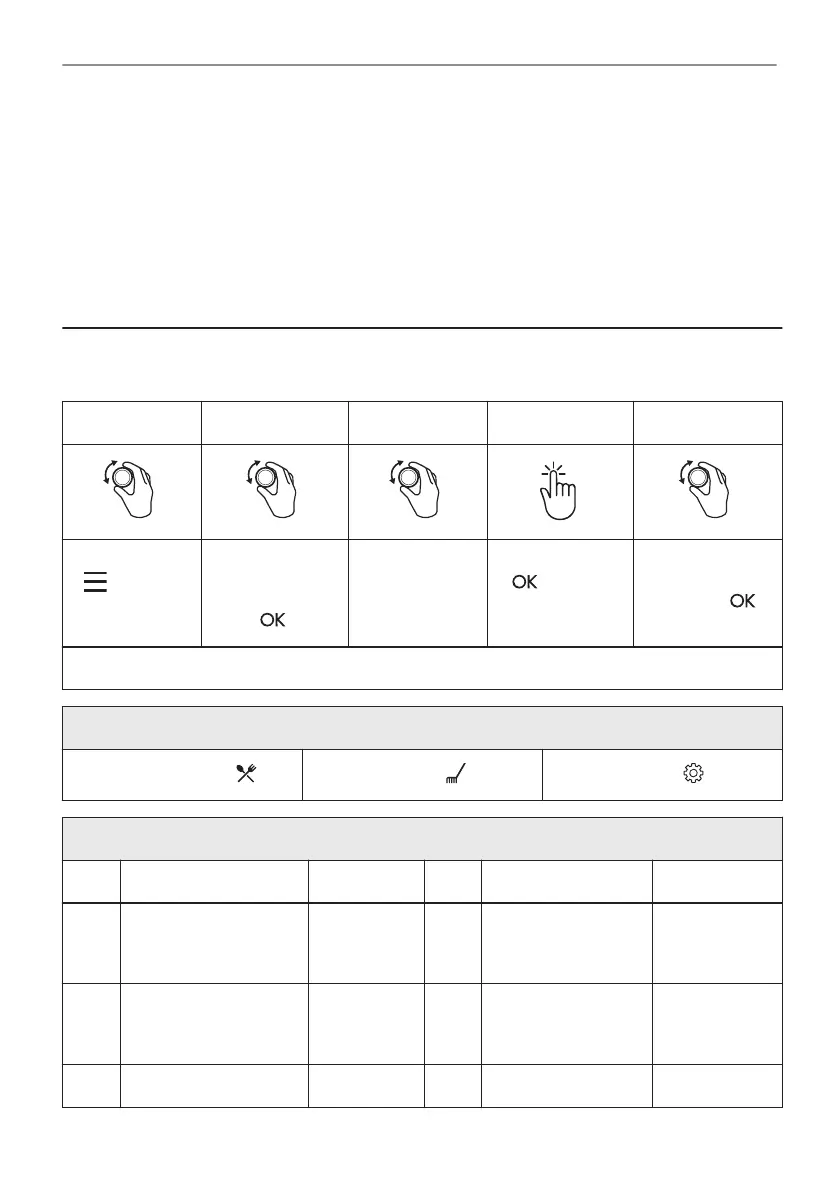
14. MENU STRUCTURE
14.1 Menu
Step 1 Step 2 Step 3 Step 4 Step 5
- select to
enter the Menu.
Select the option
from Menu struc‐
ture and press
.
Select the set‐
ting.
- press to
confirm setting.
Adjust the value
and press .
Turn the knob for the heating functions to the off position to exit the Menu.
Menu structure
Assisted Cooking
Cleaning
Settings
Settings
01 Time of day Change 02 Display brightness 1 - 5
03 Key tones 1 - Beep
2 - Click
3 - Sound off
04 Buzzer volume 1 - 4
05 Food Sensor Action 1 - Alarm
and stop
2 - Alarm
06 Uptimer On / Off
07 Light On / Off 08 Fast Heat Up On / Off
39/44
MENU STRUCTURE






 To Next Page