12
Controls & Settings
ALLOWING COOLING TIME BEFORE USE
To ensure reliable food storage, allow your refrigerator and freezer to operate with
the doors closed for 8 to 12 hours before placing food inside. During this cooling
period, you do not need to adjust the controls, which are preset at the factory.
SETTING COOLING TEMPERATURES
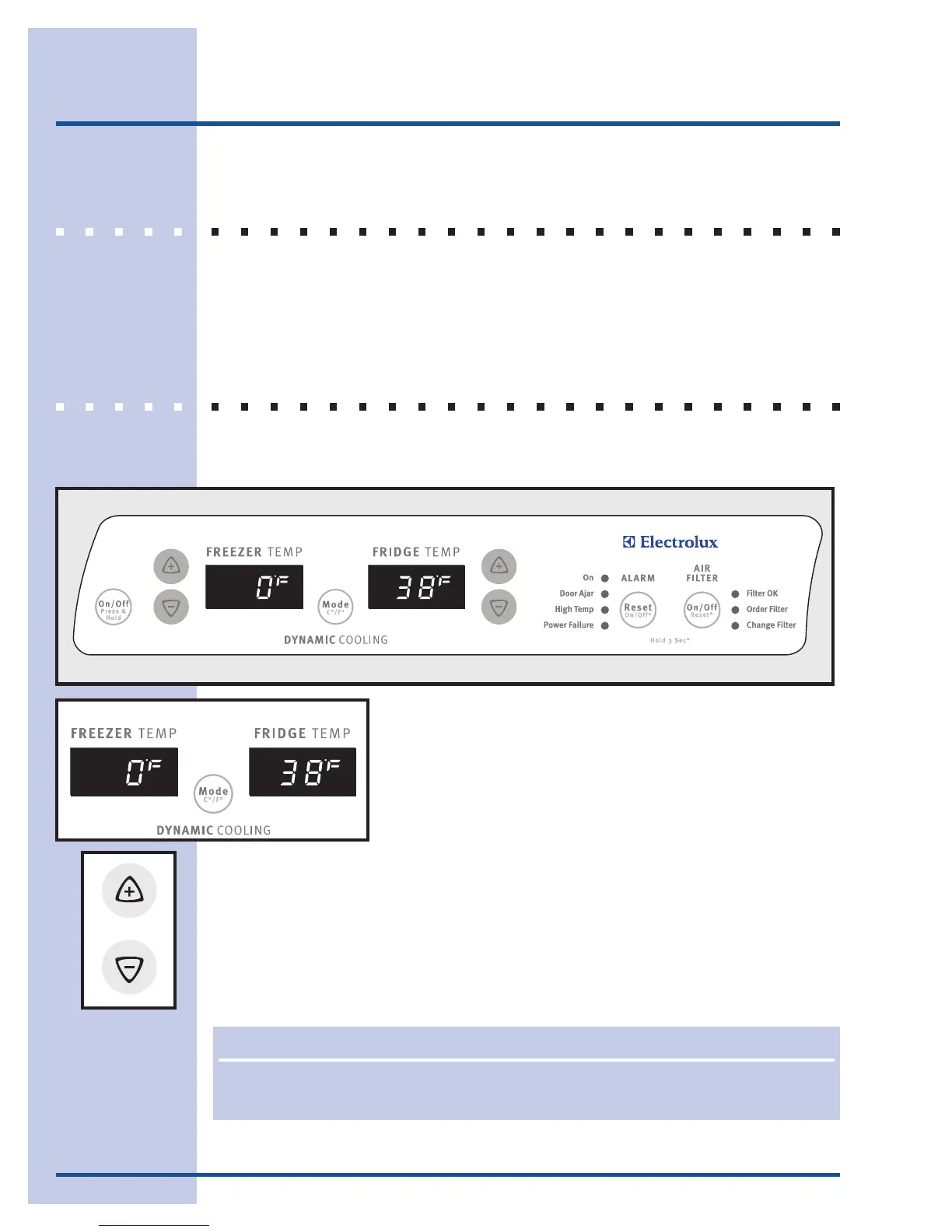
Your refrigerator comes with a state-of-the-art electronic digital control system. The
system’s control panel is located at the top of the the fresh food compartment.
The two digital displays on the left half of the control panel
indicate the current temperatures of your freezer and fresh
food compartments.
To adjust the temperature to a higher or lower setting, press the Up or Down
Arrow button closest to the display. The first time you press the button, the display
shows the last setting you entered. Each press of the button after that increments
the setting by one degree.
The display shows your new setting momentarily, then changes back to the current
temperature. (Refer to page 13 for more about temperature settings.)
NONO
NONO
NO
TETE
TETE
TE
The advanced electronic control system in your refrigerator includes additional display
modes that service professionals can use to rapidly diagnose performance issues.




 To Next Page