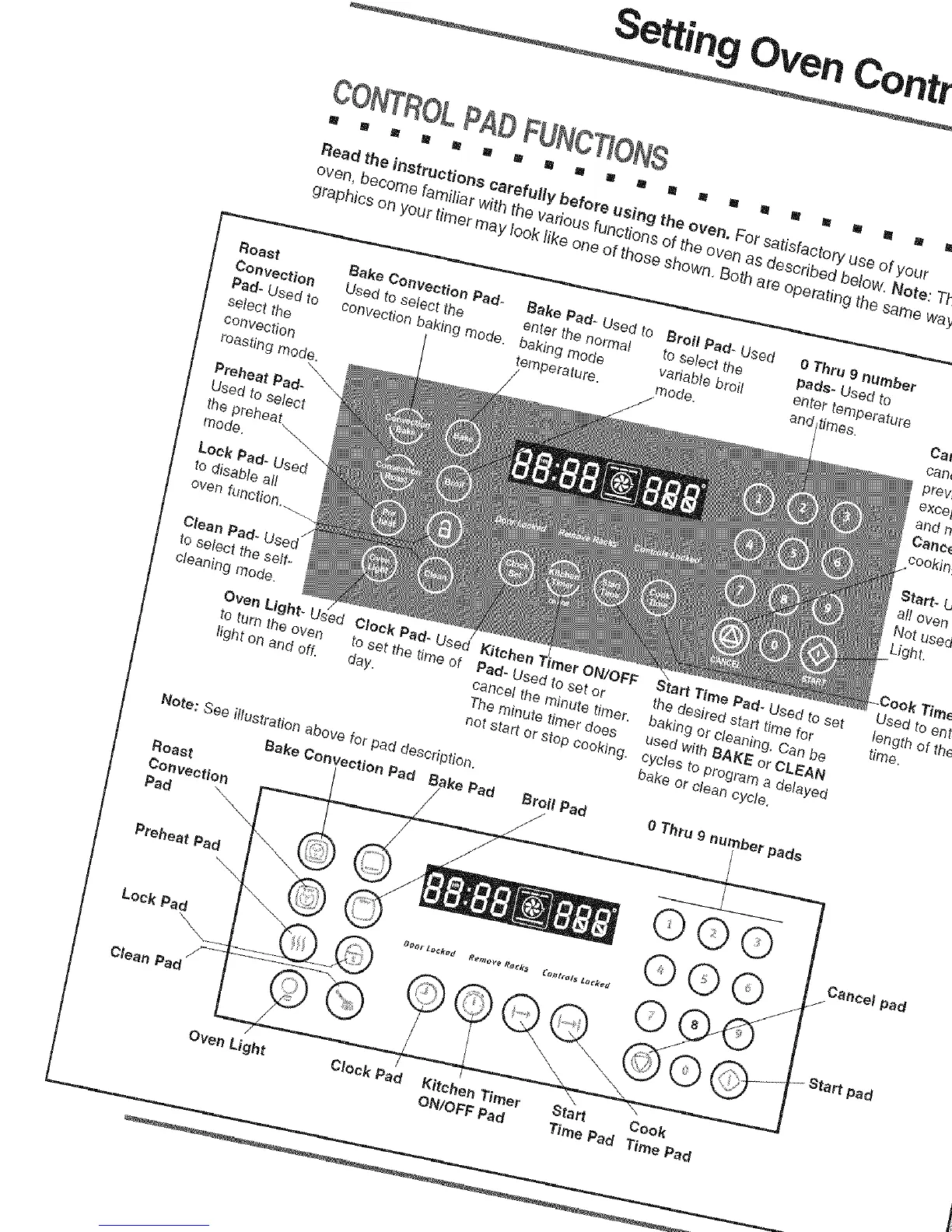
CONTROLPADFUNCTIONS
m II I II U _ R m m ml !1 II R g I 8 lU m IN In I
Read the instructions carefully before using the oven, For satisfactory use of your
oven, become familiar with the various functions of the oven as described below, Note: Th
graphics on your timer may look like one of those shown, Both are operating the same way
Roast
Convection
Pad- Used to
select the
convection
roasting mode,
Preheat Pad-
Used to select
the preheat
mode.
Lock Pad- Used
to disable all
oven function.
Bake Convection Pad* Bake Pad- Used to Broil Pad- Used
Used to select the enter the normal to select the
convection baking mode. baking mode variable broil
temperature, mode.
/
0 Thru 9 number
pads- Used to
enter temperature
and times.
Clean Pad-
to select the self-
cleaning mode.
Oven Light- Used
to turn the oven
light on and off.
Clock Pad- Used Kitchen Imer ON/OFF
to set the time of Pad- Used to set or
day. cancel the minute timer,
The minute timer does
not start or stop cooking.
Note: See illustration above for pad description.
Bake Convection Pad Pad
Roast
Convection
Pad _.\
Broil Pad
/
Preheat Pad
Lock Pad
Clean Pad
Oven Light
Start Time Pad- Used to set
the desired start time for
baking or cleaning. Can be
used with BAKE or CLEAN
cycles to program a delayed
bake or clean cycle,
0 Thru 9 number pads
©O©
®©Q
®0 .
% .............
Clock Pad Kitchen Timer Start Cook
ON/OFF Pad Time Pad Time Pad
Cal
can_
prev_
exce_
and n
Canc_
cookin_
Sta_- b
all oven
Notused
Light.
Used to ent,
iength of the
time,
Cancel pad
/
Start pad







 To Next Page