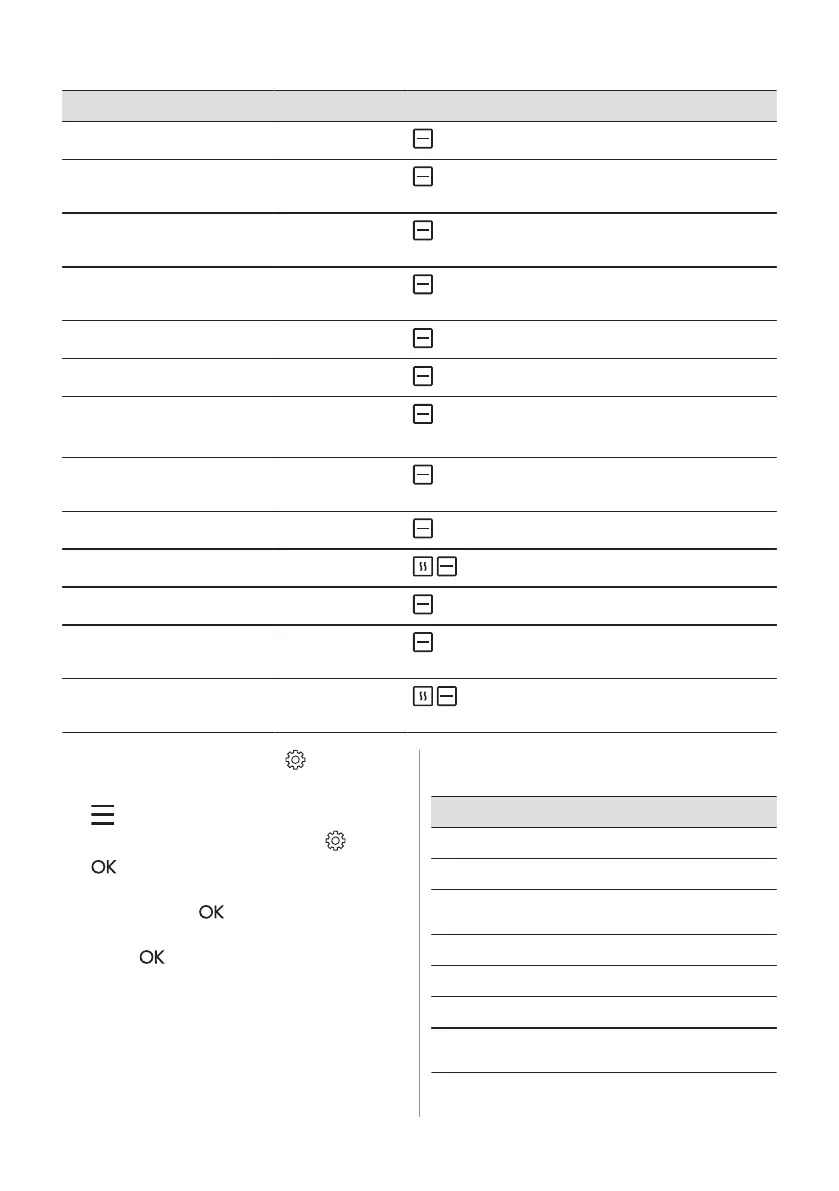
Dish Weight Shelf level / Accessory
P33
Loaf cake -
1; loaf pan on wire shelf
P34
Baked potatoes 1 kg
1; baking tray
Put the whole potatoes with skin on baking tray.
P35
Wedges 1 kg
2; baking tray lined with baking paper
Cut potatoes into pieces.
P36
Grilled mixed vegeta‐
bles
1 - 1.5 kg
2; baking tray lined with baking paper
Cut the vegetables into pieces.
P37
Croquettes, frozen 0.5 kg
2; baking tray
P38
Pommes, frozen 0.75 kg
2; baking tray
P39
Meat / vegetable la‐
sagna with dry pasta
sheets
1 - 1.5 kg
; casserole dish on wire shelf
P40
Potato gratin (raw po‐
tatoes)
1 - 1.5 kg
1; casserole dish on wire shelf
Rotate the dish after half of the cooking time.
P41
Pizza fresh, thin
-
1; baking tray lined with baking paper
P42
Pizza fresh, thick
-
1; baking tray lined with baking paper
P43
Quiche -
1; baking tin on wire shelf
P44
Baguette / Ciabatta /
White bread
0.8 kg
2; baking tray lined with baking paper
More time needed for white bread.
P45
Whole grain / Rye /
Dark bread
1 kg
1; baking tray lined with baking paper / loaf pan
on wire shelf
6.6 Changing: Settings
1. Turn the knob for the heating functions to
.
2. Turn the control knob to select . Press
.
3. Turn the control knob to select the
setting. Press .
4. Turn the control knob to adjust the value.
Press
.
5. Turn the knob for the heating functions to
the off position to exit Menu.
Submenu: Settings
Setting Value
01
Time of day Change
02
Display brightness 1 - 5
03
Key tones 1 - Beep, 2 - Click,
3 - Sound off
04
Buzzer volume 1 - 4
05
Uptimer On / Off
06
Light On / Off
07
Demo mode Activation code:
2468
ENGLISH 13







 To Next Page