2. Turn the knob for the heating functions to
select a function.
3. Turn the control knob to adjust settings.
To turn off the appliance: turn the knob for the
heating functions to the off position .
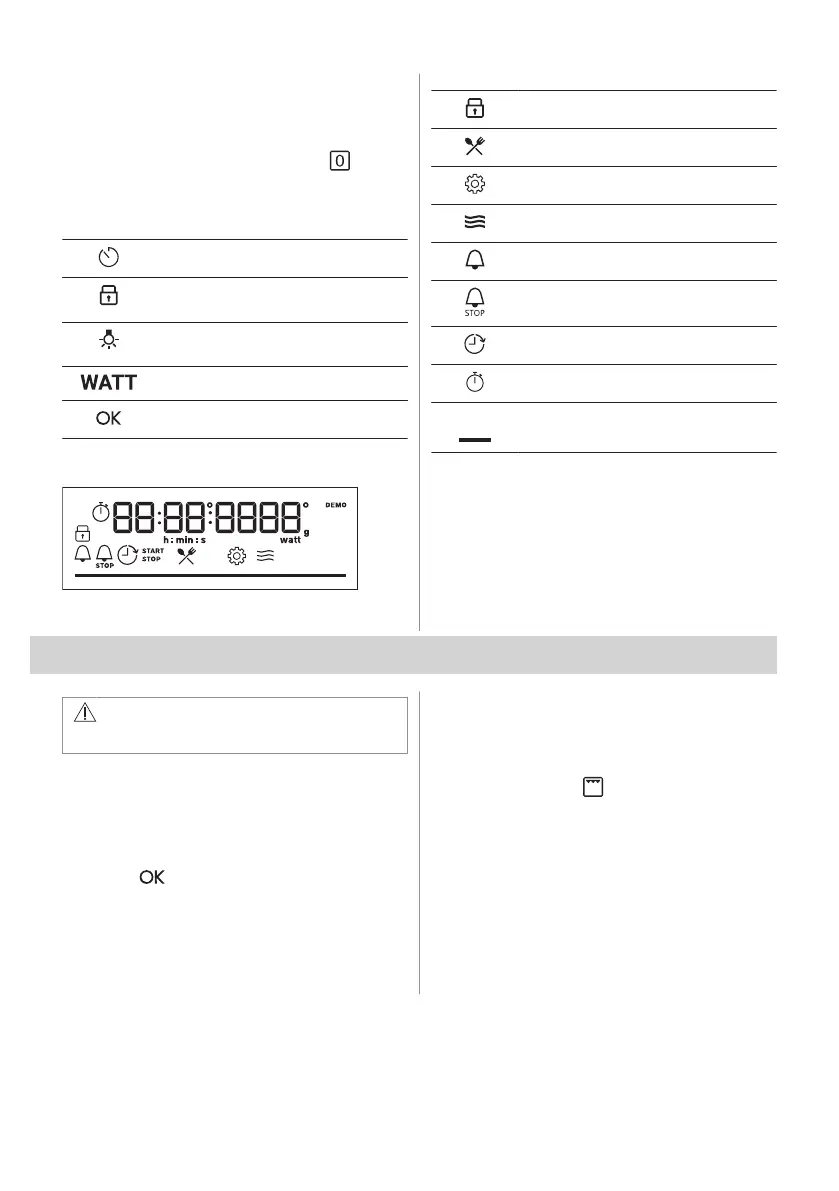
4.2 Control panel overview
Press to set timer functions.
Press and hold to set the function:
Lock.
Press to turn the appliance lamp on
and off.
Press to set: Microwave power.
Press to confirm your selection.
4.3 Display indicators
Display with key functions.
The appliance is locked.
Submenu: Assisted Cooking.
Submenu: Settings
Microwave function is activated.
Minute minder is activated.
Cooking time is activated.
Time Delayed Start is activated.
Uptimer is activated.
Progress bar - visually indicates when
the cooking time comes to an end.
5. BEFORE FIRST USE
WARNING!
Refer to Safety chapters.
5.1 Setting the time
After the first connection to the mains, wait
until the display shows: "00:00".
1. Turn the control knob to set the time.
2. Press .
5.2 Initial preheating and cleaning
Preheat the empty appliance before the first
use and contact with food. The appliance can
emit unpleasant smell and smoke. Ventilate
the room during preheating.
1. Remove all accessories from the
appliance.
2. Set the function . Let the appliance
operate for 1 h.
3. Turn off the appliance and wait until it is
cold.
4. Clean the appliance and the accessories
only with a microfibre cloth, warm water
and a mild detergent.
5. Put the accessories back to their initial
position.
ENGLISH 9







 To Next Page