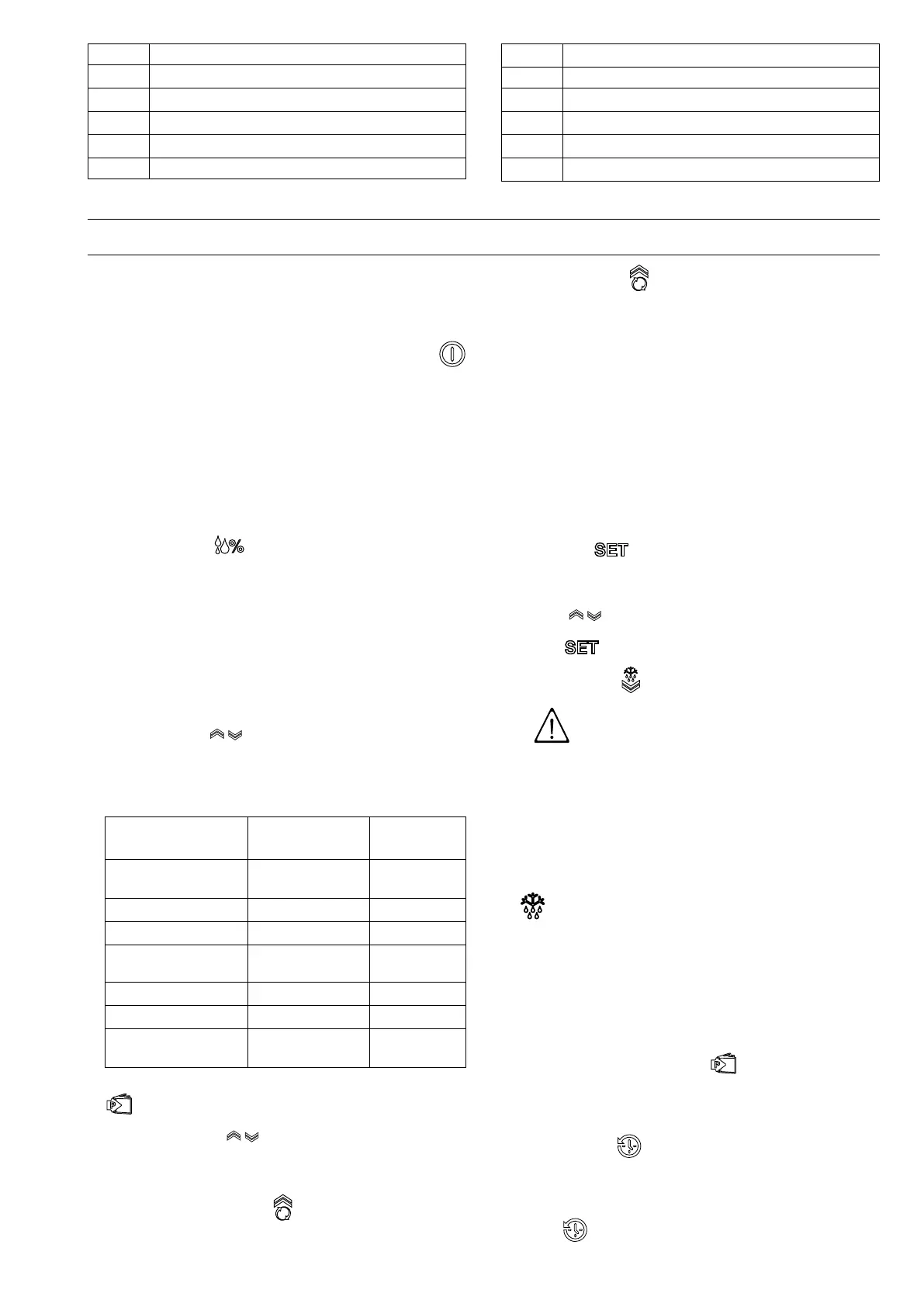
13
55 ON/OFF button
66
Door Open alarm signalling icon
77
High temperature alarm signalling icon
88
Low temperature alarm signalling icon
99
Assistance alarm signalling icon
1100 Defrost/Down button
1111
UP/Continuous Cycle button
1122 Set button
1133
High/low humidity button
1
1144
Programme selection button
1155
History button
1166
History function on signalling icon
1. refrigerated models only
EE IINNSSTTRRUUCCTTIIOONN FFOORR TTHHEE UUSSEERR
EE..11 SSwwiittcchhiinngg tthhee aapppplliiaannccee oonn
Connect the power cable to a power socket. The instrument
display performs a Lamp Test and the message OFF will
appear.
To activate and deactivate the appliance press the button
for 5 seconds.
The display will show the message ON (for activation) or OFF
(for deactivation).
Even if the machine is deactivated with the ON/OFF button it
still remains powered.
This button only disconnects the power to the loads connected
to the instrument.
EE..22 CCoonnttrrooll ppaanneell bbuuttttoonnss
• HHuummiiddiittyy bbuuttttoonn
Present only on refrigerated models, it is used to set 3
different humidity levels.
Humidity varies on the base of the ambient temperature and
the cell temperature (Set point).
Depending on the humidity level, the display will show the
images with:
– 1 line (low humidity - from 40% to 50%)
– 2 lines (medium humidity - from 60% to 70%)
– 3 lines (high humidity - from 70% to 85%)
Use the buttons to select the most suitable humidity
level.
TTaabbllee ooff ccaatteeggoorriieess,, ccoommppaarrttmmeenntt tteemmppeerraattuurree aanndd
hhuummiiddiittyy sseettttiinngg
CCaatteeggoorriieess
TTeemmppeerraattuurree
((℃℃))
HHuummiiddiittyy
Fresh meat (beef,
mutton, pork)
4
high humidity
Poultry
-2
high humidity
Fruit & Vegetables
6
high humidity
Eggs, Butter,
Cheese, Charcuterie
6
high humidity
Fresh fish
4
high humidity
Patisserie
6
high humidity
Beverages
8
medium
humidity
To confirm the degree of humidity selected, press the button
for 5 seconds.
• UUpp--DDoowwnn bbuuttttoonnss
Up for increasing the values;
Down for decreasing the values;
• CCoonnttiinnuuoouuss ccyyccllee bbuuttttoonn
Press the button more than 5 seconds to activate the
Turbo Cooling “TC“ cycle function (the message ccb=start
appears);
the temperature reinstatement function is activated, skip-
ping Defrost.
During the continuous cycle the compressor remains on;
the low temperature alarm is deactivated;
the message TC and the temperature value alternate on the
display.
The continuous cycle ends:
– when the button is pressed (the message cce=end
appears);
– when the minimum foreseen temperature is reached;
– when the maximum duration (time 1h) is reached;
– when the instrument is switched off.
• SSeett bbuuttttoonn .
Press for more than 1 second to display and/or set the
sseettppooiinntt. To increase or decrease the values use the
buttons . To confirm the new value, press the Set
button .
• DDeeffrroosstt bbuuttttoonn
IIMMPPOORRTTAANNTT
Do not use mechanical devices or other
means to speed up the defrost process,
unless recommended by the
manufacturer.
Do not damage the circuit.
The appliance has an automatic defrost function. A manual
defrost cycle can be started by keeping the button pressed
for at least 5 seconds (the display shows the message dFb ).
This function is signalled by lighting up of the defrost icon
. Defrost is with forced ventilation only for refrigerated
models with compartment set point higher than or equal to
“+2“.
Defrost can be stopped manually by pressing the button for
a few seconds (the display shows the message dFE).
Defrost cannot be activated in the continuous cycle
programming phase. If the continuous cycle is activated
and the button is pressed, defrost will be carried out at the
end.
• PPrrooggrraammmmee sseelleeccttiioonn bbuuttttoonn
It is used in the HISTORY function (see the following
paragraph). Pressing this button also brings up the
Technical Menu, which cannot be modified.
• HHiissttoorryy bbuuttttoonn
Records the temperature every 24 hours from activation, for
a total of 62 saves.
Records high/low temperature alarms. The first press of the
button brings up the list of daily recorded values (t00=
current day; t01, t02, t03, etc.=recording days going back).





 To Next Page