15
SETTING OVEN CONTROLS
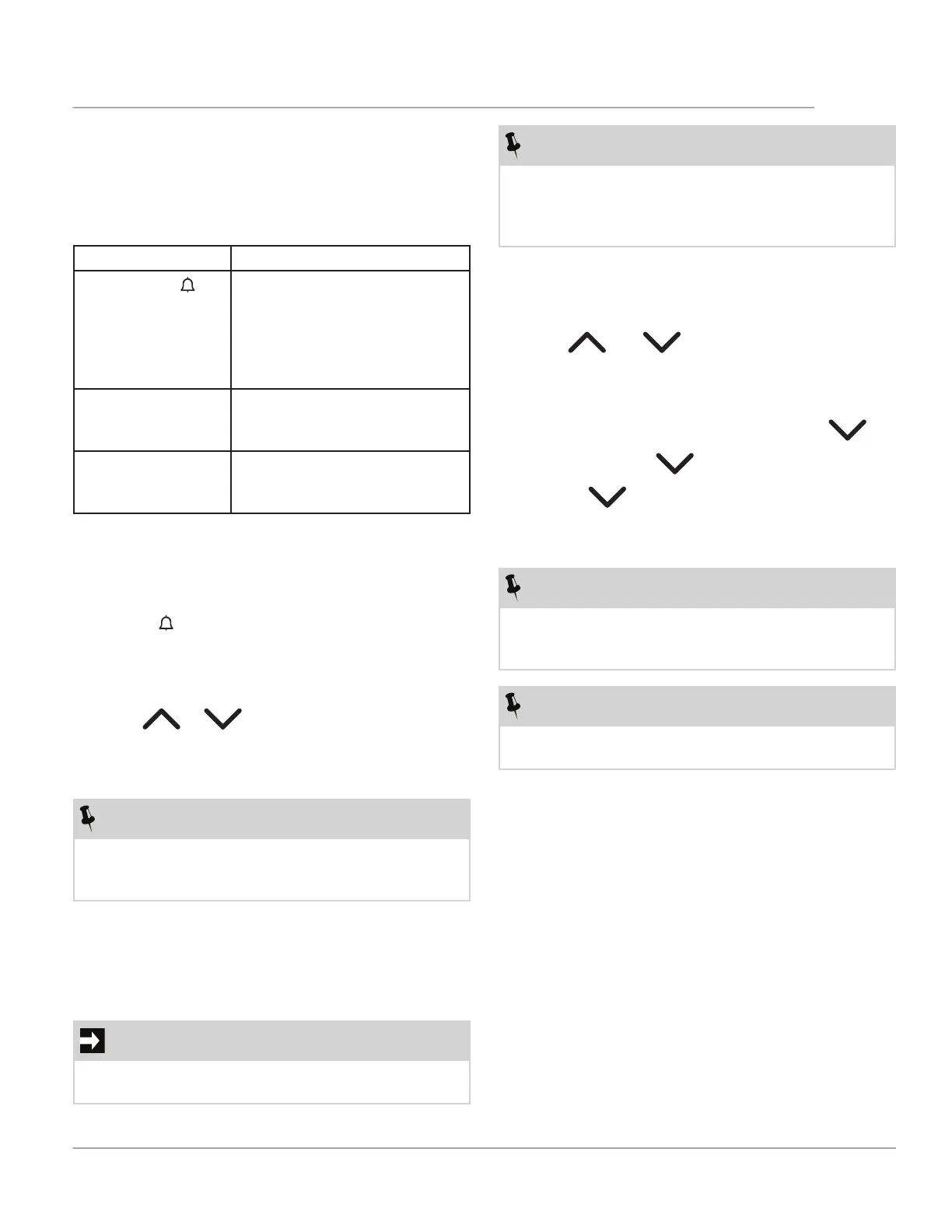
To set a timer function:
1. For Duration (dur) and END (end), use the oven
temp and oven mode knobs to set an oven func-
tion and cooking temperature. (This is not neces-
sary for .)
2. Press timer on-off until the desired function option
appears, indicated by the bell symbol, dur, or END,
and starts to flash.
3. Press or to set the desired timer func-
tion. The timer function activates, and the corre-
sponding indicator will appear in the display. For
End and dur, A will also appear in the display.
NOTE
Duration and End time may be used at the same time
if you want the appliance to activate and deactivate
automatically. First, set Duration. Then, set End.
4. When the time ends, the function’s indicator on the
display will start flashing, the Timer Activate Indica-
tor icon (C in figure 6) will go off, and a signal will
sound for two minutes. Press any button to stop the
signal.
IMPORTANT
With the Duration and End functions, the appliance
will stop cooking automatically.
To cancel the timer function:
1. Press timer on-off until the desired function option
appears.
2. Press and hold and at the same time.
The timer function will go out after several seconds.
To change the acoustic signal:
1. To hear the current signal, press and hold .
2. Repeatedly press to change the signal.
3. Release The last tone you heard will be the
new signal.
4. Wait five seconds for the setting to be confirmed.
NOTE
When the appliance is disconnected from the outlet
or after a power outage, the signal tone will be set
back to the default tone.
NOTE
To see how much time is left press the clock icon
button.
Timer Functions
This appliance is equipped with three timer options:
minute countdown timer, cook time (dur), and end time
(END).
Table 1: Timer Functions
Function Application
Minute Timer ( )
Use to track your cooking
times without interfering with
the cooking process. The timer
may be set from a minimum
time of 1 minute to a maximum
of 23 hours and 59 minutes
Minute Timer (dur) Use to set the cooking time of
the oven, from 1 minute to 10
hours.
End Time (END) Use to program a time for the
oven to stop cooking, from 1
minute to 10 hours.
NOTE
After a button is pressed to stop the signal, the oven
will re-activate to the function and temperature it is
currently set.. Switch function and temp knobs to “off”
to disable cooking.



 To Next Page