14
SETTING OVEN CONTROLS
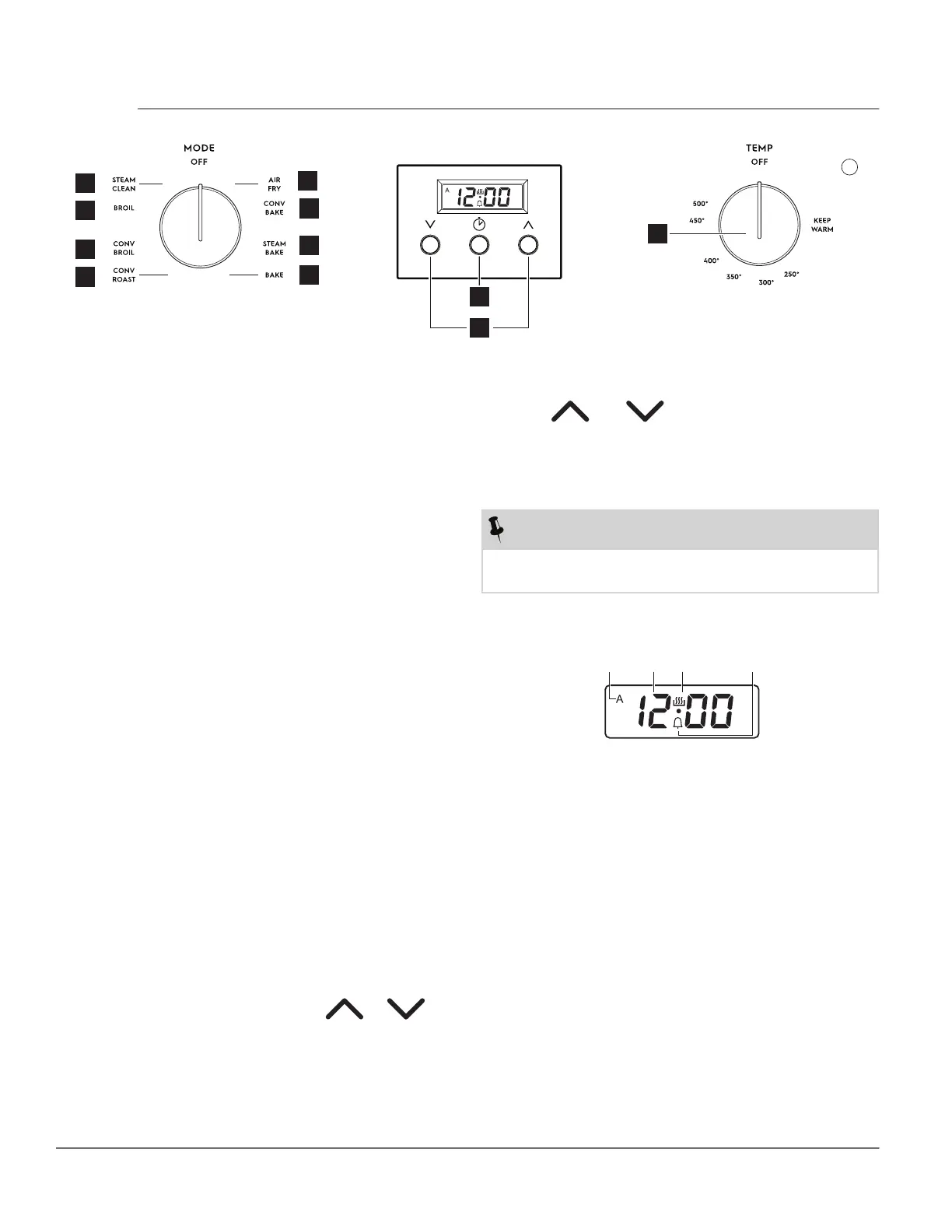
1. Steam Clean - The Steam Clean feature offers a
time saving method for cleaning light soils.
2. Broil - Use to select the broil feature.
3. Convection Broil - Use to set convection broil.
4. Convection Roast - Use to set convection roast.
5. Air Fry - The Air Fry feature works best for sin-
gle rack baking with packaged and convenience
foods.
6. Convection Bake - Use to set convection bake.
7. Steam Bake - Use to set steam bake.
8. Bake - Use to select for all baking.
9. Set Clock and Timer On/Off - Used to enter clock
set-up and timer functions.
10. Up and Down arrow keys - Use to adjust clock or
timer functions.
11. Temperature Selector - Use to select suitable tem-
perature.
Setting the Clock
When the appliance is first plugged in or when the
power supply to the appliance has been interrupt-
ed, the display will flash 12:00. It is recommended to
always set the clock for the correct time of day before
using the appliance.
To set the clock at initial startup:
1. Press Clock Icon.
2. Within 5 seconds, press and hold or
until the correct time of day appears in the display.
1
2
3
4
5
6
7
8
9
10
11
Display Indicators
Figure 6: Clock Display Functions
• A: Duration and End time indicator
• B: Time display
• C: Timer active indicator
NOTE: Always on except when a timer function has
ended.
• D: Minute timer indicator
To Set the clock after initial startup:
1. Press and .
2. Period between hours and minutes will start blink-
ing.
3. Use up and down arrow keys to set the time.
NOTE
The clock cannot be changed when the oven is set
for cooking.



 To Next Page