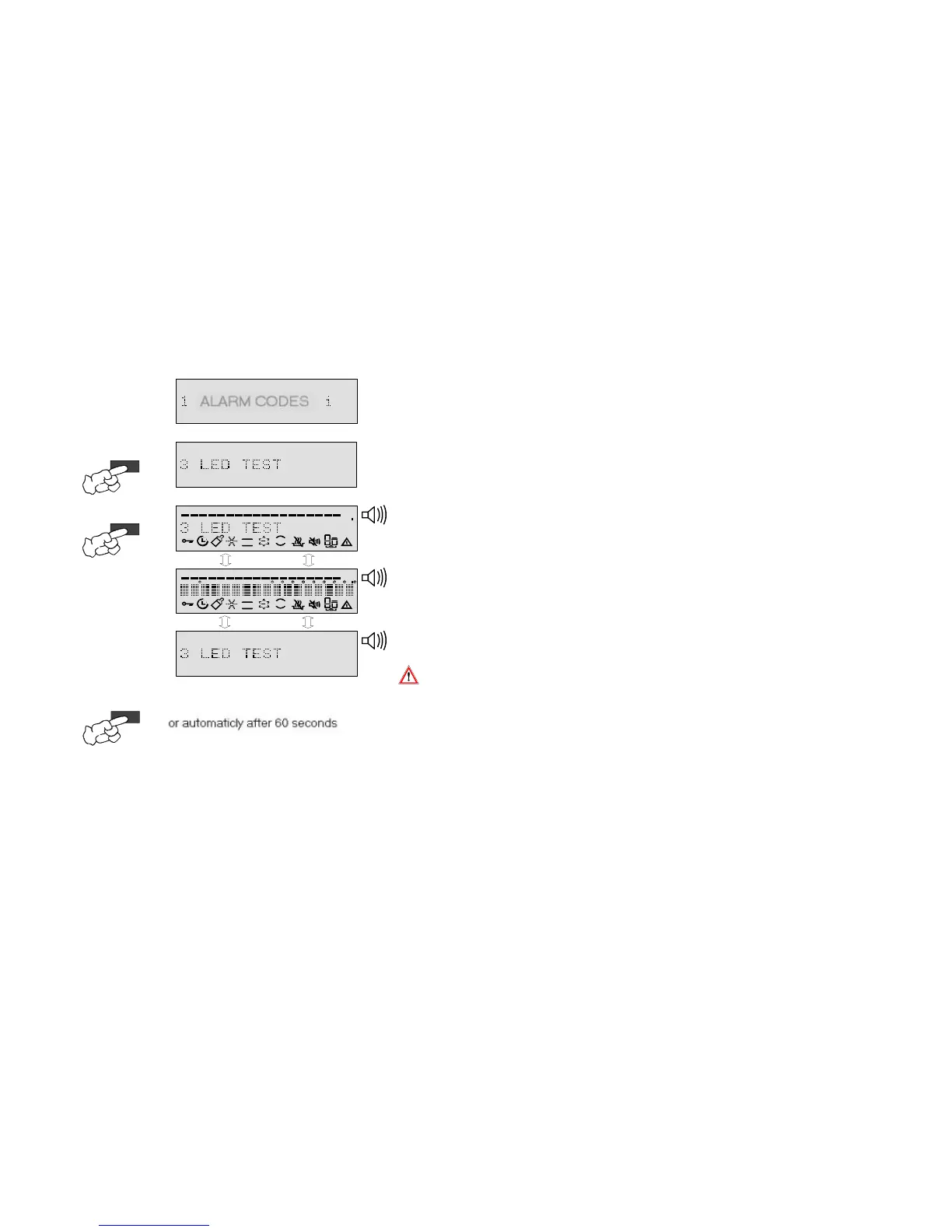
8.4.3. Service menu / Display test and deleting the error memory
2.
Ä
Scroll through to the LED test service option with the option button.
Ä
Option "3 LED TEST" is shown in the text line of the display.
3.
Ä
The option is activated by pressing the Ok/Start button.
3.
Ä
Ä
4.
After the button has been pushed for the last time, the service menu can be quitted as follows.
w
w
w
If this service option is called up and activated, the customer service error
memory will in all cases be deleted.
As is shown in the left-hand graphic, the 3 display images repeatedly appear one
after the other, in the same sequence until the function is quitted.
The signal tone also sounds for a long period, the exception being if it is
deliberately deactivated.
...by pressing the Reset button, the function is quitted and "SELECT PROGRAM"
appears in the text field of the display
or this occurs should no button be pressed within 60 seconds
or the dishwasher is deactived with the On/Off button.
1.
3.
2.
OK / START
4.
RESET
oder automatisch nach 60sek.
PROGRAM
OPTIONS
WRD
3 in 1
C
PROGRAM
OPTIONS
mih
WRD
3 in 1
C
Anzeige im Wechsel
Anzeige im Wechsel
OPTION



 To Next Page