EDW500
Technical Support – RA
Chapter
3
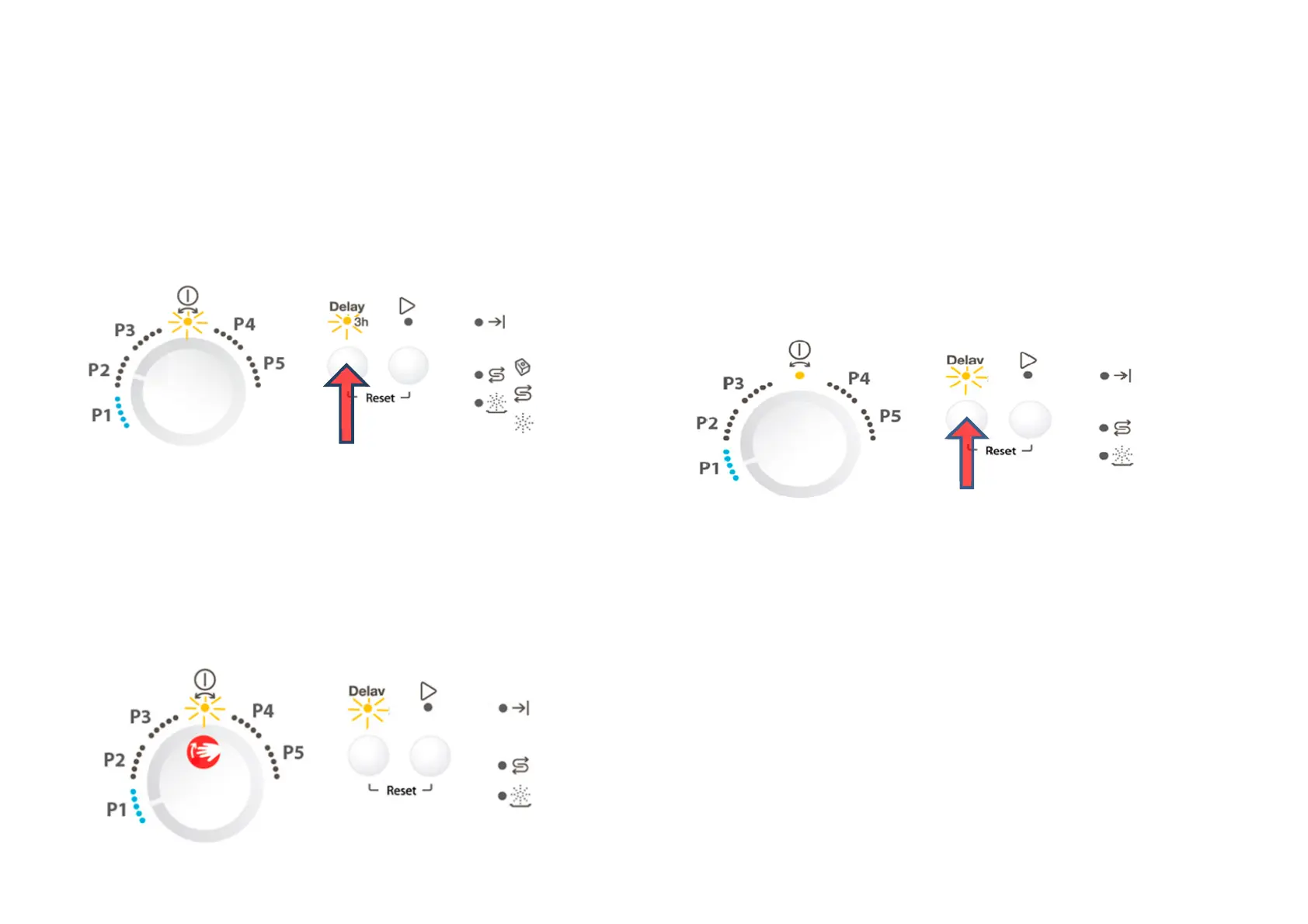
2. Press button S1 to start this function
All used LEDs blink 5 second on 1 second off.
If a buzzer is equipped, it beeps for 5 seconds.
The alarm codes saved in memory are erased.
3. Switching off the appliance will exit Service mode.
For variants that have only one button, use the only button instead
of S1.
Functional Test Cycle
After accessed Service mode (L1 and L2 blinking):
1. Turn the rotary to the 3
rd
position on the left (P1).
2. Press button S1 to start the test cycle. The cycle will not start if
door is opened.
The test cycle runs as a normal wash cycle. It can be
cancelled or run to its end.
During running, L1 stays on and L2 blinks. If phase
indication LED presented, the ‘Wash’ LED blinks when
the cycle is running. After the cycle ends, the End LED
turns on.
For variants that have only one button, use the only button instead
of S1.
Enable/disable Extra Rinse
Not available for this User Interface.
Enable/disable Pulse Wash
Not available for this User Interface.



 To Next Page