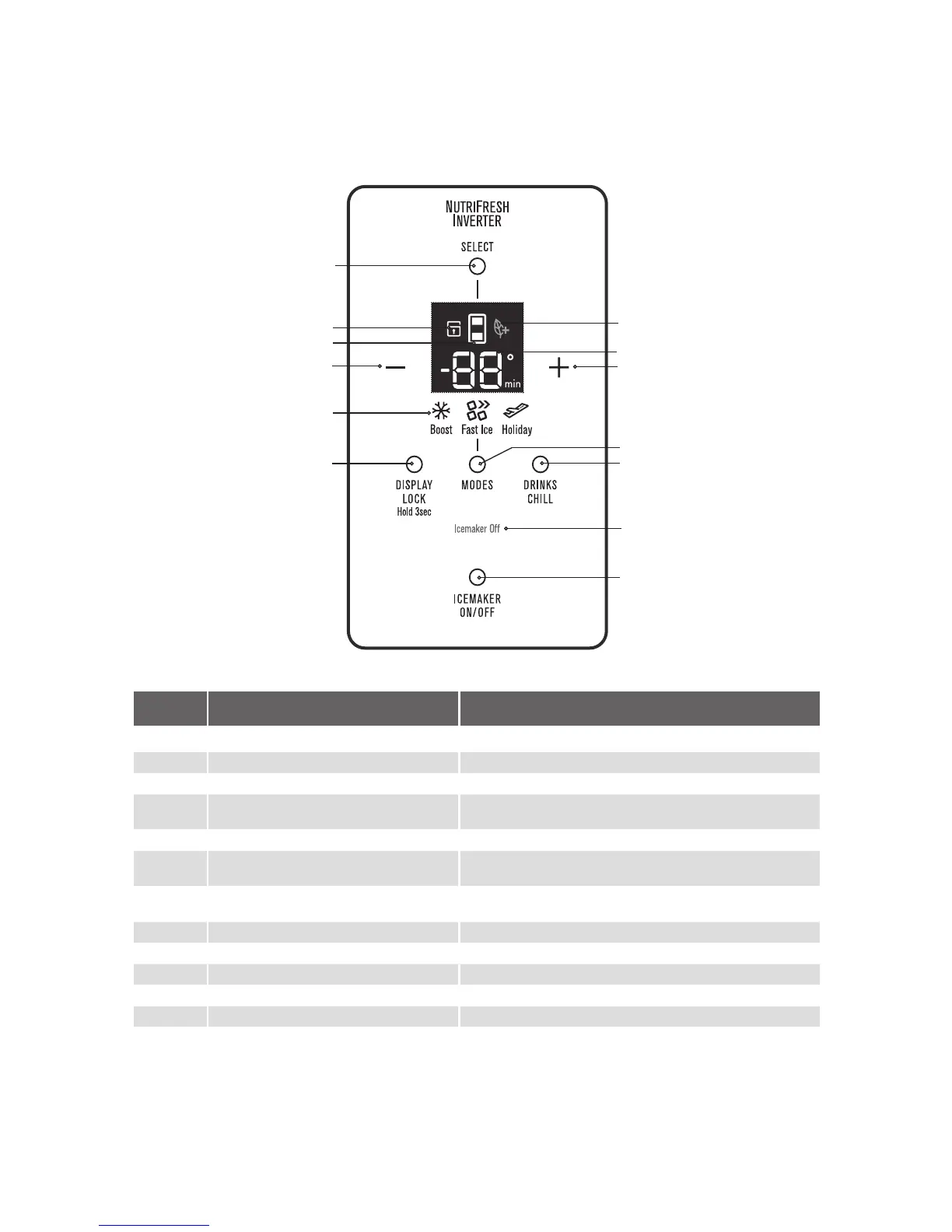
16 USER INTERFACE
ABOUT THE USER INTERFACE
Control – ETE5720 & EHE5220 models.
BUTTON /
ICON
DESCRIPTION PRIMARY FUNCTION
1 Compartment Selector button Selects controllable compartment.
2 Lock Icon Indicates if the user interface is locked.
3 Compartment Icon Indicates controllable compartment.
4
ECO Icon
Indicates if the appliance is operating in its most energy
efficient mode.
5 Digital display Indicates temperature of selected compartment.
6 Decrease button Decreases temperature of selected compartment as well as the
drinks chill time
7 Increase button Increases temperature of selected compartment as well as the
drinks chill time.
8 Mode indicators (Boost, Fast Ice, Holiday) Indicates appliance operation mod
e.
9 Display Lock button Selects lock state of user interface.
10 Mode select button Selects operation mode of appliance.
11 Drinks Chill button Selects drinks chill timer.
12 Icemaker status indicator Shows operational status .
13 Icemaker on/off button Selects operation of icemaker.
1
2
3
6
8
9
4
5
7
10
11
12
13




 To Next Page