Controls
IQ°Touch TM(some models)
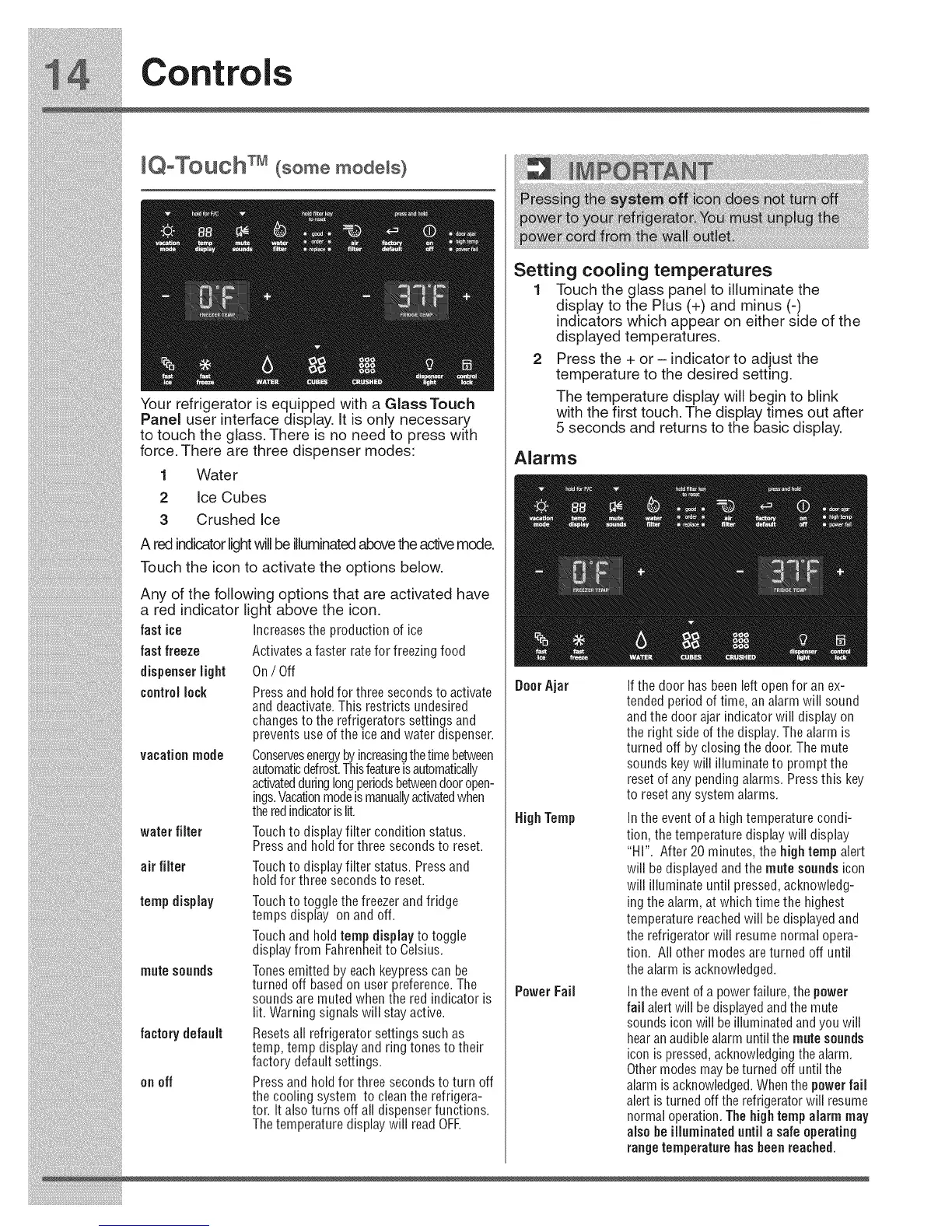
Your refrigerator is equipped with a Glass Touch
Panel user interface display, It is only necessary
to touch the glass. There is no need to press with
force, There are three dispenser modes:
1 Wate r
2 Ice Cubes
3 Crushed Ice
A red indicatorlightwillbe illuminatedabovetheactivemode.
Touch the icon to activate the options below.
fastice
fastfreeze
dispenserlight
controllock
Any of the following options that are activated have
a red indicator light above the icon.
Increasesthe production of ice
Activates a faster rate for freezing food
On/ Off
vacationmode
waterfilter
air filter
tempdisplay
mutesounds
factory default
onoff
Press and hold for three secondsto activate
and deactivate. This restricts undesired
changesto the refrigerators settings and
prevents use ofthe ice and water dispenser.
Conservesenergyby increasingthetimebetween
automaticdefrost.Thisfeatureisautomatically
activatedduringlongperiodsbetweendooropen-
ings.Vacationmodeismanuallyactivatedwhen
theredindicatorislit.
Touchto display filter condition status.
Press and hold for three secondsto reset.
Touchto display filter status. Pressand
hold for three seconds to reset.
Touchto toggle the freezerand fridge
temps display on and off.
Touchand hold temp display to toggle
display from Fahrenheitto Celsius.
Tonesemitted by each keypresscan be
turned off based on user preference.The
sounds are muted when the red indicator is
lit. Warning signals will stay active.
Resetsall refrigerator settings such as
temp, temp display and ring tones to their
factory default settings.
Press and hold for three secondsto turn off
the cooling system to cleanthe refrigera-
tor. It also turns off all dispenser functions.
Thetemperature display will read OFE
Setting cooling temperatures
1 Touch the glass panel to illuminate the
display to the Plus (+) and minus (-)
indicators which appear on either side of the
displayed temperatures.
2 Press the + or - indicator to adjust the
temperature to the desired setting.
The temperature display will begin to blink
with the first touch. The display times out after
5 seconds and returns to the basic display,
Alarms
DoorAjar
HighTemp
PowerFail
If the door has beenleft open for an ex-
tended period of time, an alarm will sound
and the door ajar indicator will display on
the right side of the display.The alarm is
turned off by closing the door. The mute
sounds key will illuminate to prompt the
resetof any pending alarms. Pressthis key
to resetany system alarms.
Inthe event of a high temperature condi-
tion, the temperature display will display
"HI". After 20 minutes, the hightemp alert
will bedisplayed and the mute sounds icon
will illuminate until pressed, acknowledg-
ingthe alarm, at which time the highest
temperature reachedwill be displayedand
the refrigerator will resume normal opera-
tion. All other modes areturned off until
the alarm is acknowledged.
Inthe eventof a powerfailure, the power
fail alertwill be displayedand the mute
sounds icon will beilluminated and you will
hearanaudiblealarm until the mute sounds
icon ispressed, acknowledgingthe alarm.
Other modes maybeturned off until the
alarm isacknowledged.Whenthe powerfail
alert is turned off the refrigeratorwill resume
normal operation. Thehightemp alarm may
also he illuminateduntil asafe operating
range temperature hasbeen reached.





 To Next Page