Operating Instructions
Cycle Options
normal
fast =,dh
wash - LTJ_,
whitest _.
whites L-:;s(,
heavy %? _-
duty _'"
deep clean _+o
sanitize
casual
@ (,@ colors
0 I_ delicate
@_, allergen
04;[_ rinse
& spin
my eco specialty
favorite friendly cycles
start
pause
Temperature Spin Speed
_+ 0 sanitize 0 rnax
@ hot @ high
@ warm 0 medium
O cold @ low
O eco cold O no spin
Soil Options
pe_ & hold
max stain treat
_@ light
@ heavy @ c_,_,edelaystart
@ normal
prewashf) light ma×fill
_;J:- add steam c_p
(> extra light _@_ shrinkguard
_ fresh rinse
_@ control lock
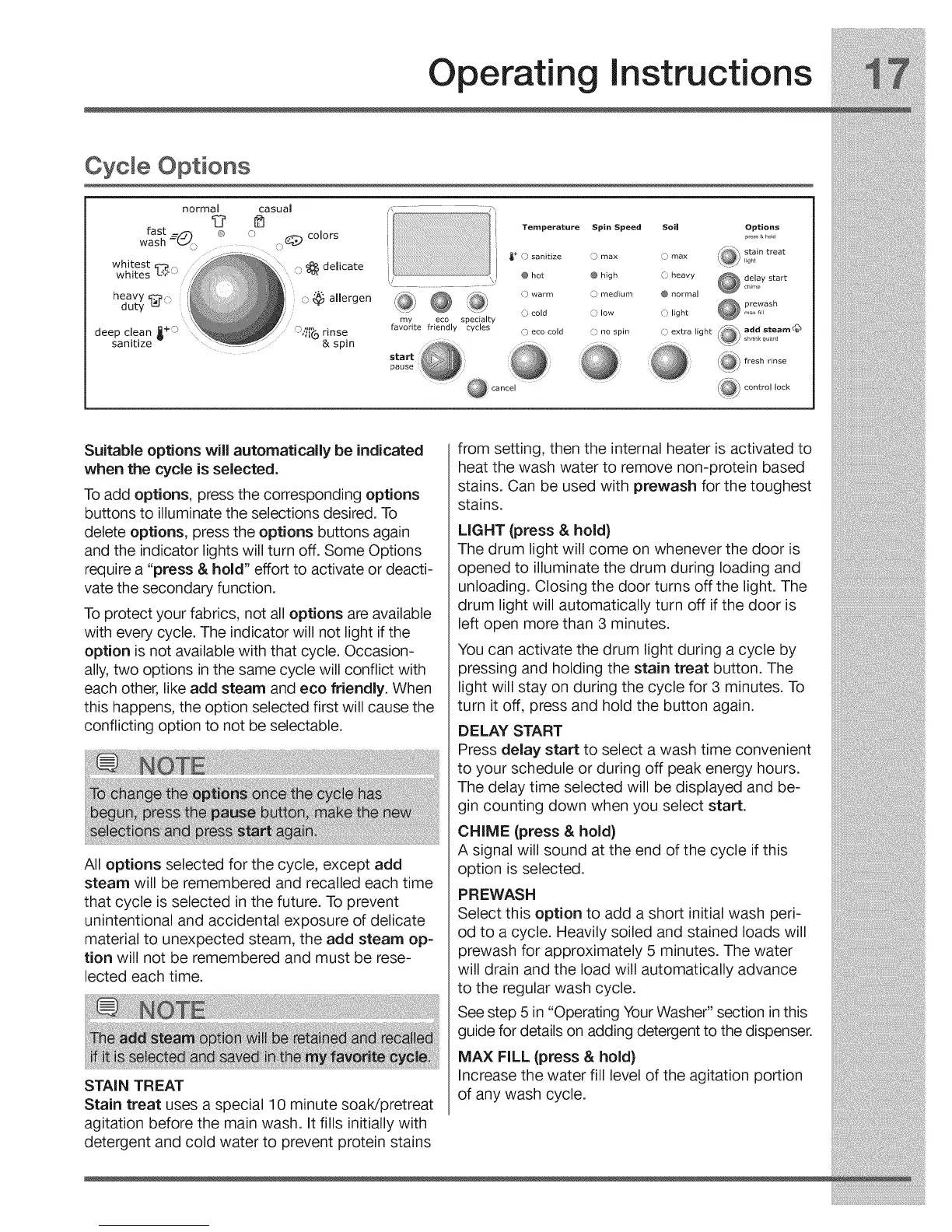
Suitable options will automatically be indicated
when the cycle is selected.
Toadd options, press the corresponding options
buttons to illuminate the selections desired. To
delete options, press the options buttons again
and the indicator lights will turn off. Some Options
require a "press & hold" effort to activate or deacti-
vate the secondary function.
To protect your fabrics, not all options are available
with every cycle. The indicator will not light if the
option is not available with that cycle. Occasion-
ally, two options in the same cycle will conflict with
each other, like add steam and eco friendly. When
this happens, the option selected first will cause the
conflicting option to not be selectable.
All options selected for the cycle, except add
steam will be remembered and recalled each time
that cycle is selected in the future. To prevent
unintentional and accidental exposure of delicate
material to unexpected steam, the add steam op=
tion will not be remembered and must be rese-
lected each time.
STAIN TREAT
Stain treat uses a special 10 minute soaWpretreat
agitation before the main wash. It fills initially with
detergent and cold water to prevent protein stains
from setting, then the internal heater is activated to
heat the wash water to remove non-protein based
stains. Can be used with prewash for the toughest
stains.
LIGHT (press & hold)
The drum light will come on whenever the door is
opened to illuminate the drum during loading and
unloading. Closing the door turns off the light. The
drum light will automatically turn off if the door is
left open more than 3 minutes.
You can activate the drum light during a cycle by
pressing and holding the stain treat button. The
light will stay on during the cycle for 3 minutes. To
turn it off, press and hold the button again.
DELAY START
Press delay start to select a wash time convenient
to your schedule or during off peak energy hours.
The delay time selected will be displayed and be-
gin counting down when you select start.
CHIME (press & hold)
A signal will sound at the end of the cycle if this
option is selected.
PREWASH
Select this option to add a short initial wash peri-
od to a cycle. Heavily soiled and stained loads will
prewash for approximately 5 minutes. The water
will drain and the load will automatically advance
to the regular wash cycle.
See step 5 in "Operating Your Washer" section in this
guide for details on adding detergent to the dispenser.
MAX FILL (press & hold)
Increase the water fill level of the agitation portion
of any wash cycle.



 To Next Page