Clean the oven with catalytic cleaning
Before the catalytic cleaning remove all accessories.
Step 1 Step 2 Step 3
Select Menu / Cleaning and
press three times.
When the cleaning ends the signal
sounds. The oven turns off.
When the oven is cold, clean the
oven floor with a wet soft cloth
Duration: 1 h.The catalytic enamel is self cleaning, do not clean it with a cloth.
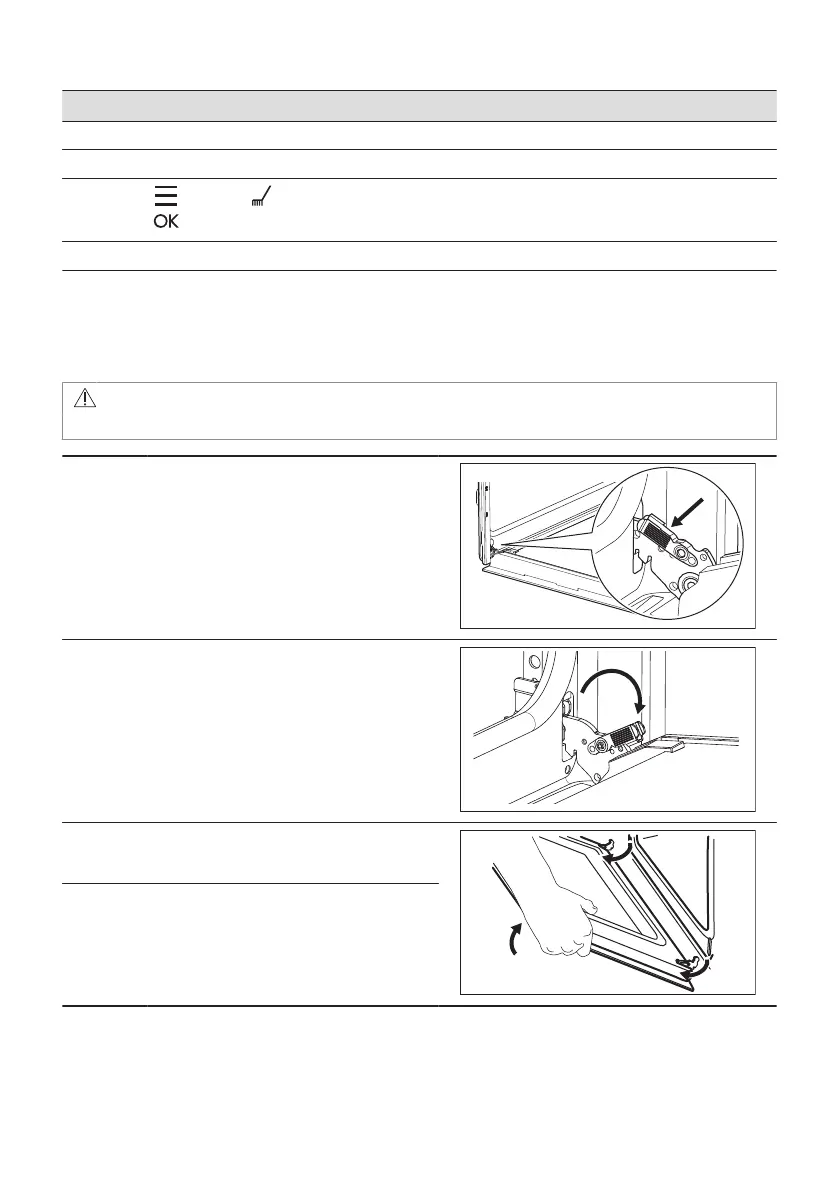
12.5 How to remove and install: Door
The oven door has three glass panels. You can remove the oven door and the internal glass
panels to clean them. Read the whole "Removing and installing door" instruction before you
remove the glass panels.
CAUTION!
Do not use the oven without the glass panels.
Step 1 Open the door fully and hold both hinges.
Step 2 Lift and pull the latches until they click.
Step 3 Close the oven door halfway to the first
opening position. Then lift and pull to remove
the door from its seat.
Step 4 Put the door on a soft cloth on a stable sur‐
face.
ENGLISH 25



 To Next Page