10. ADDITIONAL FUNCTIONS
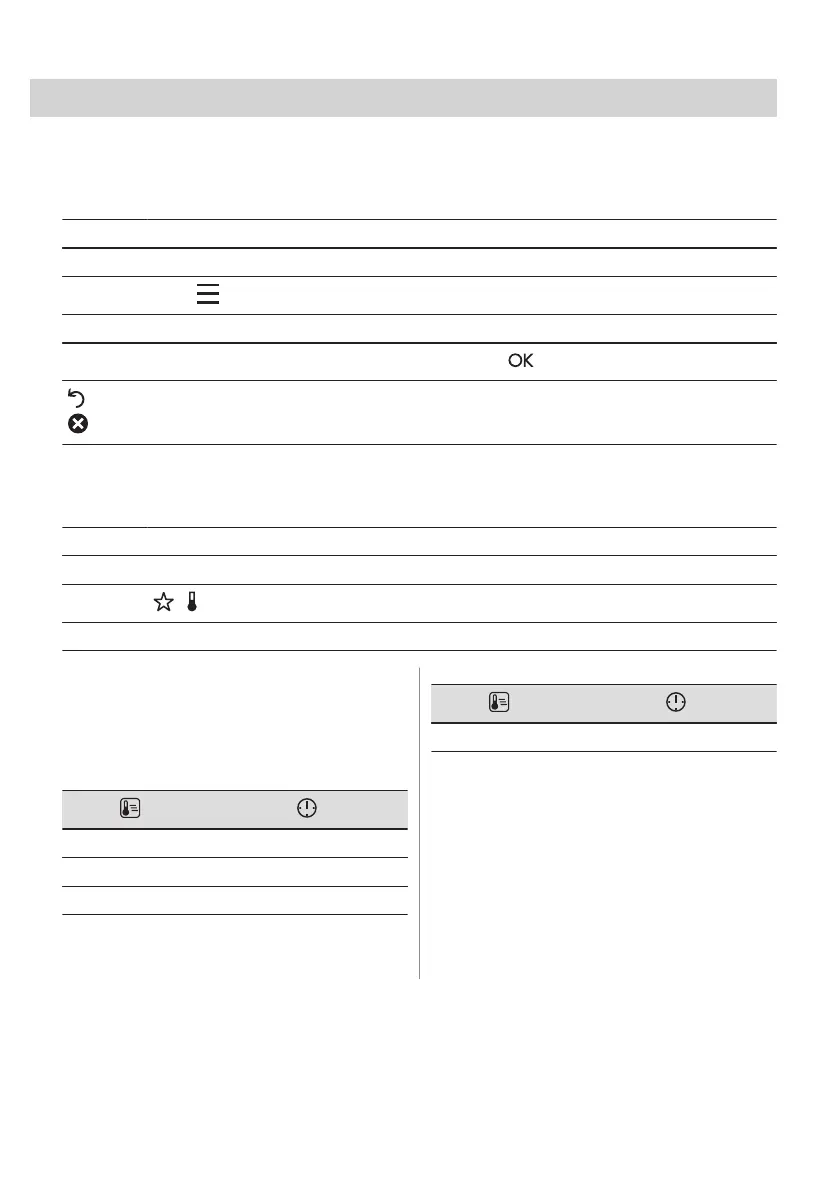
10.1 How to save: Favourites
You can save your favourite settings, such as the heating function, the cooking time, the
temperature or the cleaning function. You can save 3 favourite settings.
Step 1 Turn on the appliance.
Step 2 Select the preferred setting.
Step 3
Press: . Select: Favourites.
Step 4 Select: Save current settings.
Step 5
Press + to add the setting to the list of: Favourites. Press .
- press to reset the setting.
- press to cancel the setting.
10.2 Function lock
This function prevents an accidental change of the heating function.
Step 1 Turn on the appliance.
Step 2 Set a heating function.
Step 3
, - press at the same time to turn on the function.
To turn off the function repeat step 3.
10.3 Automatic switch-off
For safety reasons, if the heating function is
active and no settings are changed, the
appliance will turn off automatically after a
certain period of time.
(°C) (h)
30 - 115 12.5
120 - 195 8.5
200 - 245 5.5
(°C) (h)
250 - maximum 3
The Automatic switch-off does not work with
the functions: Light, Food Sensor, End time,
Slow Cooking.
10.4 Cooling fan
When the appliance operates, the cooling fan
turns on automatically to keep the surfaces of
the appliance cool. If you turn off the
appliance, the cooling fan can continue to
operate until the appliance cools down.
18 ENGLISH





 To Next Page