How to cancel: Clock functions
Step 1
- press repeatedly until the clock function symbol starts to flash.
Step 2
Press and hold: .
The clock function turns off after few seconds.
9. USING THE ACCESSORIES
WARNING!
Refer to Safety chapters.
9.1 Inserting accessories
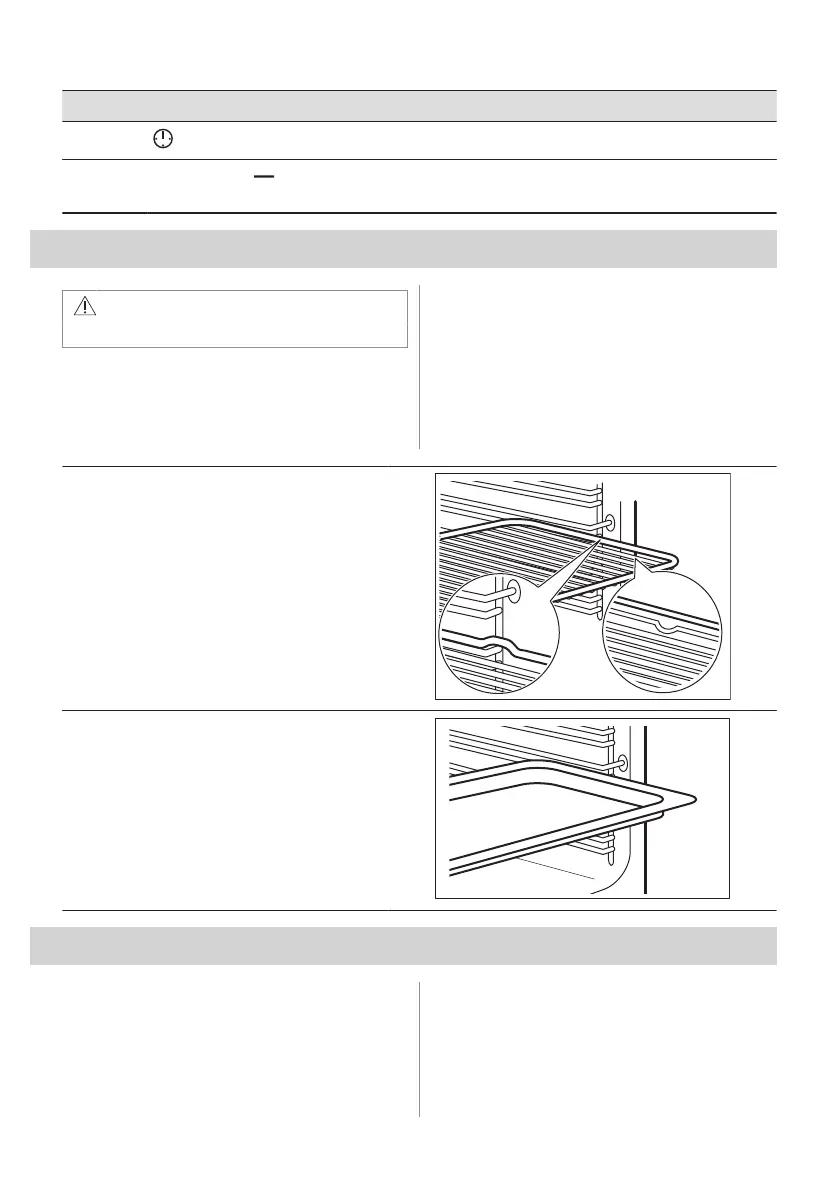
A small indentation at the top increases
safety. The indentations are also anti-tip
devices. The high rim around the shelf
prevents cookware from slipping of the shelf.
Wire shelf:
Push the shelf between the guide bars of the shelf
support and make sure that the feet point down.
Baking tray / Deep pan:
Push the tray between the guide bars of the shelf
support.
10. ADDITIONAL FUNCTIONS
10.1 Cooling fan
When the appliance operates, the cooling fan
turns on automatically to keep the surfaces of
the appliance cool. If you turn off the
appliance, the cooling fan can continue to
operate until the appliance cools down.
12 ENGLISH



 To Next Page