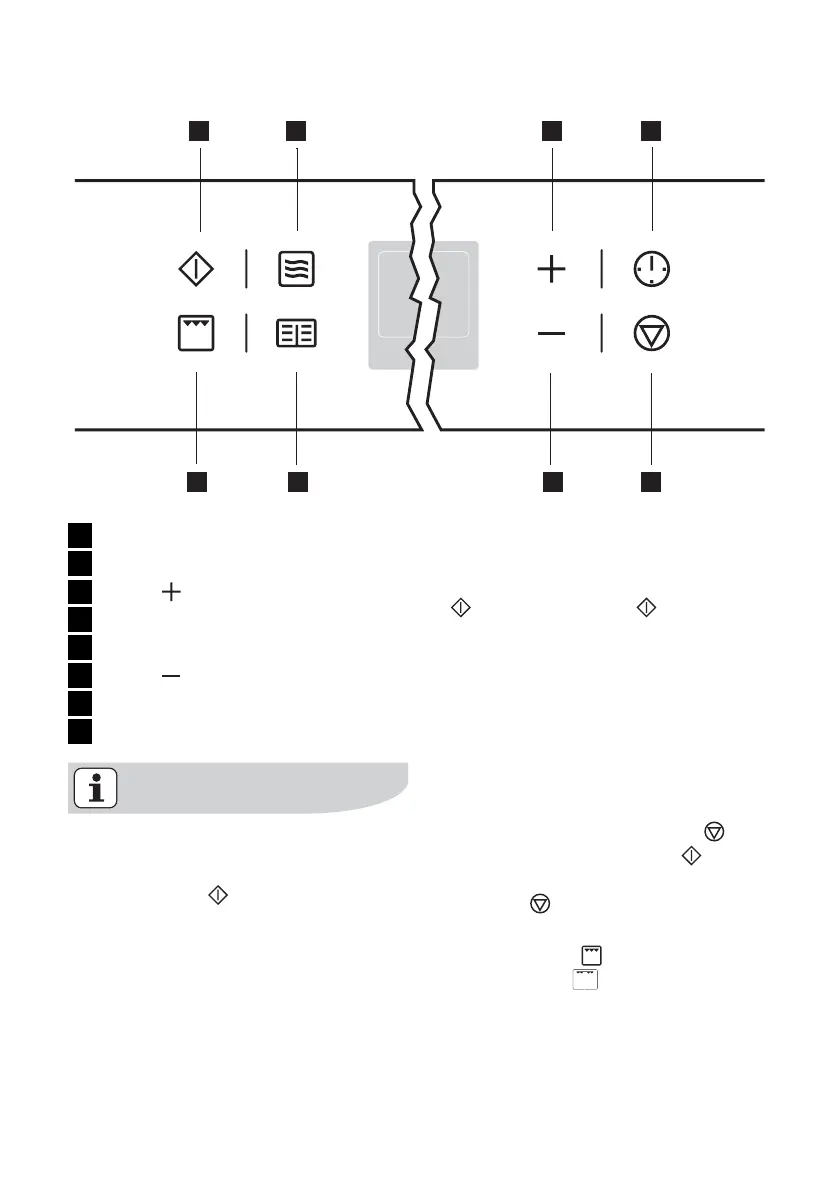
1 3 4
5
678
2
1 Start button
2 Microwave button
3 Button
4 Clock Functions
5 Stop button/ Reset
6 Button
7 Baking/roasting programmes
8 Grill Function button
General instructions
• Always confirm the selected function
with the Start
button.
If the selected function is not started
within 120 seconds, the appliance
switches itself off.
• When the selected function is started,
the oven begins to heat up or the time
set begins to count down.
• If the oven door is opened during op-
eration, the function stops. After clos-
ing the door continue with the Start
button. If the Start button is not
pressed within 120 seconds, the ap-
pliance switches off.
• The oven light is switched on as long
as an oven function is started or the
oven door is open.
The oven light goes off after 10 mi-
nutes when the door is open and the
appliance switched off.
• Stop operation with the Stop
but-
ton, continue with the Start
button.
Switch the appliance off by pressing
the Stop
button again.
Switching the oven on
1. Press the grill
button. The oven
function Grill
appears.
14 electrolux using the oven



 To Next Page