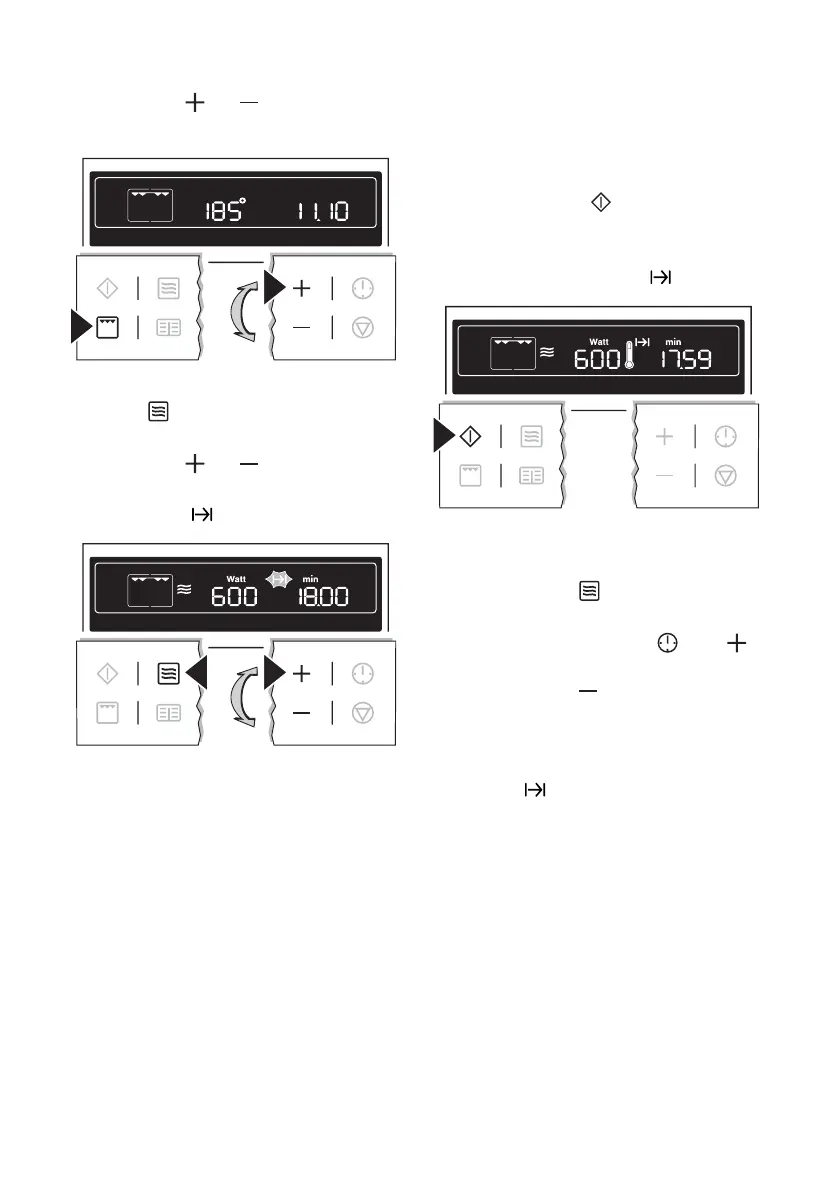
3. Using the or button set the
desired temperature.
4. By repeatedly pressing the Micro-
wave
button, set the desired mi-
crowave power (max. 600 Watt).
5. Using the
or button set the
desired cook time. The symbol for
Cook time
flashes.
– The cooking times can be set as
follows:
– from 0 to 2 mins. in 5 second
steps,
– from 2 to 5 mins. in 10 second
steps,
– from 5 to 10 mins. in 20 second
steps,
– from 10 to 20 mins. in 30 sec-
ond steps,
– from 20 mins. onwards in 1 mi-
nute steps.
The maximum length of operation
that can be set is 59 mins.
6. When the Start
button is pressed,
the time set begins to count down.
Oven and microwave are on. The
symbol for Cook time
lights up.
– While the time counts down, the
power can be changed using the
Microwave
button.
– While the time counts down, using
the Clock Functions
and
buttons the cook time can be in-
creased or
reduced.
When the time has elapsed, an acoustic
signal sounds for 2 minutes. The appli-
ance switches itself off. The symbol for
Cook time
flashes and the time dis-
play appears.
To turn off the acoustic signal: Press any
button.
18 electrolux using the oven



 To Next Page