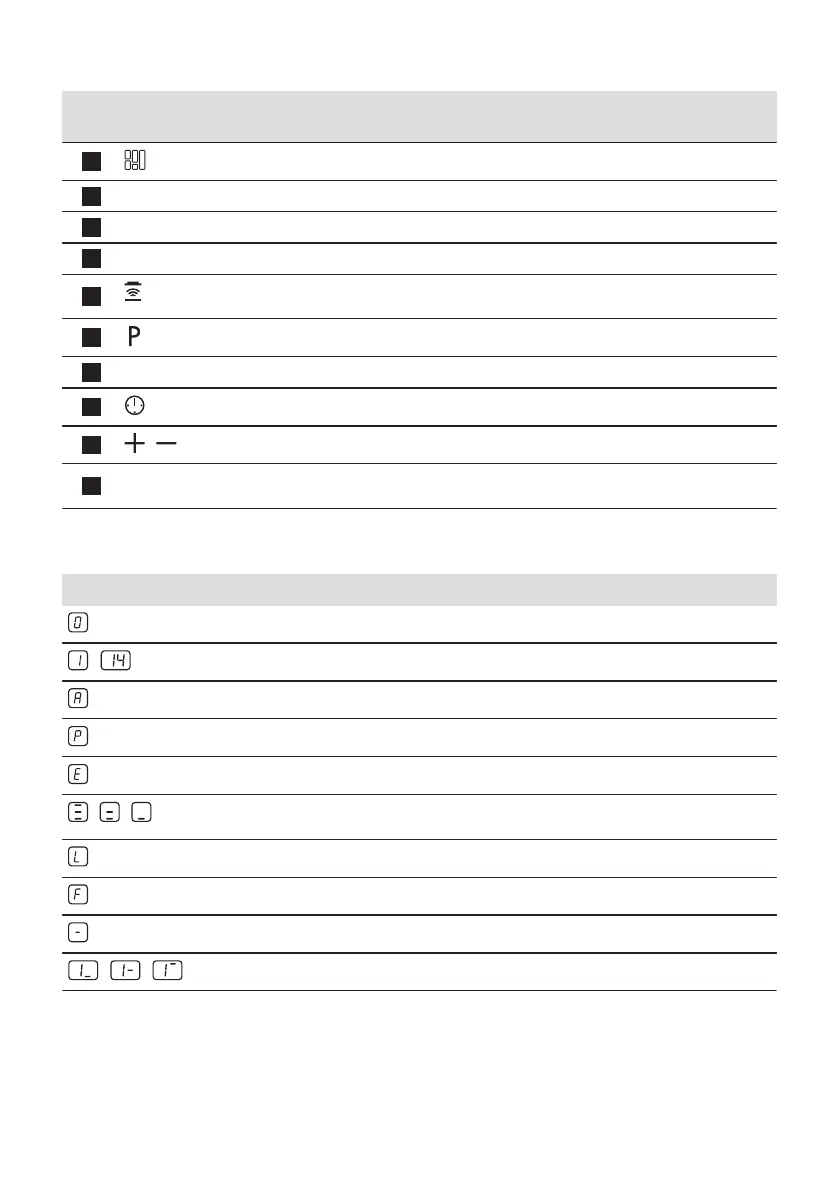
Sensor
field
Function Comment
4
FlexiBridge To switch between three modes of the function.
5
- Heat setting display To show the heat setting.
6
- Timer indicators of cooking zones To show for which zone you set the time.
7
- Timer display To show the time in minutes.
8
Hob²Hood To activate and deactivate the manual mode of the func‐
tion.
9
PowerBoost To activate and deactivate the function.
10
- Control bar To set a heat setting.
11
- To select the cooking zone.
12
/
- To increase or decrease the time.
13
- Control bar To set the heat setting for flexible induction cooking
area.
4.3 Heat setting displays
Display Description
The cooking zone is deactivated.
-
The cooking zone operates.
Automatic Heat Up operates.
PowerBoost operates.
+ digit
There is a malfunction.
/ /
OptiHeat Control (3 step Residual heat indicator): continue cooking / keep warm / resid‐
ual heat.
Lock / Child Safety Device operates.
Incorrect or too small cookware or no cookware on the cooking zone.
Automatic Switch Off operates.
/ /
PowerSlide operates.
ENGLISH 31



 To Next Page