Controls & Settings
What To Do if The Temperature Displays
Flash
If ever you see both temperature displays
continuously flashing, it may indicate that the control
system has detected a performance problem. Call
your Electrolux service representative, who can
interpret the flashing message.
Turning The Cooling System On And
Off
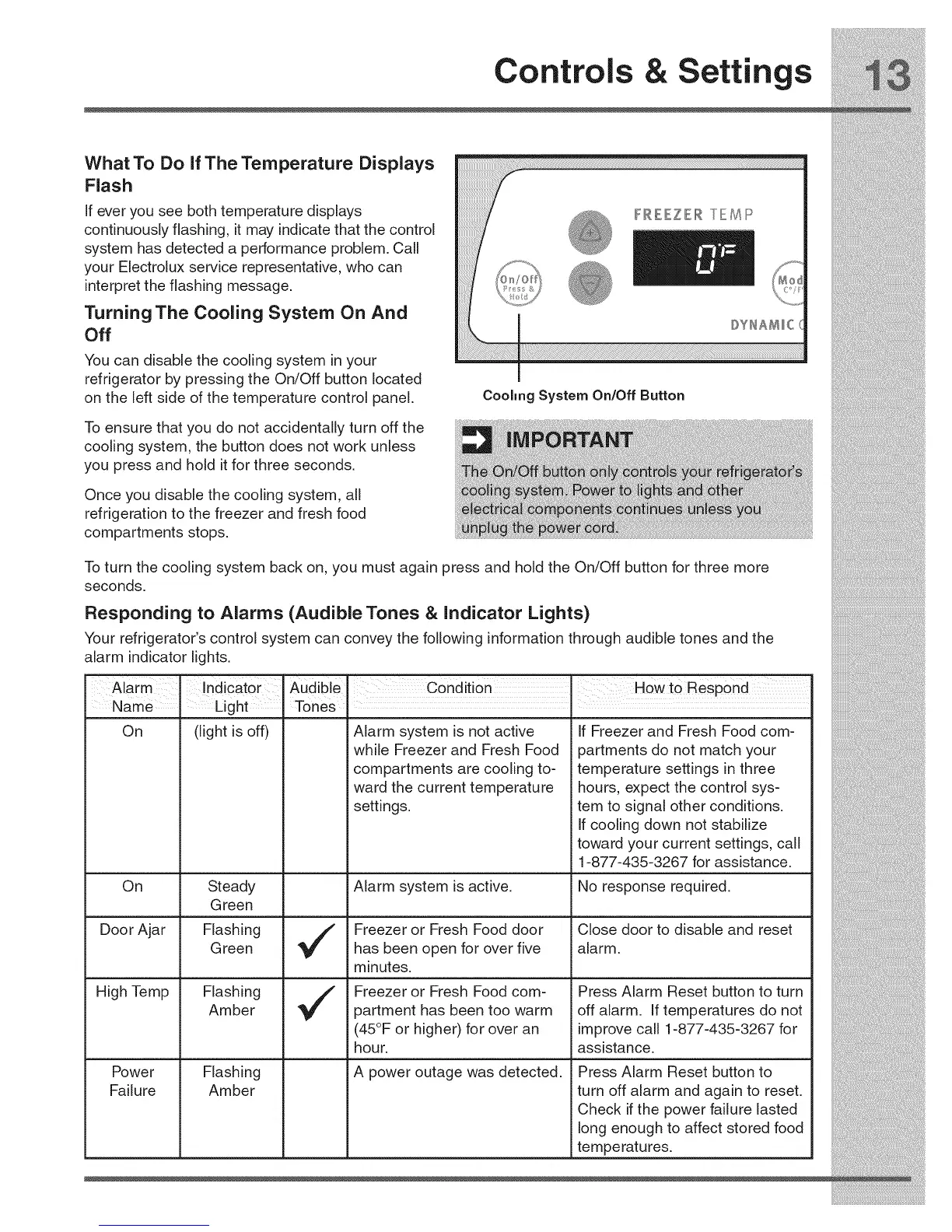
You can disable the cooling system in your
refrigerator by pressing the On/Off button located
on the left side of the temperature control panel.
To ensure that you do not accidentally turn off the
cooling system, the button does not work unless
you press and hold it for three seconds.
Once you disable the cooling system, all
refrigeration to the freezer and fresh food
compartments stops.
Coohng System On/Off Button
To turn the cooling system back on, you must again press and hold the On/Off button for three more
seconds.
Responding to Alarms (Audible Tones & Indicator Lights)
Your refrigerator's control system can convey the following information through audible tones and the
alarm indicator lights.
Alaim IndicatOr' Audible' Condition' How to Respond
Name. Light Tones
On
On
Door Ajar
(light is off)
Steady
Green
FlashingGreen
FlashingAmber
High Temp
Flashing
Amber
Power
Failure
Alarm system is not active
while Freezer and Fresh Food
compartments are cooling to-
ward the current temperature
settings.
Alarm system is active.
Freezer or Fresh Food door
has been open for over five
minutes.
Freezer or Fresh Food com-
partment has been too warm
(45°F or higher) for over an
hour.
A power outage was detected.
If Freezer and Fresh Food com-
partments do not match your
temperature settings in three
hours, expect the control sys-
tem to signal other conditions.
If cooling down not stabilize
toward your current settings, call
1-877-435-3267 for assistance.
No response required.
Close door to disable and reset
alarm.
Press Alarm Reset button to turn
off alarm. If temperatures do not
improve call 1-877-435-3267 for
assistance.
Press Alarm Reset button to
turn off alarm and again to reset.
Check if the power failure lasted
long enough to affect stored food
temperatures.



 To Next Page