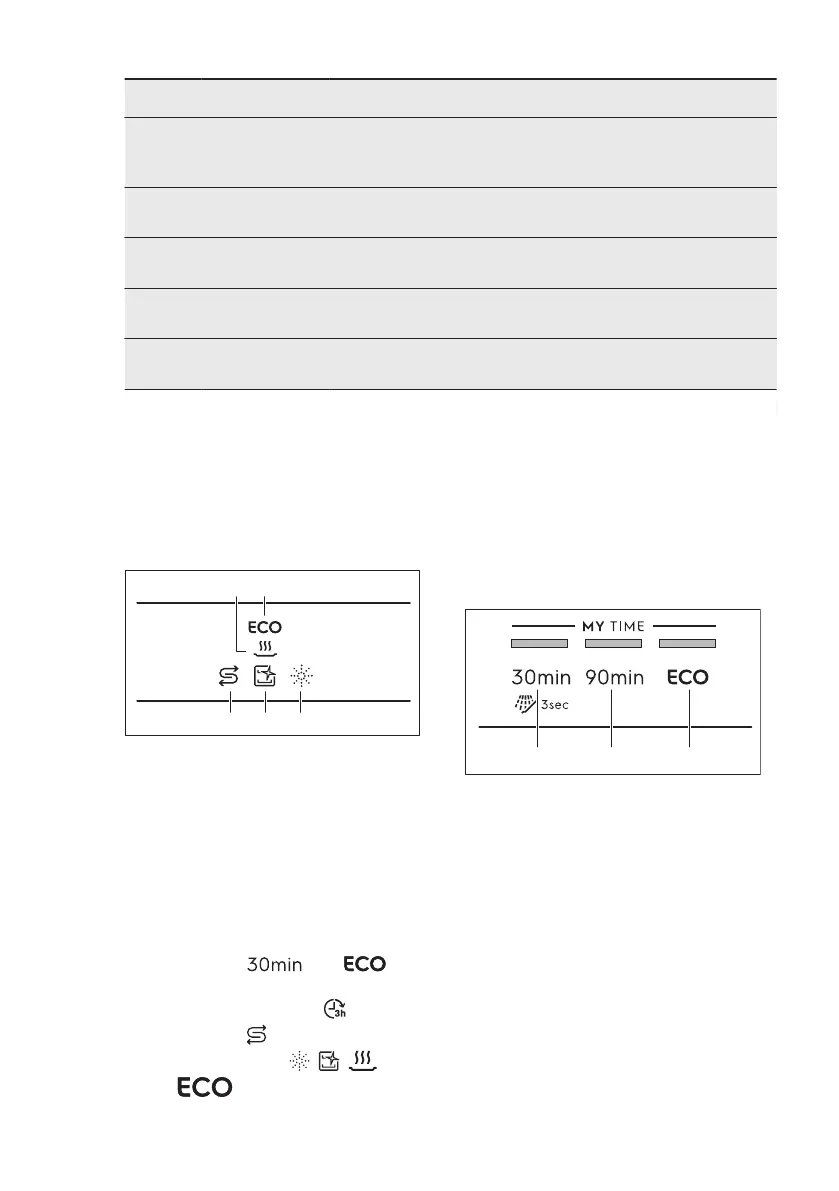
Number Settings Values
Description
1)
1 Water hard‐
ness
From level 1 to
level 10 (de‐
fault: 5)
Adjust the level of the water softener ac‐
cording to the water hardness in your
area.
2 Rinse aid emp‐
ty notification
On (default)
Off
Activate or deactivate the rinse aid indi‐
cator.
3 End sound On
Off (default)
Activate or deactivate the acoustic signal
for the end of a programme.
4 Auto door open On (default)
Off
Activate or deactivate the AirDry.
5 Key tones On (default)
Off
Activate or deactivate the sound of the
buttons when pressed.
1)
For more details, refer to the information provided in this chapter.
You can change the basic settings in
setting mode.
When the appliance is in setting mode,
the indicators on the control panel
represent available settings. For each
setting, a dedicated indicator flashes:
6.1 Setting mode
How to enter setting mode
You can enter setting mode before
starting a programme. You cannot enter
setting mode while the programme is
running.
To enter setting mode, press and hold
simultaneously and for
about 3 seconds.
• The light related to and the
indicator
flash.
• The indicators , , and
are on.
• The lights related to MY TIME
selection bar are on.
How to navigate in setting
mode
You can navigate in setting mode using
MY TIME selection bar.
A. Previous button
B. OK button
C. Next button
Use Previous and Next to switch
between the basic settings and to
change their value.
Use OK to enter the selected setting and
to confirm changing its value.
How to change a setting
Make sure the appliance is in setting
mode.
1. Press Previous or Next until the
indicator dedicated to the desired
setting flashes.
www.electrolux.com10



 To Next Page