26
CONNECTIVITY (cont'd.)
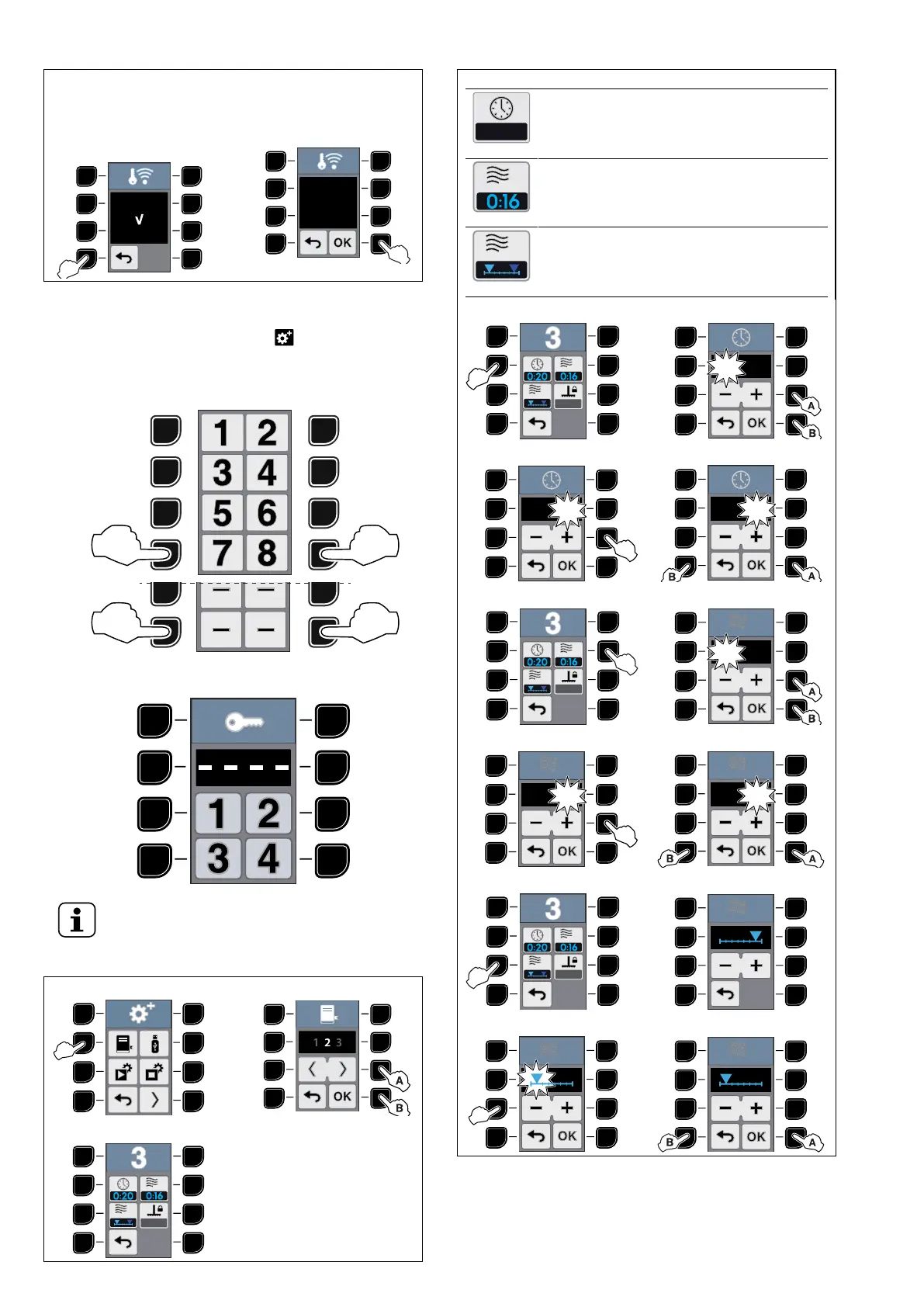
If it is necessary to interrupt the remote connection with the
Service press simultaneously the buttons “7“ and “8“ and
go straight to step 8 CONNECTION EXIT.
7 REMOTE CONNECTION
ENDED
8 CONNECTION EXIT
J.5 Advanced settings
To access the “Advanced Settings“ , insert the required
password.
1. Press simultaneously buttons “7“ and “8“ (or – and –) for
two seconds to activate the password menu.
2. Press the corresponding buttons in the correct sequence
to insert the password.
NOTE!
Only the Chef can access to the Advanced settings.
PROGRAM SETTING - Single Phase
1 2
3
PROGRAM SETTING - Single Phase (cont'd.)
Full program duration
• Increase or decrease the full duration of
the program.
Microwave phase duration
• Increase or decrease the full duration of
the phase.
Set microwave starting
• You can set the microwave start at the
beginning or at the end of the program.
4 5
6 7
8 9
10 11
12
1
13
14 15
1. With this option, it is possible choose when the microwave phase starts
(at the beginning or at the end of the cooking cycle).





 To Next Page