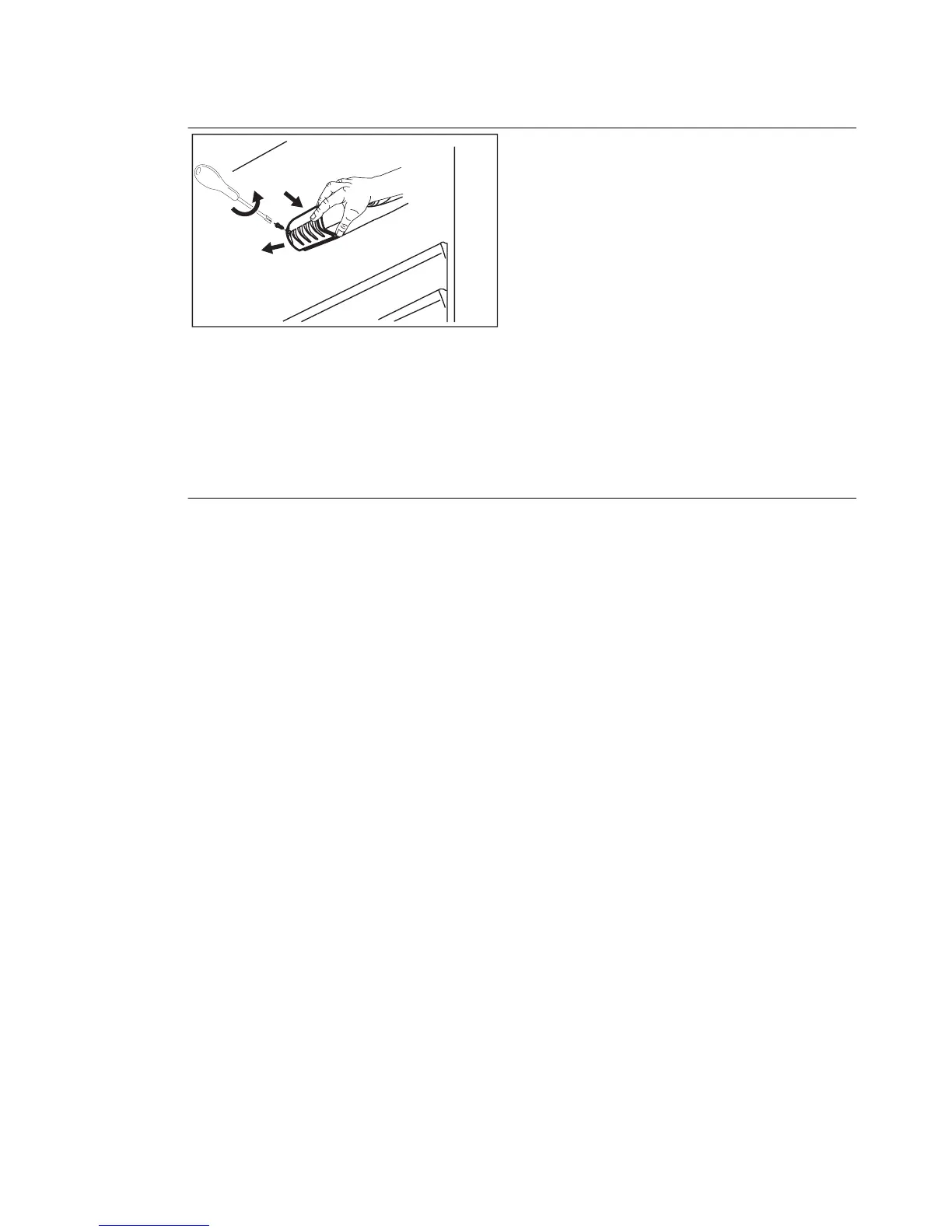
REPLACING THE LAMP
1.
Disconnect the mains plug from the
mains socket.
2.
Remove the screw from the lamp cov-
er.
3.
Remove the lamp cover (refer to the il-
lustration).
4.
Replace the used lamp with a new
lamp of the same power and specifi-
cally designed for household applian-
ces. (the maximum power is shown on
the lamp cover).
5.
Install the lamp cover.
6.
Tighten the screw to the lamp cover.
7.
Connect the mains plug to the mains
socket.
8.
Open the door. Make sure that the
lamp comes on.
CLOSING THE DOOR
1.
Clean the door gaskets.
2.
If necessary, adjust the door. Refer to
"Installation".
3.
If necessary, replace the defective door
gaskets. Contact the Service Center.
16
www.electrolux.com





 To Next Page