12. Troubleshooting
12
11
438 9152-11/03
04.03
Service
Manual
I/O-BOARD 1
EMERGENCY STOP
TEMPORARY PAUSE
OIL
REMOTE START
SERVICE
PHASE CHECK
DOOR LOCKED
DOOR CLOSED
UNBALANCE
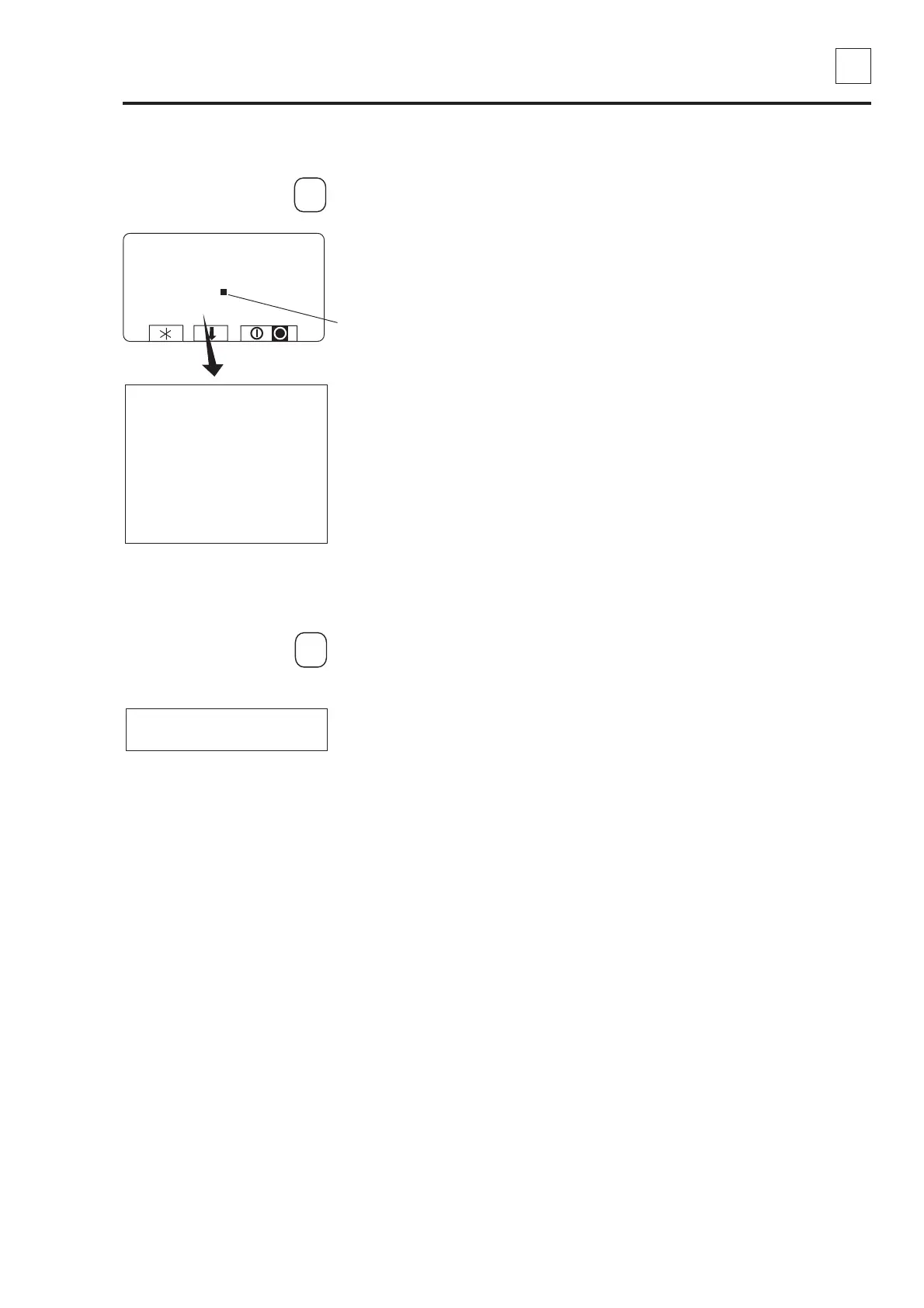
Press 1.
Now you can check the
various input signals from I/O
board 1.
A black square in front of the
name indicates that the input
is active.
1
Press any key to go back to
the previous display.
I/O card inputs
I/O-BOARD 2
CHANGE HEATING SYSTEM
REPEAT RINSE
Press 2.
When the programme unit
has two I/O cards:
2
Press any key to go back to
the previous display.
It is now possible to verify the
various input signals from I/O
card 2.
To end the service programme
End the service programme by pressing a.
SERVICE PROGRAM
LEVEL 2
TEMP 22°C
SPEED 0
DRAIN CLOSED YES
EMERGENCY STOP DOOR LOCKED
TEMPORARY PAUSE DOOR CLOSED
OIL
REMOTE START UNBALANCE
SERVICE
PHASE CHECK



 To Next Page