-5-
3.2: Command Codes
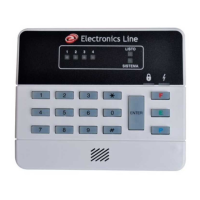
The Penta security system is operated by entering command codes on the numeric
keypad. A command is executed by pressing the ‘Q‘ button followed by the
corresponding command number. In some cases, a valid user code is also required.
The following is a summary of the command codes used in system operation.
Q0
Quick Arm
Q5 + (User Code 1)
Program User Codes
Q1 + (User Code)
Bypass Mode
Q6
Zone Chime
Q2
Emergency/Trouble
Event Log
Q8 + (User Code)
Forced Arming
Q3
Zone Alarm
Event Log
Q9 + (User Code)
Stay Arming
Q41
Q42 + (User Code 1)
Bell/LED Test
Walk Test
ENTER 1 + (User Code 1)
Stop Communications
3.3: Keypad Tones
The keypad sounds various tones to indicate the following:
• Short Beep – Confirmation of each keystroke
• Half Second Beep – Acknowledgement of a successful command entry
• Low Beep – Rejection of an illegal command entry
• Continuous Beeps – Entry/Exit Delay in progress
3.4: User Codes
User codes are the codes that grant you access to various system operations, such as
arming and disarming. Each user code is four digits long. Of the four user codes, only
User Code 1 has the authorization to program other user codes. The default code for
User 1 is ‘1111’. This default value must be changed immediately to prevent
unauthorized access to your system.
To program user codes 1-4:
1. Press Q, 5.
2. Enter User Code 1; the Armed and System LEDs flash and the zone LEDs indicate
the programming status of each user code as follows:
OFF:
NOT PROGRAMMED
ON:
PROGRAMMED
FLASHING:
CURRENTLY BEING PROGRAMMED
3. Enter the number of the code to be changed (1-4); the requested zone LED flashes.
4. Enter the new user code; the LED stops flashing.
Note: If the new code is identical to an existing user code, an error tone will be
sounded and the new code will not be accepted.
To erase a user code:
1. Press Q, 5.
2. Enter User Code 1.
3. Enter the number of the code to be erased (1-4); the requested zone LED flashes.
4. Enter Q, Q, Q, Q; the LED stops flashing and the code is erased.
Note: Do not erase User Code 1! Erasing this code denies the user the ability to
program user codes. If User Code 1 is accidentally erased,contact your installer.


 To Next Page