-9-
3.10: Additional Operations
Bell Cancel
To cancel the bell:
• Enter a valid user code or turn the keyswitch as if disarming the system.
Stop Communications
To stop the panel from sending a message to the central station:
1. Press ENTER, 1.
2. Enter User Code 1; all communications stop immediately and all unsent messages
are cancelled.
Zone Chime On/Off
The keypad can be set to chime when perimeter zones are opened or closed when the
system is disarmed.
To toggle the zone chime On or Off:
• Press Q, 6 while the system is disarmed.
The keypad will sound a continuous tone to indicate “Zone Chime ON” or a series of
short beeps to indicate “ Zone Chime OFF”.
Keypad Backlight On/Off
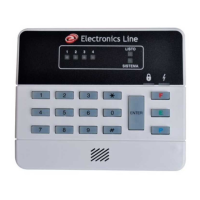
To toggle the backlight of any keypad On or Off:
• Press and hold down # for more than 2 seconds.
3.11: Testing the System
Electronics Line recommends that you test your system at least once a week.
Walk Test
Walk test mode enables you to test peripheral detection devices, such as PIR detectors
and magnetic door contacts. In this mode, when a zone is opened , the keypad chimes.
To perform a walk test:
1. Press Q, 4, 2.
2. Enter User Code 1; the Ready, System, Power and Armed LEDs flash to indicate
that the system is in Walk Test mode. To end Walk Test mode, press #. This mode
is automatically terminated after 4 minutes.
Bell/LED Test
To perform a bell/LED test:
• Press Q, 4; the siren is sounded and all LEDs on the keypad are lit for a period of
two seconds.


 To Next Page