®
CD
Electrophone
AM/SSB
TRANSCEIVER
MODEL TX560
SIGNAL
DX
LOC
c=i g=2
1 2 3 4
TX RX
PA
I= =I
I=3
VOLUME SQUELCH
CD CD
SSB
■
AM CL
R
Operating controls
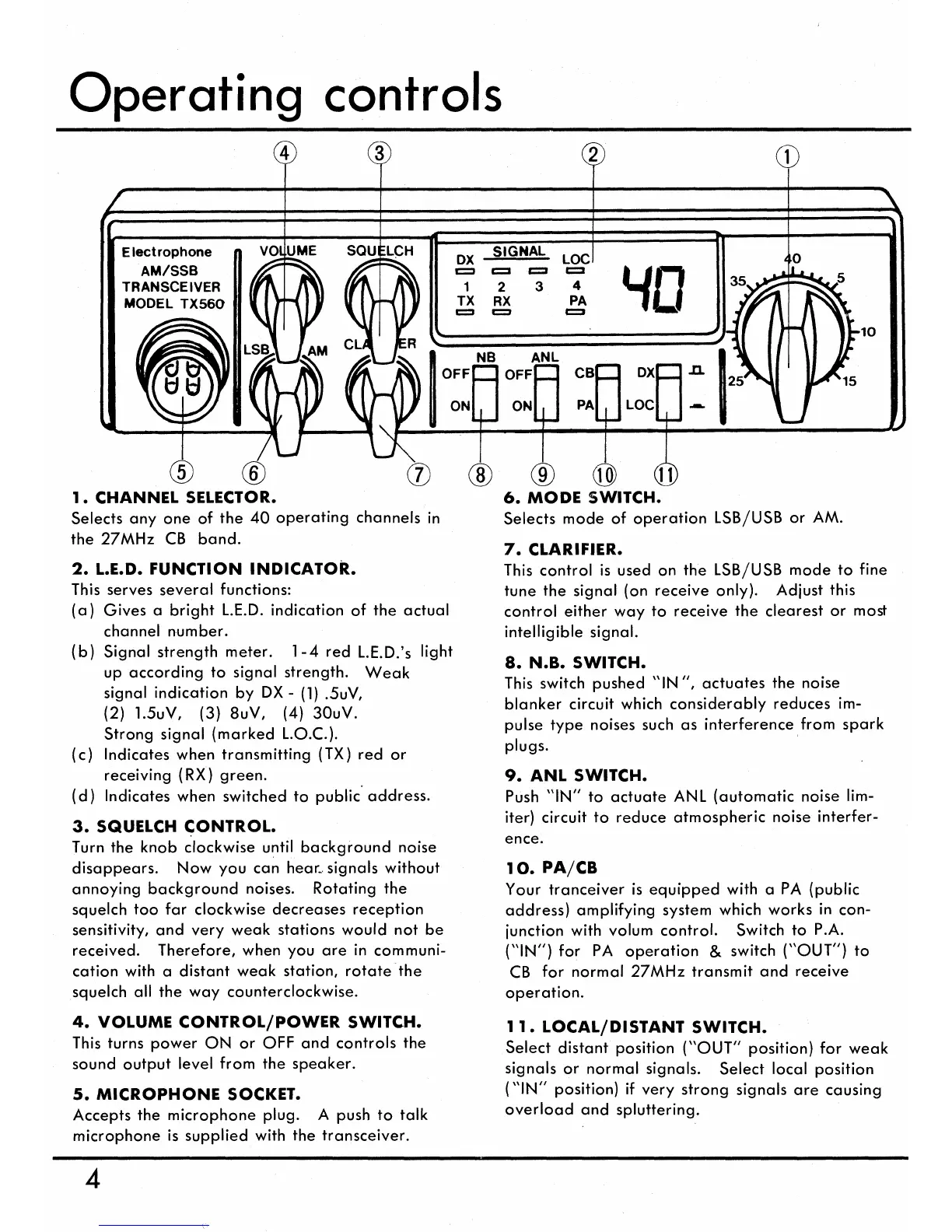
1. CHANNEL SELECTOR.
Selects any one of the 40 operating channels in
the 27MHz CB band.
2. L.E.D. FUNCTION INDICATOR.
This serves several functions:
(a)
Gives a bright L.E.D. indication of the actual
channel number.
(b)
Signal strength meter. 1-4 red L.E.D.'s light
up according to signal strength. Weak
signal indication by DX - (1) .5uV,
(2) 1.5uV, (3) 8uV, (4) 30uV.
Strong signal (marked L.O.C.).
(c)
Indicates when transmitting (TX) red or
receiving (RX) green.
(d)
Indicates when switched to public address.
3. SQUELCH CONTROL.
Turn the knob clockwise until background noise
disappears. Now you can hear.. signals without
annoying background noises. Rotating the
squelch too far clockwise decreases reception
sensitivity, and very weak stations would not be
received. Therefore, when you are in communi-
cation with a distant weak station, rotate the
squelch all the way counterclockwise.
4. VOLUME CONTROL/POWER SWITCH.
This turns power ON or OFF and controls the
sound output level from the speaker.
5. MICROPHONE SOCKET.
Accepts the microphone plug. A push to talk
microphone is supplied with the transceiver.
6.
MODE SWITCH.
Selects mode of operation LSB/USB or AM.
7.
CLARIFIER.
This control is used on the LSB/USB mode to fine
tune the signal (on receive only). Adjust this
control either way to receive the clearest or most
intelligible signal.
8.
N.B. SWITCH.
This switch pushed "IN ", actuates the noise
blanker circuit which considerably reduces im-
pulse type noises such as interference from spark
plugs.
9.
ANL SWITCH.
Push "IN" to actuate ANL (automatic noise lim-
iter) circuit to reduce atmospheric noise interfer-
ence.
10.
PA/CB
Your tranceiver is equipped with a PA (public
address) amplifying system which works in con-
junction with volum control. Switch to P.A.
("IN") for PA operation & switch ("OUT") to
CB for normal 27MHz transmit and receive
operation.
11.
LOCAL/DISTANT SWITCH.
Select distant position ("OUT" position) for weak
signals or normal signals. Select local position
("IN" position) if very strong signals are causing
overload and spluttering.
4


 To Next Page
 Loading...