09
EN
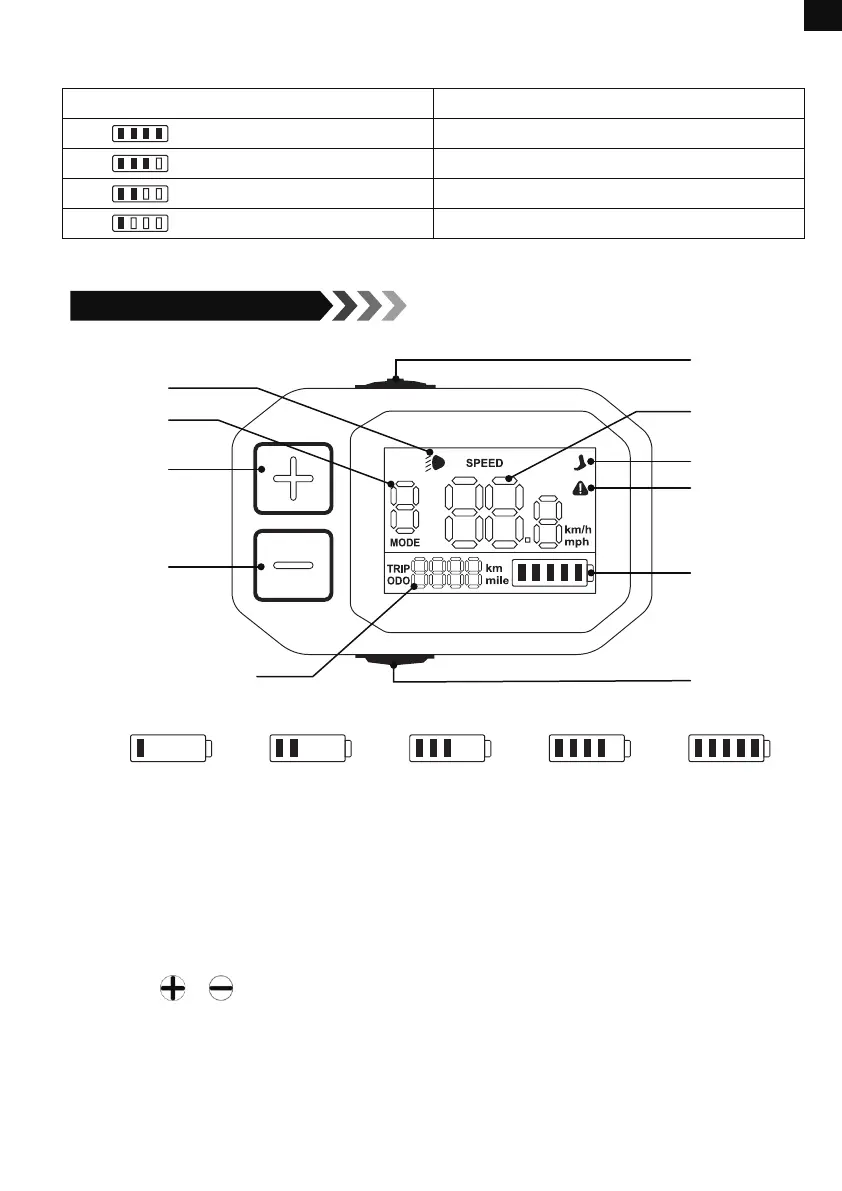
Contents on The Display
Battery Level Indicator
Light Mark
Speed Level
Up
Down
Trip Distance/Odometer
On/off Button
Speed/
Error Code
Push Mode
Brake/
Malfunction Mark
Battery Level
Light Switch
≤20%
≤40%
≤60% ≤80% ≤100%
Functions
Power on/off
Long press the on/off button for 3 seconds to turn the display on/off.
Light on/off
Short press the light switch to turn the light on/off.
Shifting Speed Level
Short press or to shift among 5 speed levels, including 12/16/20/23/25 km/h.
6km/h Push Mode
When the bike is at zero speed, long press the light switch to activate the push mode.
Switching Trip Distance/Odometer
Short press the light switch twice to switch trip distance with odometer.
8.Display Guide
Correspondence between battery indicator lights and battery level under 1C current
discharge:
Number of Lights On Battery Level
4 66%-100%
3 51%-65%
2
11%-50%
1
0-10% (Only red light on)


 To Next Page