EN
Changing Speed Unit
Short press the light switch 3 times to switch between “km” and “mile”.
Removing ODO Data
When the display is on, long press the on/off button for 8 seconds till the display flashes. The ODO
data will be removed when the display reboots.
Restoring Factory Settings
10
Hidden Menu
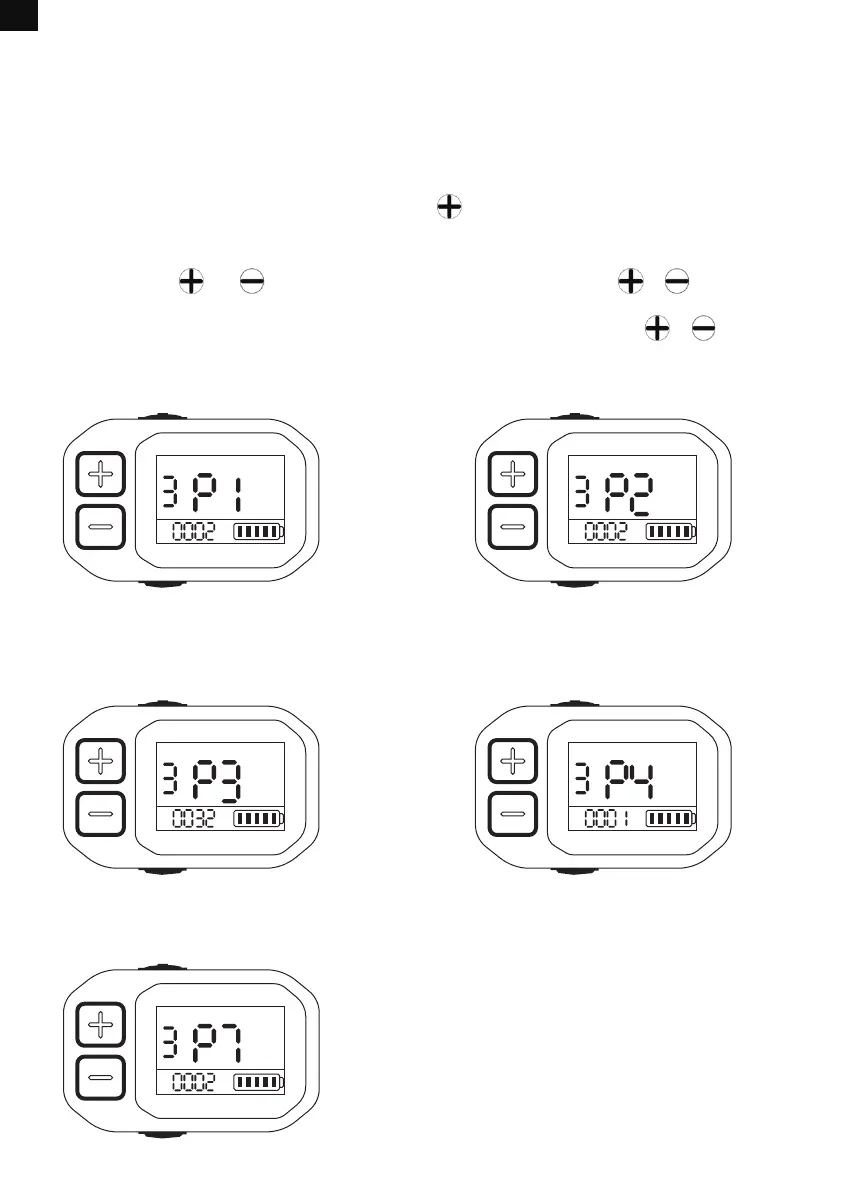
First, long press both and to enter the hidden menu. Second, short press or to shift
among different menu pages. Different pages are for setting different functions. Third, after selecting
the page you want, short press the light switch to stay on this page and short press or to set
the item on the page. Fourth, short press the light switch again to remain your setting. Last, short
press the on/off button to exit the hidden menu.
MODE MODE
P1: adjusting the backlight brightness
between level 1-3.
P2: setting the screen timeout within
0-30 minutes; 0 means it never sleeps.
MODE MODE
P3: setting the speed limit within 0-25km/h;
The default speed limit is 25km/h.
P4: setting the default speed level;
0 means starting at speed level 0, and 1
means starting at speed level 1.
MODE
P7: turning on/off the bike locking function; 0
means the locking function is turned off, and 1
means the locking function is activated. The
default setting is 0.
When the display is on, long press the on/off button and for 5 seconds till the display flashes.
Or restore the factory settings via the Eleglide app.


 To Next Page