11
-
+
MENU
-
+
MENU
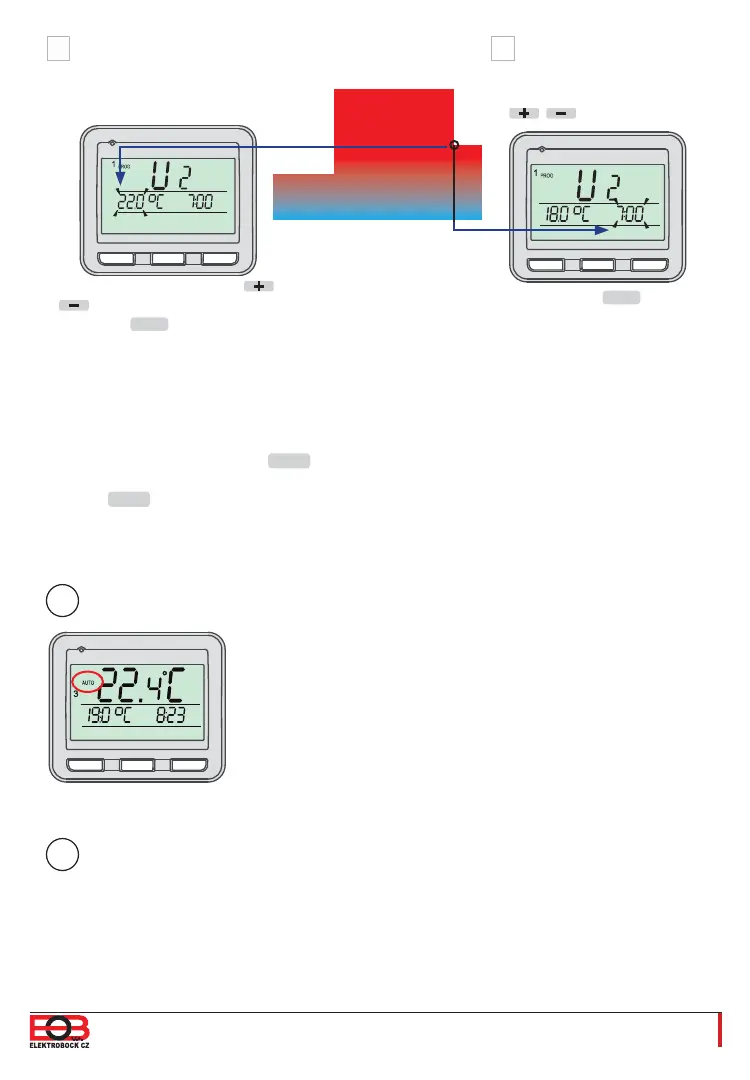
Set a temperature with the /
buttons and confi rm it with the
MENU
button.
U2 (2nd temperature change)
appears on the display.
U3 now appears on the display to set a third temperature change.
Use the same method as for the setting of the previous temperature stages.
In this way, up to six temperature changes per day can be set.
After the setting is done, hold the
MENU
button long 1x to select other days of the week
or
push the
MENU
button long 3x to return to the basic view.
In order for the thermostat to work according to the programme set, the AUTO operating
mode has to be enabled.
You can fi nd the process of setting the thermostat modes on
page 12.
You can fi nd an example of the process of setting a one-week programme
on page 20.
Confi rm it with the
MENU
button.
Desired
temperature
Time
Set the time for this
temperature using the
/ buttons.
H I
2
3
4
5
2
3
4
5
U2
U1
i
i
-
+
MENU


 To Next Page