19
Error Messages
Tips
-
+
MENU
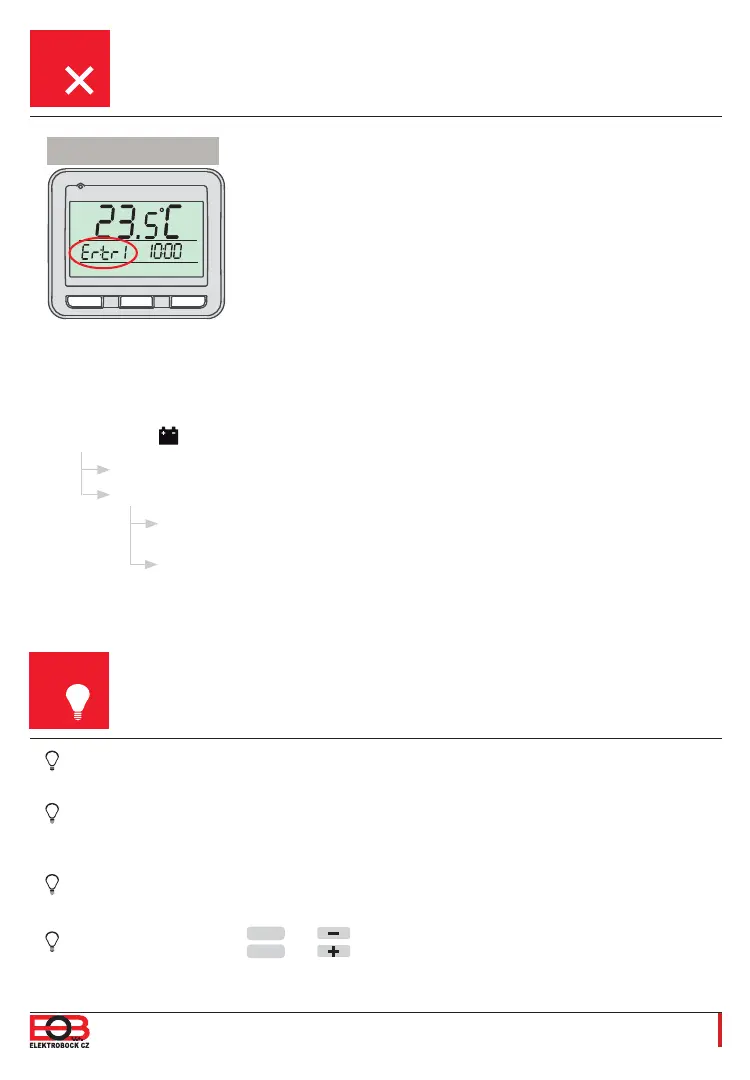
Ertr
= Connection error.
The number after the Ertr message states which one of the
receivers is not communicating with the thermostat (e.g. Ertr2
means that the second receiver is not communicating).
Possible solutions:
A. If the error occurred while pairing the receiver with the transmitter, repeat the pairing process –
see p. 7.
B. The error occurred during normal operation after a certain period of usage:
Check if the
symbol indicating low batteries is not shown on the thermostat.
When the heating season is not under way, it is recommended to enable the OFF operating
mode – see p. 12.
It is not recommended to remove the batteries from the thermostat while it is paired with a plugged-
in receiver, as in this case the receiver will switch to a mode in which it will be ON for 2 minutes
and OFF for 8 minutes regardless of the current temperature.
It is also not recommended to leave a paired receiver unplugged, as in this case the thermostat will
start transmitting a so-called Search Signal, which will cause a quick depletion of the batteries.
A simultaneous push of the
MENU
and buttons in the basic view = keys locked.
A simultaneous push of the
MENU
and buttons in the basic view = keys unlocked.
If green LED1 is fl ashing, the code in the receiver was deleted and the pairing
process has to be repeated – see p. 7.
If green LED1 is constantly shining, remove the batteries from the thermostat for
2 minutes and unplug the receiver for 2 minutes as well. Then insert the batteries
back into the thermostat and plug the receiver in. After a short while, the devices
should pair again.
If it IS, replace the fl at batteries with new ones.
If NOT, check if the green LED1 on the receiver is fl ashing or constantly shining.


 To Next Page