20
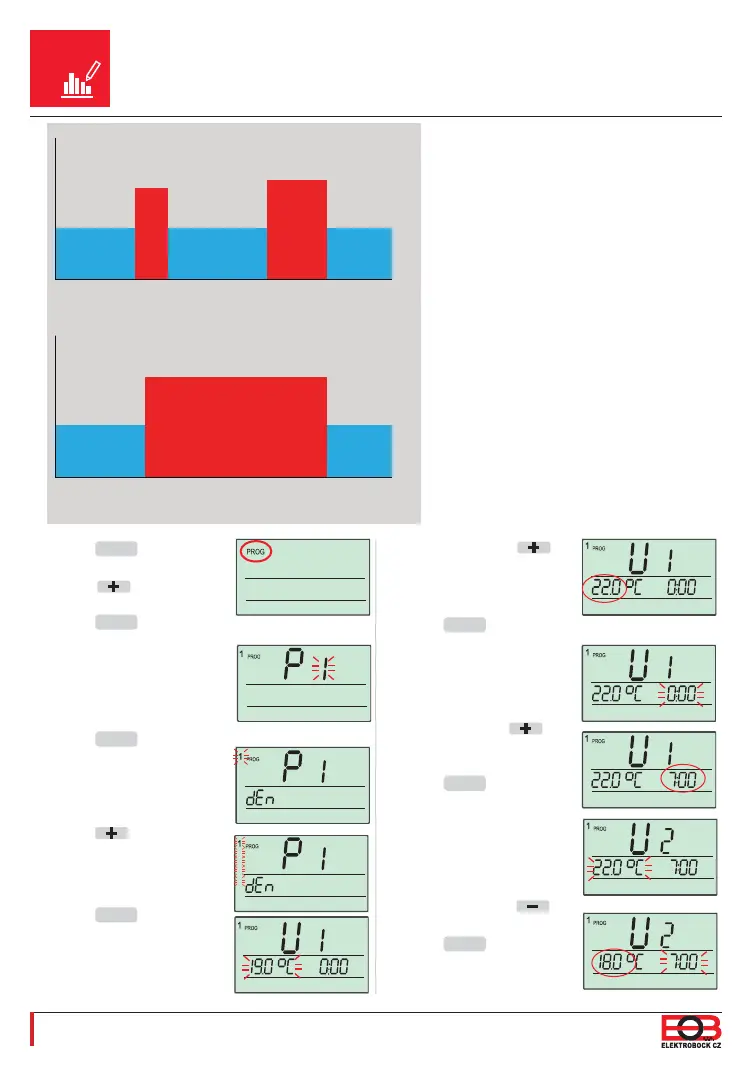
Set 22 °C using the
button.
Push the
MENU
button 1x.
The time indication 0:00 is
now fl ashing on the display.
Set 7:00 using the
button.
Push the
MENU
button 1x.
U2 (2nd temperature
change) appears on the dis-
play and 22 °C is fl ashing.
Set 18 °C using the
button.
Push the
MENU
button 1x.
The time 7:00 is now fl ashing
on the display.
An Example of the Setting of
a One-week Programme
18°C 18°C
22°C
23°C
18°C
7:00
U1
8:30
U2
16:00
U3
21:00
U4-U6
Hours
Temp. (°C)
Mo-Fr
18°C
23°C
18°C
7:00
U1
21:00
U2-U6
Hours
Temp. (°C)
Sa-Su
Push the
MENU
button 2x
and select the PROG mode
using the button.
Push the
MENU
button 1x.
P1 is fl ashing on the display
(= the fi rst one-week
programme).
Push the
MENU
button 1x.
A small number 1
(=Monday) is fl ashing on
the display.
Push the
button 7x.
1,2,3,4,5 (= Monday to
Friday) is now fl ashing on the
display.
Push the
MENU
button 1x.
U1 (1st temperature
change) appears on the
display and 19 °C is fl ashing.
2
3
4
5
2
3
4
5
2
3
4
5
2
3
4
5
2
3
4
5
2
3
4
5
2
3
4
5


 To Next Page