14
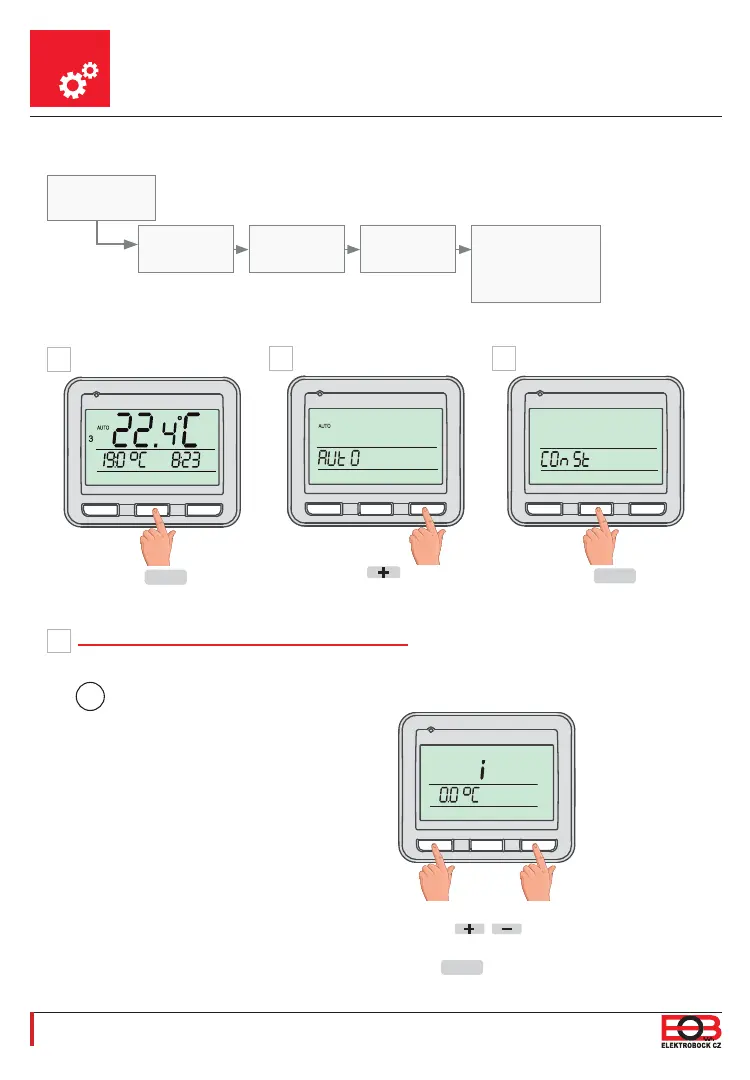
Setting Constants
-
+
MENU
-
+
MENU
1. 2. 3. 4.
Set the appropriate value
with the
/ buttons
and confi rm it with the
MENU
button.
A
D
AUTO or MANU
appears
1. Measured Temperature Correction
(-5 °C to +5 °C)
-
+
MENU
-
+
MENU
Using the button,
fi nd „COnSt“.
Push
MENU
1x.
B C
-
+
MENU
Const
MEASURED
TEMPERATURE
CORRECTION
“OPEN
WINDOW”
FUNCTION
PAIRING WITH
RECEIVERS
FIRMWARE
VERSION/
RESET TO FACTORY
DEFAULTS
This constant is used for the manual
comparison of deviations between the
real and the measured temperatures
(this may be caused, for instance,
by an inappropriate placement of the
thermostat).
i
2x
MENU
.
Basic view
Graphical depiction of constants:


 To Next Page