15
-
+
MENU
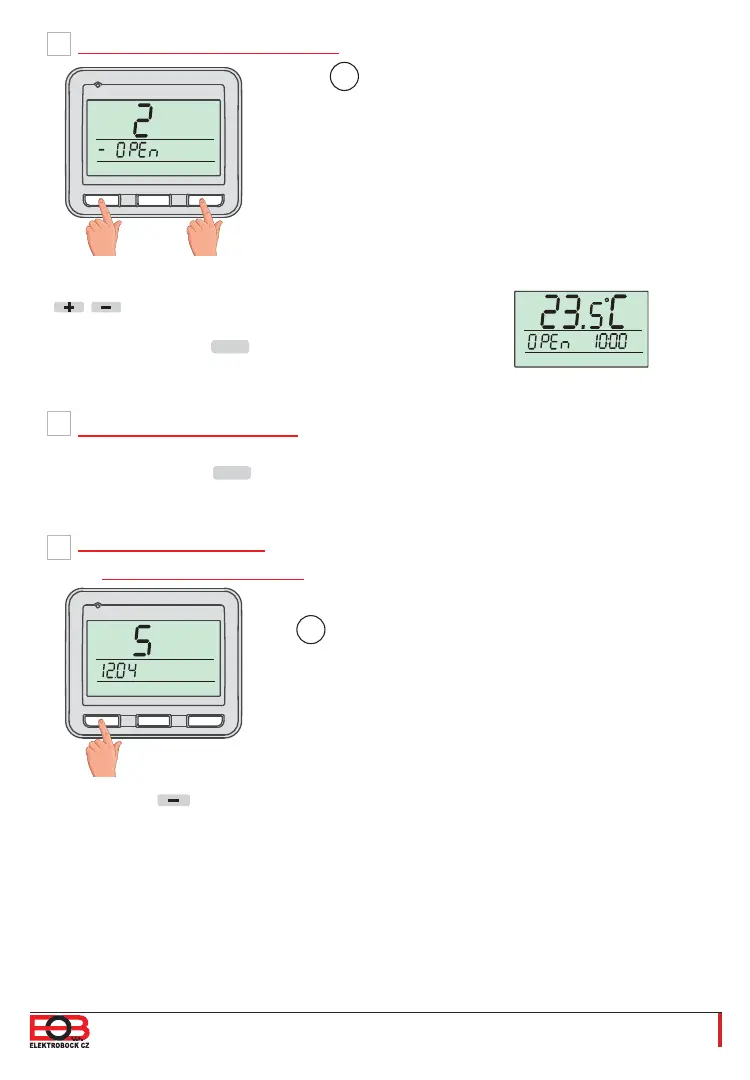
To activate this function, select the “y”
symbol using the
/ buttons, and to deactivate
this function, select the “–” symbol.
Confi rm by pressing the
MENU
button.
E
F
2. “OPEN WINDOW” Function
3. Pairing with Receivers
If the temperature in the room drops sud-
denly by 1-2 °C in 2 minutes, the thermos-
tat sends out a signal to turn off the heating
appliances in order to save energy.
The thermostat returns to a normal mode
as soon as the temperature rises again.
See page 7.
Confi rm by pressing the
MENU
button.
The activation of this function is indicated in
basic view by
the OPEN sign.
i
Information about the fi rmware version
appear under the constant 4.
i
-
+
MENU
If you push the button long (for more than
3 seconds), the RESET message appears on
the display and the thermostat returns to factory
defaults.
All settings will be deleted by this!
G
4. Firmware Version/
Reset to Factory Defaults
!


 To Next Page