10
Setting a Programme
-
+
MENU
-
+
MENU
-
+
MENU
-
+
MENU
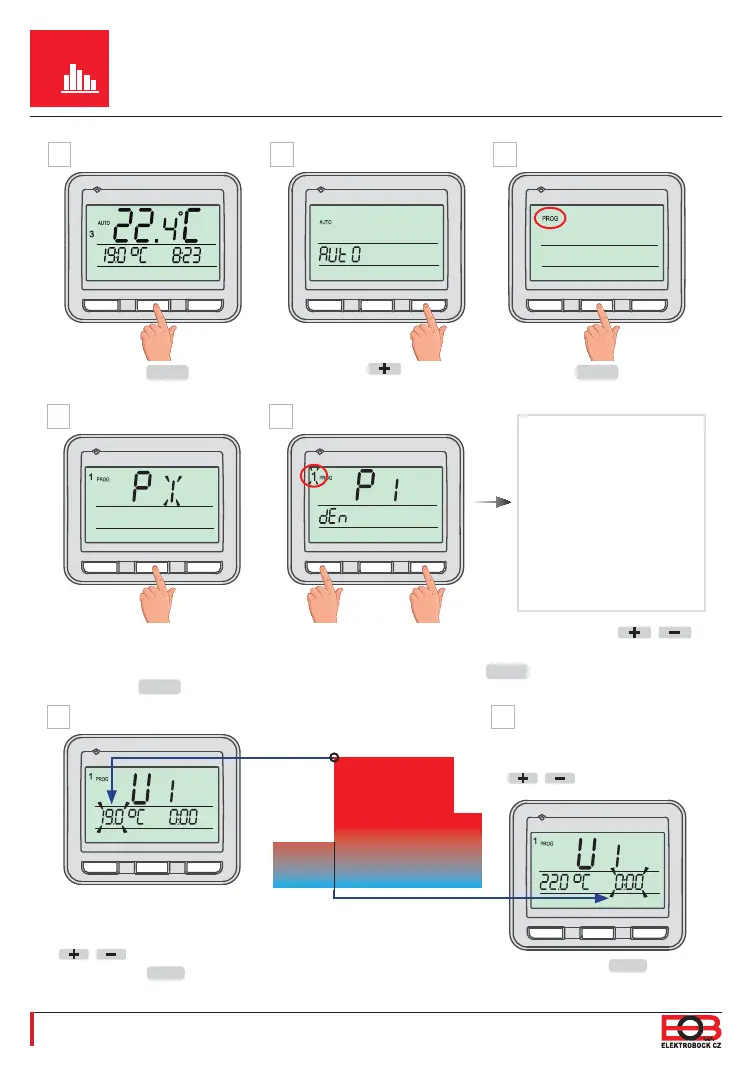
U1 (1st temperature change)
appears on the display.
Set a temperature with the
/ buttons and confi rm it
with the
MENU
button.
Confi rm it with the
MENU
button.
P1 fl ashes on the display
(= the fi rst one-week
programme*).
Push the
MENU
button 1x.
U1
1 (= Monday) fl ashes on the right side. Using the
/
buttons, select day(s) to be programmed.
Then push the
MENU
button 1x.
1 = Monday
2 = Tuesday
.
.
.
6 = Saturday
7 = Sunday
12345 = Mo-Fr
67 = Sa-Su
1234567 = whole week
Desired temperature
Time
Set the time for this
temperature using the
/ buttons.
F
D
G
E
2
3
4
5
2
3
4
5
U2
-
+
MENU
-
+
MENU
-
+
MENU
Using the button,
fi nd “PROG”.
Push
MENU
1x.
A B C
2x
MENU
.
Basic view
AUTO or MANU
appears
*It is possible to set up to 7 one-week programmes.


 To Next Page