21
Push the
MENU
button 1x.
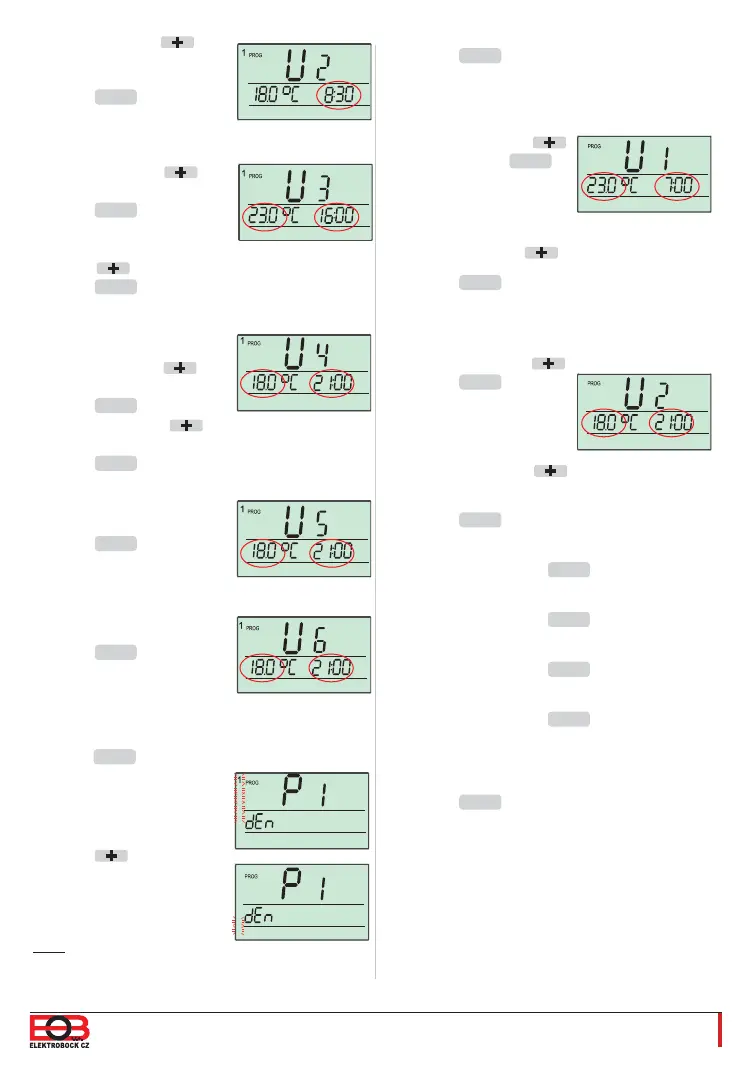
U1 (1st temperature change) appears on the
display and 19 °C is fl ashing.
Set 23 °C using the
button. Push the
MENU
button 1x.
The time 0:00 is now
fl ashing on the display.
Set 7:00 using the
button.
Push the
MENU
button 1x.
U2 (2nd temperature change) appears on the
display and 23 °C is fl ashing.
Set 18 °C using the
button.
Push the
MENU
button
1x.
The time 7:00 is now
fl ashing on the display.
Set 21:00 using the
button.
Push the
MENU
button 1x.
U3 appears on the display. Leave U3
unchanged. Push the
MENU
button 2x.
U4 appears on the display. Leave U4
unchanged. Push the
MENU
button 2x.
U5 appears on the display. Leave U5
unchanged. Push the
MENU
button 2x.
U6 appears on the display. Leave U6
unchanged. Push the
MENU
button 2x.
U1 appears again on the display. Saturday and
Sunday are set now.
Push the
MENU
button long 3 x to return to the
basic view.
Set 8:30 using the
button.
Push the
MENU
button 1x.
U3 appears on the display
and 18 °C is fl ashing.
Set 23°C using the
button.
Push the
MENU
button 1x.
The time 8:30 is now fl ashing
on the display. Set 16:00
using the button.
Push the
MENU
button 1x.
U4 appears on the display
and 23 °C is fl ashing.
Set 18°C using the
button.
Push the
MENU
button 1x.
Set 21:00 using the
button.
Push the
MENU
button 1x.
U5 appears on the display.
Leave U5 unchanged.
Push the
MENU
button 2x.
U6 appears on the display.
Leave U6 unchanged.
Push the
MENU
button 2x.
1,2,3,4,5 (Monday to
Friday) starts fl ashing on the
display.
Push the button 1x.
6,7 (Saturday to Sunday) is
now fl ashing on the display.
U1 appears on the display. Monday to Friday are
set now.
Push the
MENU
button long 1x.
Note: We will set Saturday
and Sunday in programme 1 as well. P1 will be
left unchanged.
2
3
4
5
2
3
4
5
2
3
4
5
2
3
4
5
2
3
4
5
2
3
4
5
6
7
6
7
6
7


 To Next Page