TEMP. IN AUTO
TEMP. IN MANU
OPER HOURS H.C.
4
HINTS FOR THE USER
QUICK CHANGE OF THE DESIRED TEMP. / PROGRAM
Press the
“ “ button twice, the desired temperature starts
blinking on the display. Change the temperature by turning the
“ “ button, and press the“ “ button.
In the AUTO mode, the change lasts until the next program change.
Another program can be selected in this mode in the same way.
In the MANU mode, the change is permanent.
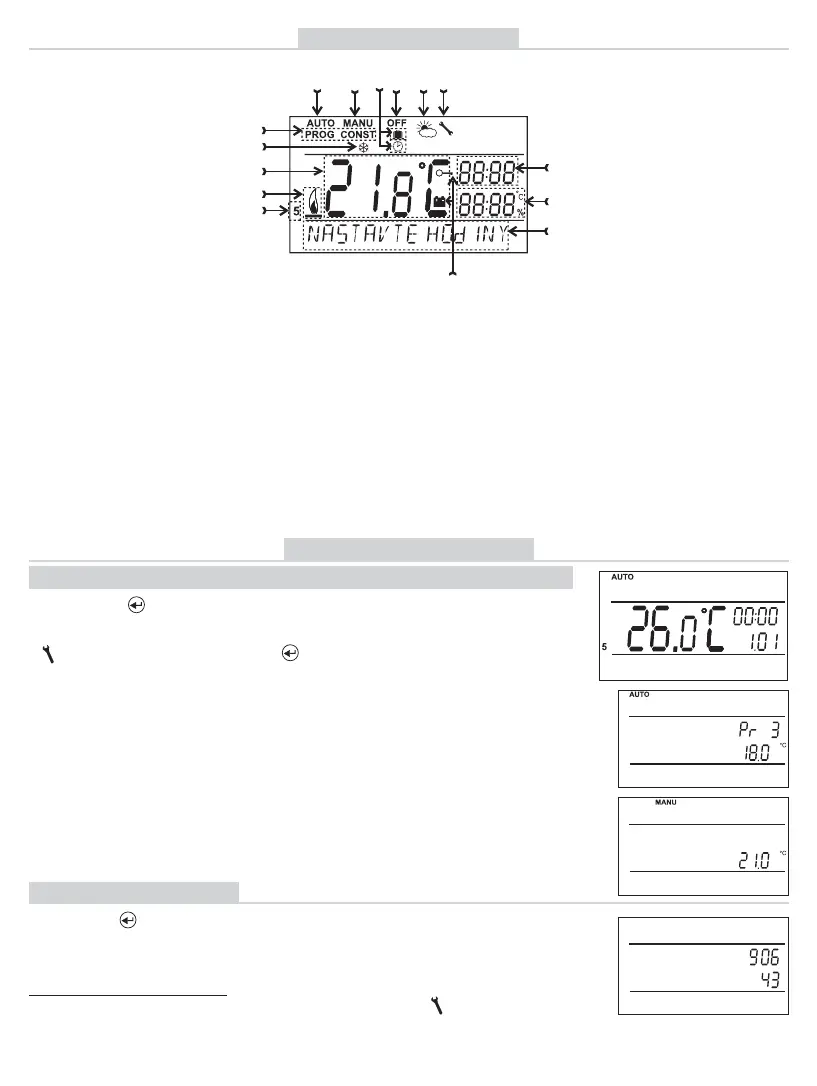
LCD DESCRIPTION
1
2
4
678
9
10 12
13
14
15
16
3
5
11
17
1, Current day (in the Prog
mode, selection of days to be
programmed)
2, Heating on indication
3, Current room temperature
4, Anti-freeze temperature
5, Modes for setting programs
(PROG) and constants
(CONST) (page 6-13)
6, Automatic mode ( page5)
7, Manual mode (page 5)
8, Clock setting mode
(page 5)
9, Holiday mode (page 5)
10, Permanent shut-off (page 5)
11, Summer mode (page 10)
12, Boiler inspection indication
(page13)
13, Cur rent time
14, Current date (various
parameters in the CONST
mode; for details, see page 6)
15, Status line, dynamically
changing according to
the process running
16,Key lock indication (page 12)
17, Low battery indication
OPERATIONAL HOURS
Push the “ “button four times. The boiler operating hours
appear on the LCD. The fi gure on the picture means 906 hours
43 minutes.
Resetting the counter:
When operational hours are displayed, turn the “ “ button
anti-clockwise.


 To Next Page