10
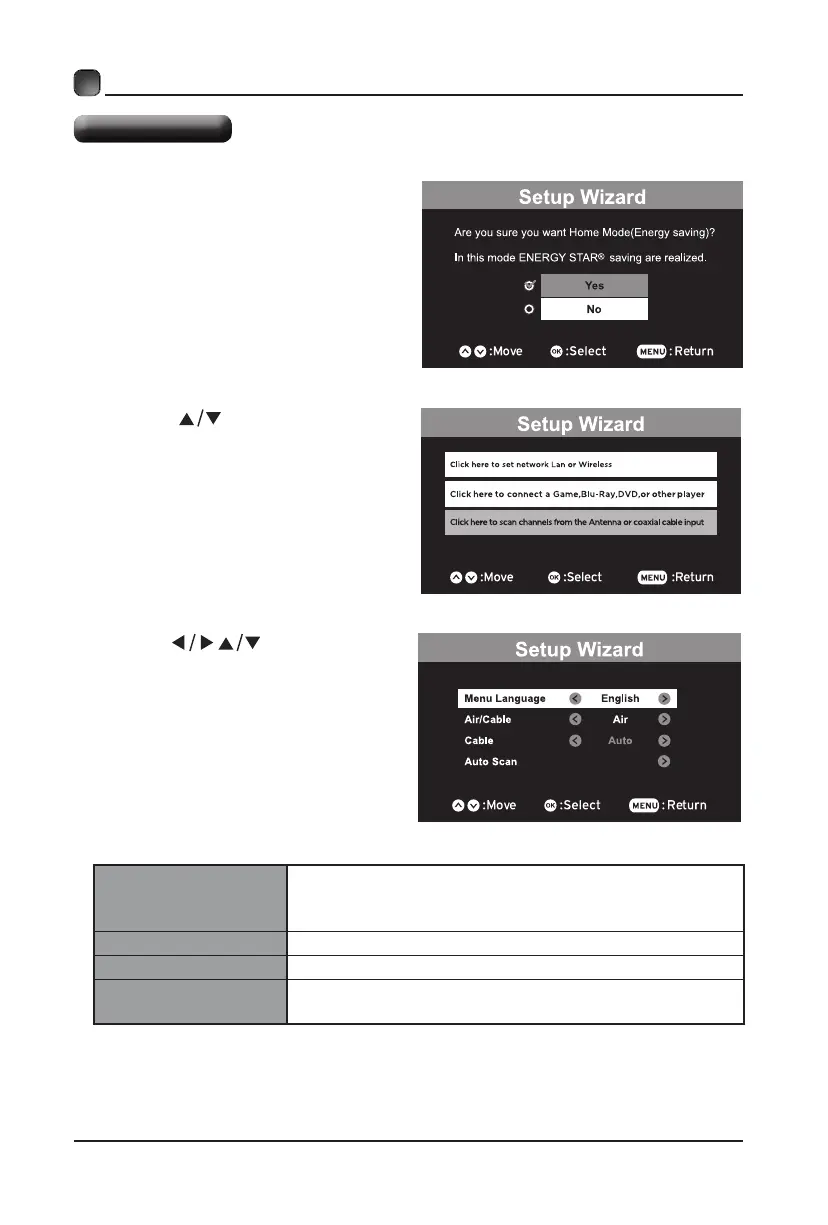
Menu Language
Select your desired language to be displayed on the
menu. The default on-screen menu language is set
as English.
Air/Cable Select antenna between Air and Cable.
Cable Select Cable system: Auto, STD, IRC, HRC.
Auto Scan
Search and store the available
channels automatically.
Note: If you want change the modes between
HomeMode(Energy Saving)and
Retail
Mode,
you can change the setting in the Setup Menu
under Display Mode.
• Press the buttons to select
your desired mode and press OK
buttontoconrm.
• Press the buttons to select your
desired mode and press OK button to
conrm.
Setup Wizard
• PressYestoconrm.
CUSTOMIZING TV SETTINGS
.
.
.


 To Next Page