20
CUSTOMIZING TV SETTINGS
Network Settings
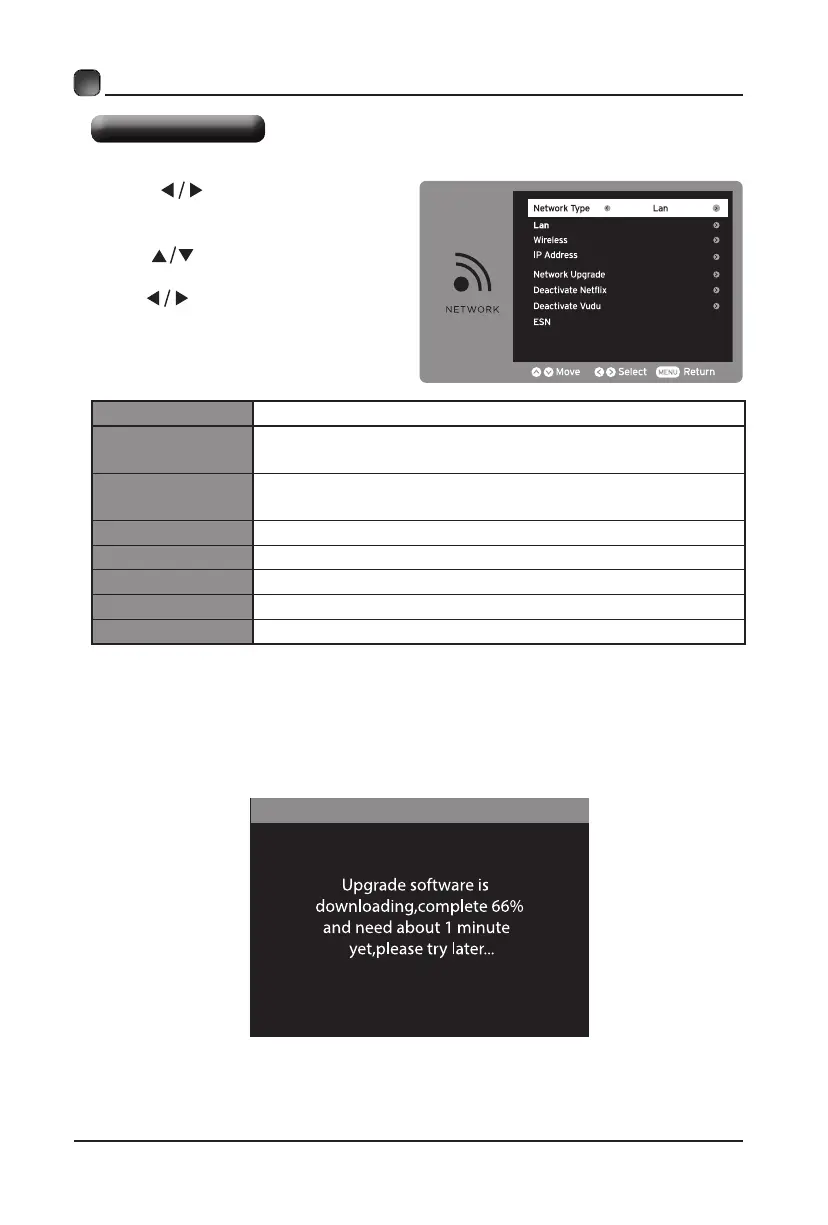
• Press buttons to select
NETWORK menu and then press OK
button to enter.
• Press buttons to select the
following network options and then
press buttons to adjust each
option’s setting.
Network Type
Select two types of network: Wireless or Lan.
Lan
Connect the TV to the wired Lan: Auto Get IP/Manual
Get IP.
Wireless
Connect the TV to the wireless network through
searchingtheavailableWi.
IP Address
Display the current IP information.
Network Upgrade
Upgrade the TV software through the network.
Deactivate Netix
DeactivateNetixandcleartheaccountinformation.
Deactivate Vudu
Deactivate Vudu and clear the account information.
ESN
Electronic Serial Number
• After the TV connects to network, the system will automatically detect software
version.
Auto Upgrade


 To Next Page