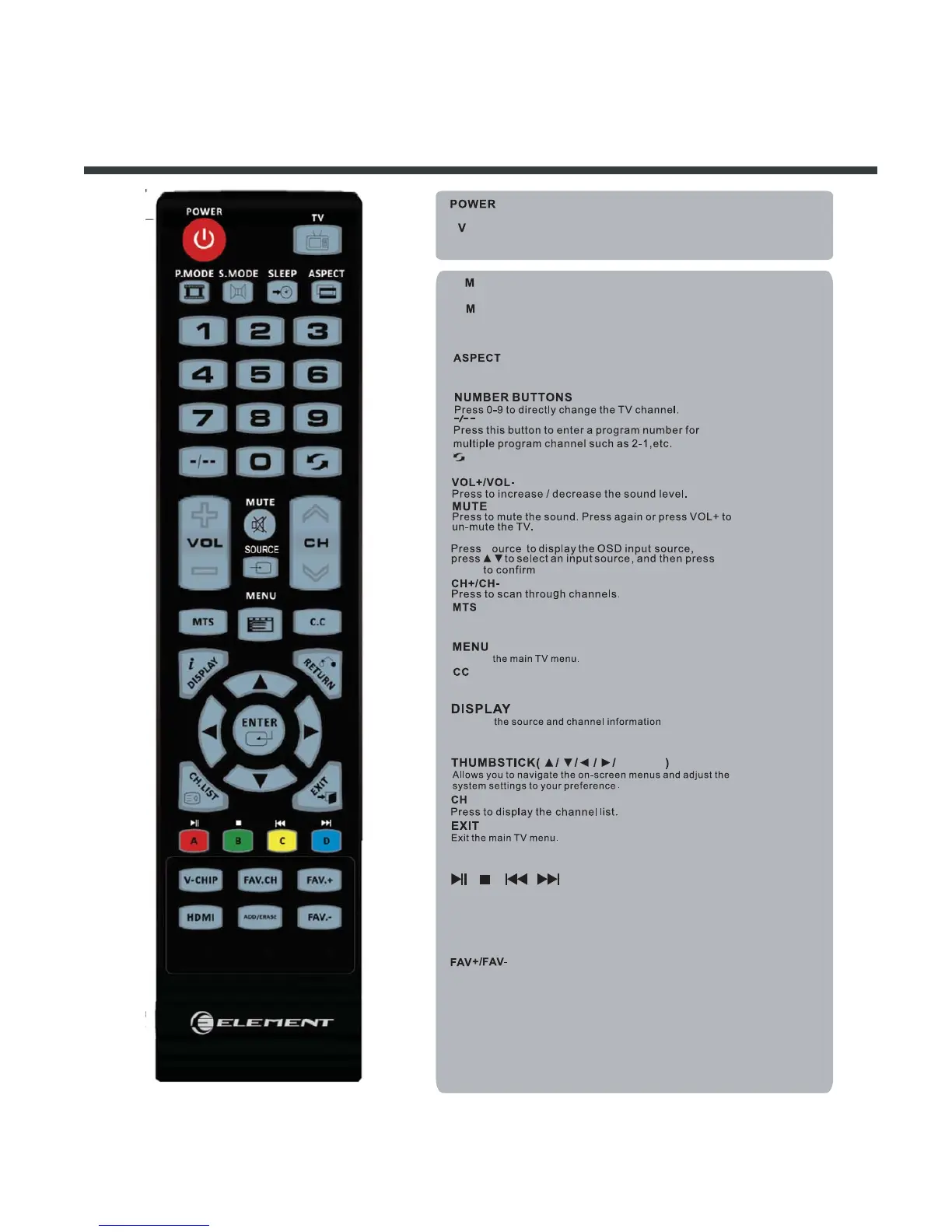
Remote Control Key Functions
10
P
Select the picture mode.
Turn the LED TV ON or OFF.
S
Select the sound mode.
SLEEP
Set the Sleep Timer.
Displays
.
ODE
.
ODE
S
T
Press this button,turn to TV source.
Press these two keys to switch to your favourite programs.
Press to diaplay the favourite program list.
Add/Erase channel to favourite program list.
Press to set the closed caption
as follow cc mode on,cc mode off,cc mode on mute
Choose Mono,stereo or SAP for analog TV input.
Choose English,French or Spanish
for DTV input.
Press to select Aspect ratio
( As follow Standard,Wide,Wide Zoom,Zoom,etc.)
Displays
ENTER
ENTER
RETURN
A ,B,C,D
HDMI
V-CHIP
FAV.CH
ADD/ERASE
Return to previous menu.
Return to previous channel viewed.
Push and hold 3 second then store current channel in A ,B,C,D.
Switch to HDMI input.
Only use in USB mode.
Switch to V-CHIP input.
LIST
.
SOURCE



 To Next Page