17
CUSTOMIZING TV SETTINGS
Picture Settings
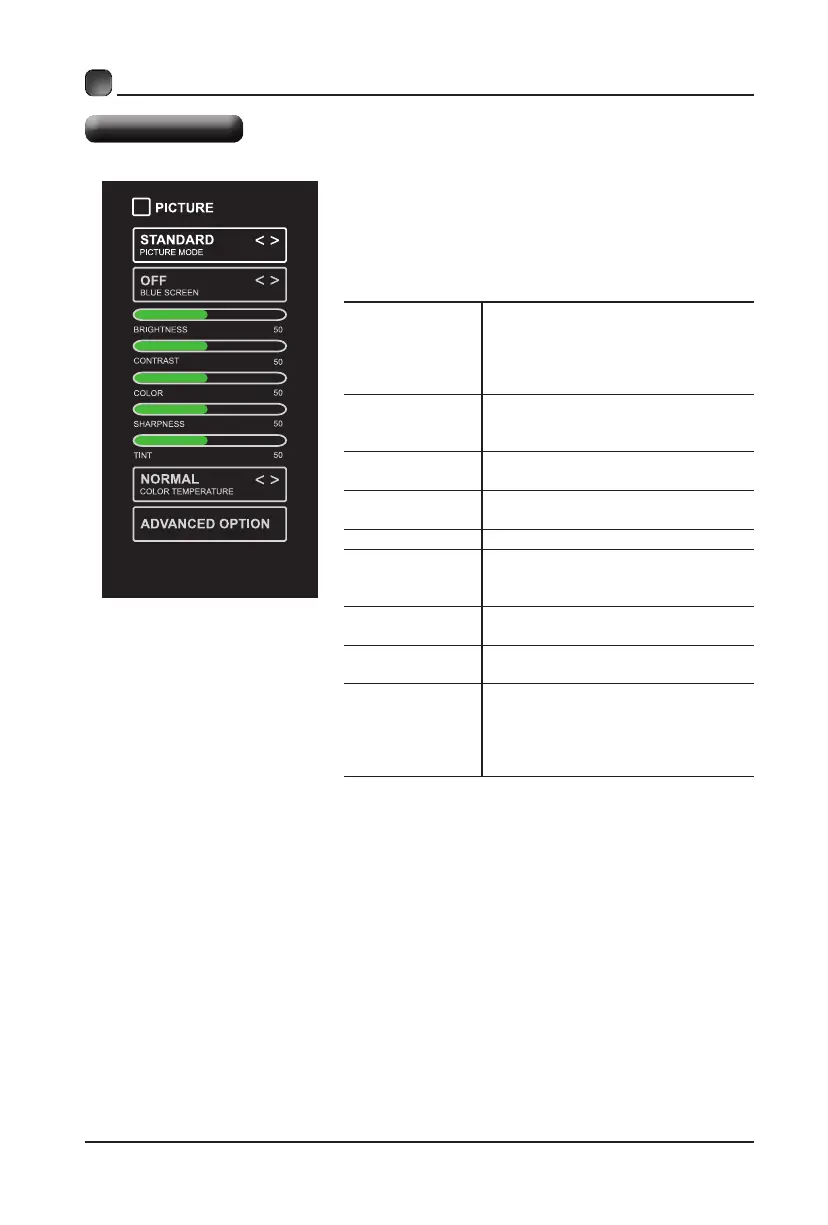
PICTURE MODE
Cycleamongpicturemodes:
Dynamic/Standard/Movie/User.
Alternative:PressP.MODEbuttonon
remotecontroltosetthepicturemode
directly.
BLUE SCREEN
Allow the blue background to turn
On/Off during weak or no signal
conditions.
BRIGHTNESS
Increaseordecreasetheamountof
whiteinthepicture.
CONTRAST
Adjustthedifferencebetweenlight
anddarklevelsinthepictures.
COLOR Controlthecolorintensity.
SHARPNESS
Adjustcrispnesslevelinedges
betweenlightanddarkareasofthe
picture.
TINT
Adjust the balance between red and
green levels.
COLOR
TEMPERATURE
Cycle among color temperatures:
Normal/Warm/Cool.
ADVANCED
OPTION
Set the following options:
Noise Reduction: Reduce the noise
level of the connected device: Off/
Weak/Middle/Strong.
DLC: On/Off.
• Press MENU to display the main interface, then
use the Arrow buttons to highlight TV Settings
and press OKtoconrm.UsetheArrow buttons
to cycle among different options and select
Picture to enter and adjust each option setting.


 To Next Page