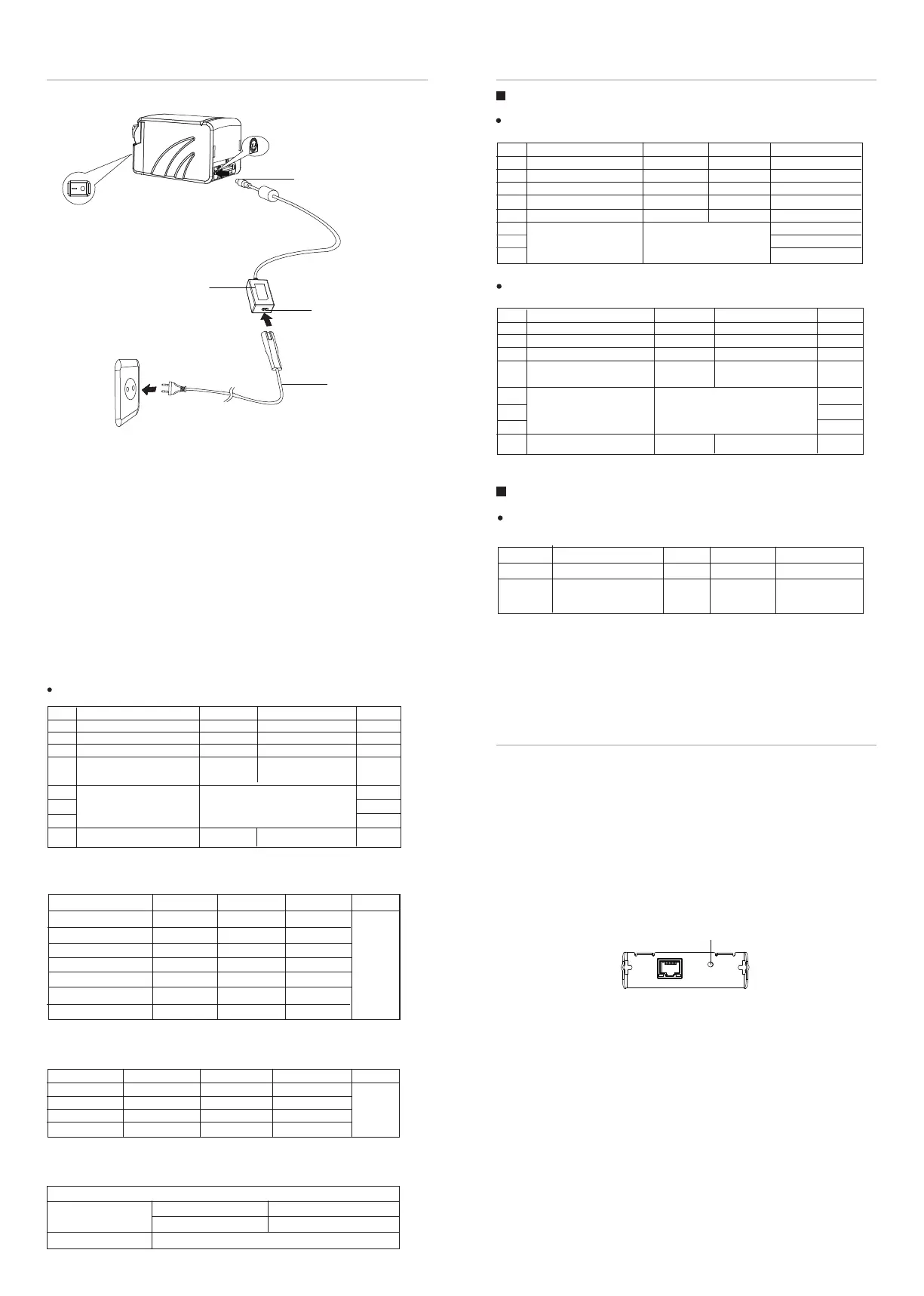
2.Plug in the cable connector of the AC adapter to the power
connector at the rear of the printer.
3.Connect the power cord to the inlet of AC adapter, and insert the
power cord plug into a suitable wall outlet.
Transmission Speed
2400
4800
9600
19200
38400
57600
115200
1-6
ON
ON
OFF
OFF
OFF
OFF
ON
1-7
OFF
OFF
ON
OFF
ON
OFF
ON
1-8
OFF
ON
OFF
OFF
ON
ON
ON
Default
9600
2-5
ON
OFF
ON
OFF
2-6
ON
OFF
OFF
ON
2-7
Reserved
Reserved
Reserved
Reserved
Print Density
1(Light)
2
3
4(Dark)
Default
2
DIP Switch Set 2
SW 2-3
ON
OFF
2. For ethernet interface card TCP/In printer
Press and hold on the reset
then power on again to go back to the
3. The default language is English. Please select DIP switch 2 to
Power Cord
OFF
Inlet
AC Adapter
Cable Connector
SW
1-1
1-2
1-3
1-4
1-5
1-6
1-7
1-8
Handshake
Bit length
Parity check
ON
Enable
XON/XOFF
7bits
Yes
Even
OFF
Disable
DTR/DSR
8bits
No
Odd
Baud rate
Refer to table 6-1
Default
OFF
OFF
OFF
OFF
OFF
OFF
ON
OFF
DIP Switch 1
DIP Switch 2
SW
2-1
2-2
2-3
2-4
2-5
2-6
2-7
2-8
Chinese/English mode
Internal beeper control
Print density
ON
English
Disable
Disable
Receive
buffer full
Refer to table 6-2
512
OFF
Chinese
Enable
Enable
Printer offline or
Receive buffer full
Default
ON
OFF
OFF
OFF
OFF
OFF
OFF
OFF
576
DIP Switch 1
SW
1-1
1-2~1-8
Reserved
ON
Enable
OFF
Disable
Default
OFF
OFF
-- --
DIP Switch 2
SW
2-1
2-2
2-3
2-4
2-5
2-6
2-7
2-8
Chinese/English mode
Internal beeper control
Print density
ON
English
Disable
Disable
Receive
Refer to table 6-2
512
OFF
Chinese
Enable
Enable
Default
ON
OFF
OFF
OFF
OFF
OFF
OFF
OFF
576


 To Previous Page
 Loading...



