38
OPERATING the FIREPLACE
Element4 Gas Fireplaces EuropeanHome.com
Note: The system shuts o the appliance completely if there is no change in the ame height
for 5 days.
Setting °C/24 Hour or °F/12 Hour Clock.
Press ON/OFF andÈto toggle between °F/12 hr and °C/24 hr clock.
Setting the time.
Simultaneously press theÈand
Çbuttons, the display will ash.
PressÇto set the hour andÈto set the minute.
Press ON/OFF to return to manual mode.
Igniting the Appliance.
NOTE: During start-up, the MANUAL knob on the gas valve cannot be in the MAN position. It
must be in the ON position. (See Figure 32)
On the remote control, simultaneously press and hold the ON/OFF andÇbuttons.
An acoustic signal indicates that the start sequence has begun. Release the buttons.
The electronic system then checks that the main gas is owing and ignites the main burner; this may take up to 20 seconds.
Changing the Mode of Operation.
Briey pressing the SET button changes the mode of operation in the following order:
Man - Temp - Temp - Timer - back to Man
Man - Manual Flame Height Adjustment.
To increase the ame, theÇbutton should be depressed. Pressing theÈbutton on the handset will reduce the ame. The main
ame may be lowered all the way down until it is o, leaving only the pilot ignited. This is called standby mode.
Fully Extinguishing the Appliance
From any heat setting, press the ON/OFF button for a few seconds. This will cause the burner to fully extinguish.
The system has a safety interlock which will not allow the ignition until the interlock rests. This may take a few minutes.
The appliance should be shut o completely using the ON/OFF button on the handset and not left on pilot only, except for
temporary use. This resets the system and all safety features.
Temp - Daytime Temperature mode.
The appliance must be in standby mode, pilot ignited. The room temperature is measured and compared to the set temperature.
The ame height is then automatically adjusted to reach the daytime set temperature.
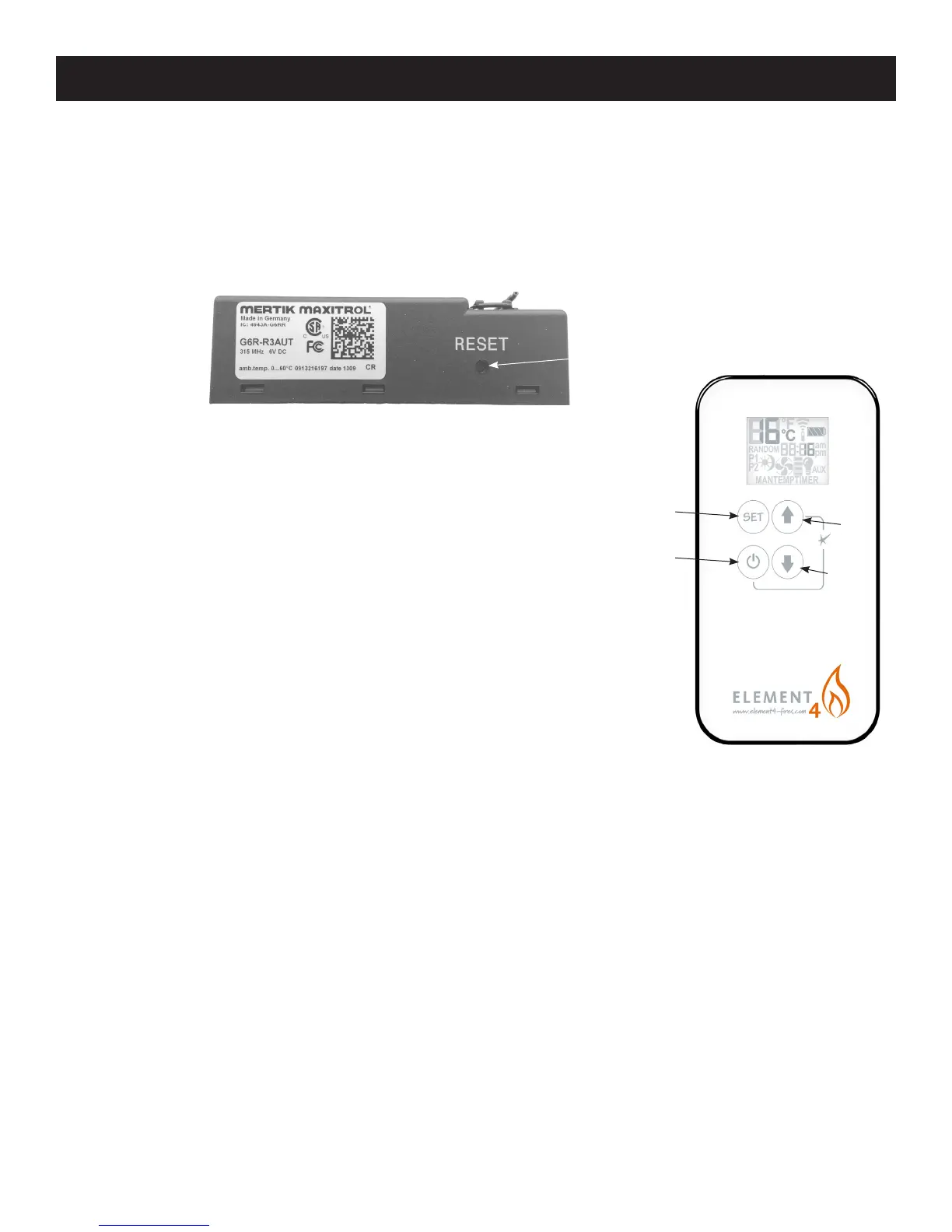
UP
DOWN
USING THE REMOTE CONTROL ELECTRONIC IGNITION SYSTEM
ON/OFF
SET
Figure 30 Receiver
RESET BUTTON
Figure 31 Remote Control
PAIRING THE REMOTE AND RECEIVER (for rst re and when reset is needed)
From the factory, the remote control will communicate with the receiver; they are ‘paired’ and should need no further attention. If
the receiver does not respond to commands from the remote they should be paired to each other. This is done as follows:
1. Press and hold the receiver reset button (Figure 30) using a small, long tool until you hear the second of two beeps. After the
second beep release the reset button.
2. Press and hold the È (down) button on the remote until you hear the second of two beeps. Release the È (down) button.
HOW TO LIGHT YOUR FIREPLACE



 To Next Page