26
Fingered Chord
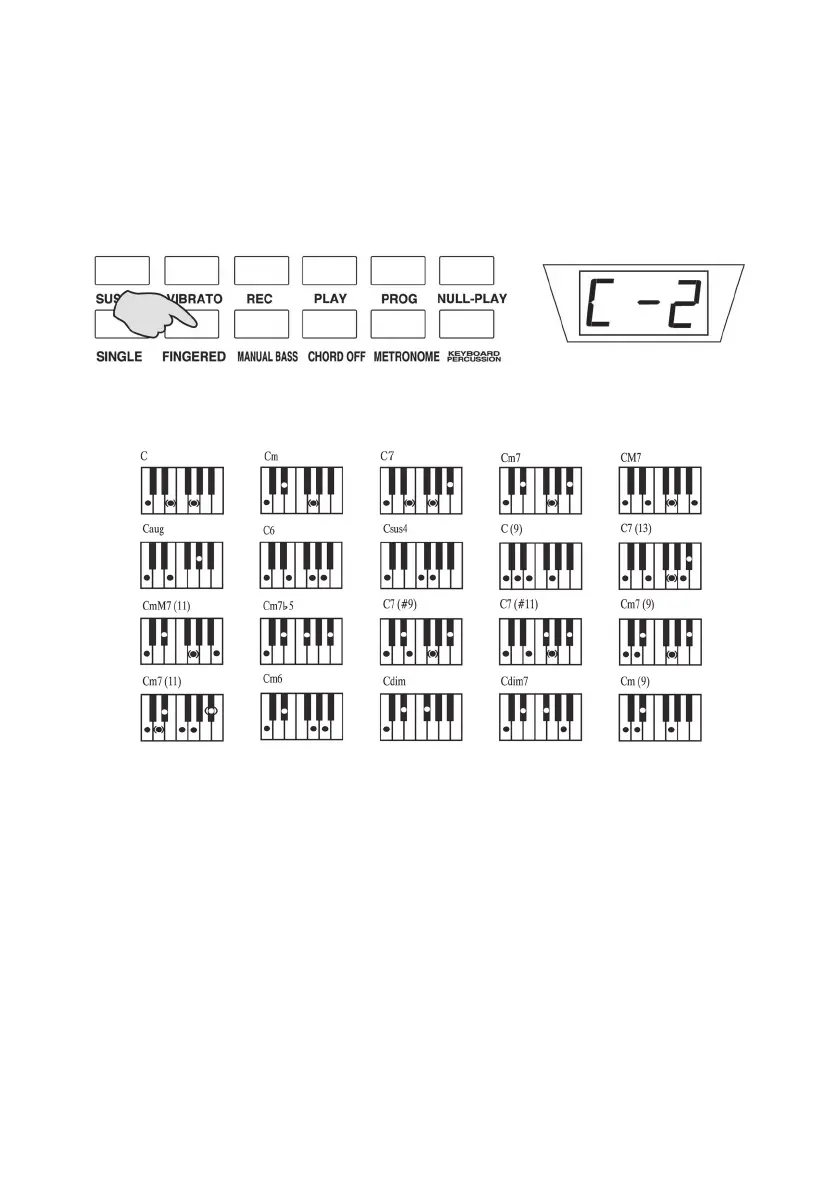
Press the [FINGERED] button with the [C-2] appearing on the screen,
which means that the fingered auto-bass chord is on and 19 note keys
on the left keyboard are turn to chord keyboard. In accordance with the
Fingered chord fingering to play on the chord keyboard, the fingered
chord can be performed.
Press the [CHORD OFF] button, the screen shows [OFF], the fingered
chord stops.
The following table is Tune “C”, the others may be deduced analogy like
this.
FINGERED CHORD FINGERING (Tune C)
Manual Bass
Press the [Manual Bass] button, the manual bass function is on, the 19
keys on the left side of the keyboard turn to the bass keyboard and keep
the intrinsic timbre, now you can select the timbres on the right key-
board.
Press [Chord Off] button, the manual bass function and the bass key-
board will be off, the timbre of the keyboard is the latest selection.



 To Next Page