25
The electronic keyboard has many different chord performance of such as
“Single finger Auto Bass Chord”/”Fingered Bass Chord” and “Manual Bass”.
Single-finger chord
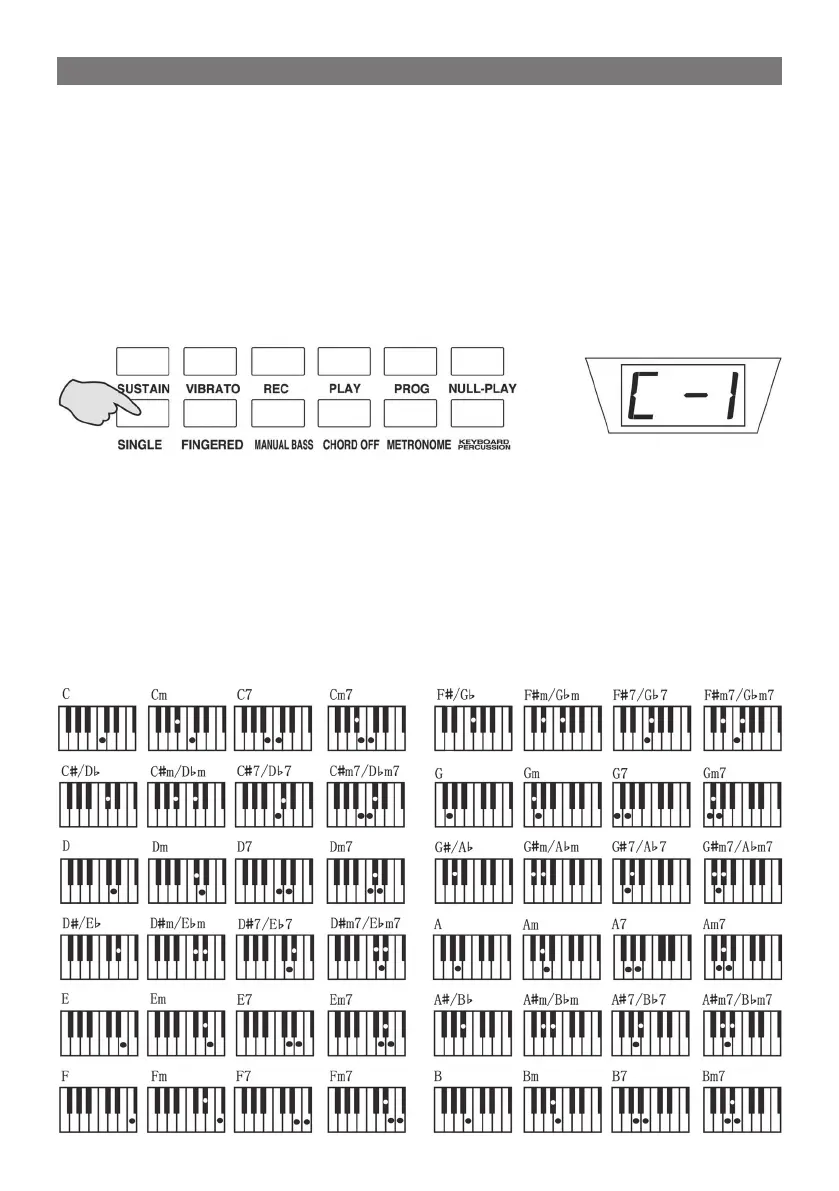
Press the [SINGLE] button with the [C-1] appearing on the screen, which
means that the single-finger auto-bass chord is on and 19 note keys
on the left keyboard are turn to chord keyboard. In accordance with the
Single Finger. Fingering to play on the chord keyboard, the single finger
chord can be performed.
Press the [CHORD OFF] button , the screen shows [OFF], the single-fin-
ger chord stops.
SINGLE-FINGER AUTO-BASS CHORD METHOD:
1) Major: press the basic voice key.
2) Minor: press the basic key and any black key on its left side synchro-
nously.
3) Seventh: press the basic key and any white key on its left side syn-
chronously.
4) Minor seventh: press the basic keys and one white key, and one black
key on its left side synchronously.
SINGLE-FINGER CHORD FINGERING
AUTO-BASS CHORD



 To Next Page