-43-
(for two-way communication
with terminal)
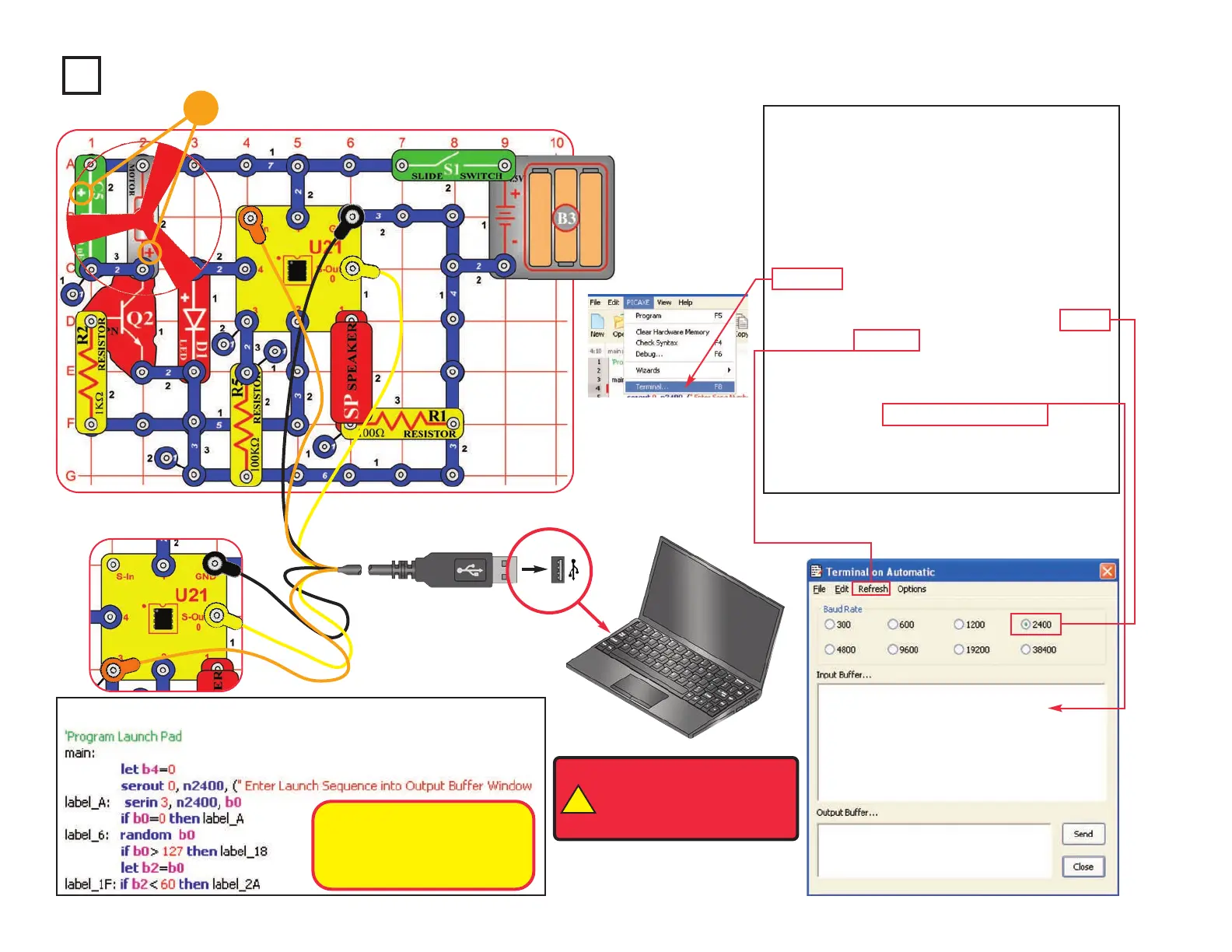
Project B10 Launch Pad
Build the circuit as shown. Turn on the slide
switch (S1). Load program Launch Pad into
the microcontroller (U21) using the
programming instructions in project B1.
After program is downloaded, move the
orange jumper wire from the S-In snap to the
3 snap, as shown. Press the F8 key or select
Terminal under the PICAXE menu to open a
terminal window for communication with the
microcontroller, set the baud rate to 2400,
and select Refresh. Turn the slide switch (S1)
off and on to reset the microcontroller.
Enter any number (your “Launch Sequence”)
in the terminal Output Buffer window. Robotic
sounds are played and the fan spins (and
often flies). Reset the fan on the motor and
enter another launch sequence.
Optional:
!
WARNING: Moving parts.
Do not touch the fan or
motor during operation. Do
not lean over the motor.
Your “Launch Sequence”
number changes the robotic
sounds sequence and adjusts
the fan spin time.
(for download)
+










 To Next Page