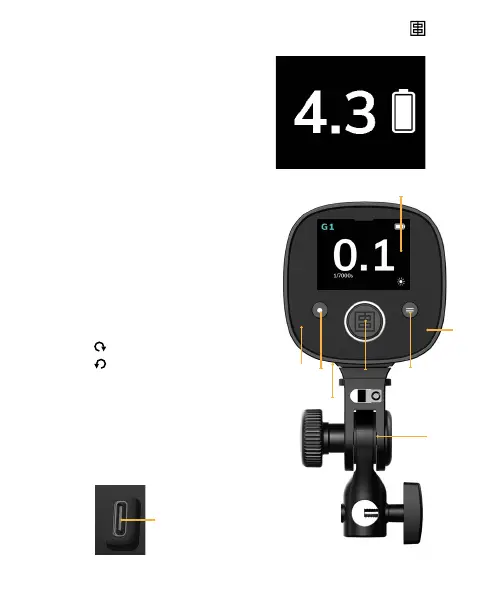
1
8
3 5
6
7
2
4
Work Screen
Shows the most important
settings, once the unit
is congured. Displayed
automatically after 45 sec of
inactivity.
Control Panel
1. On / Off Button
Long press: on/off
Short press: switch display to
Lock on / Flash / Modelling Lamp
/ LED colour temperature
2. Screen brighness sensor
3. Scroll Button
Save button: press to validate your choice
CW: +0.1 f-stop / down
CCW: -0.1 f-stop / up
4. Photocell
5. Menu Button
6. Touchscreen
7. Tilt head, removeable
8. USB C
USB-C socket for charge
and rmware update.
User manual ONE ELINCHROM — 15


 To Next Page