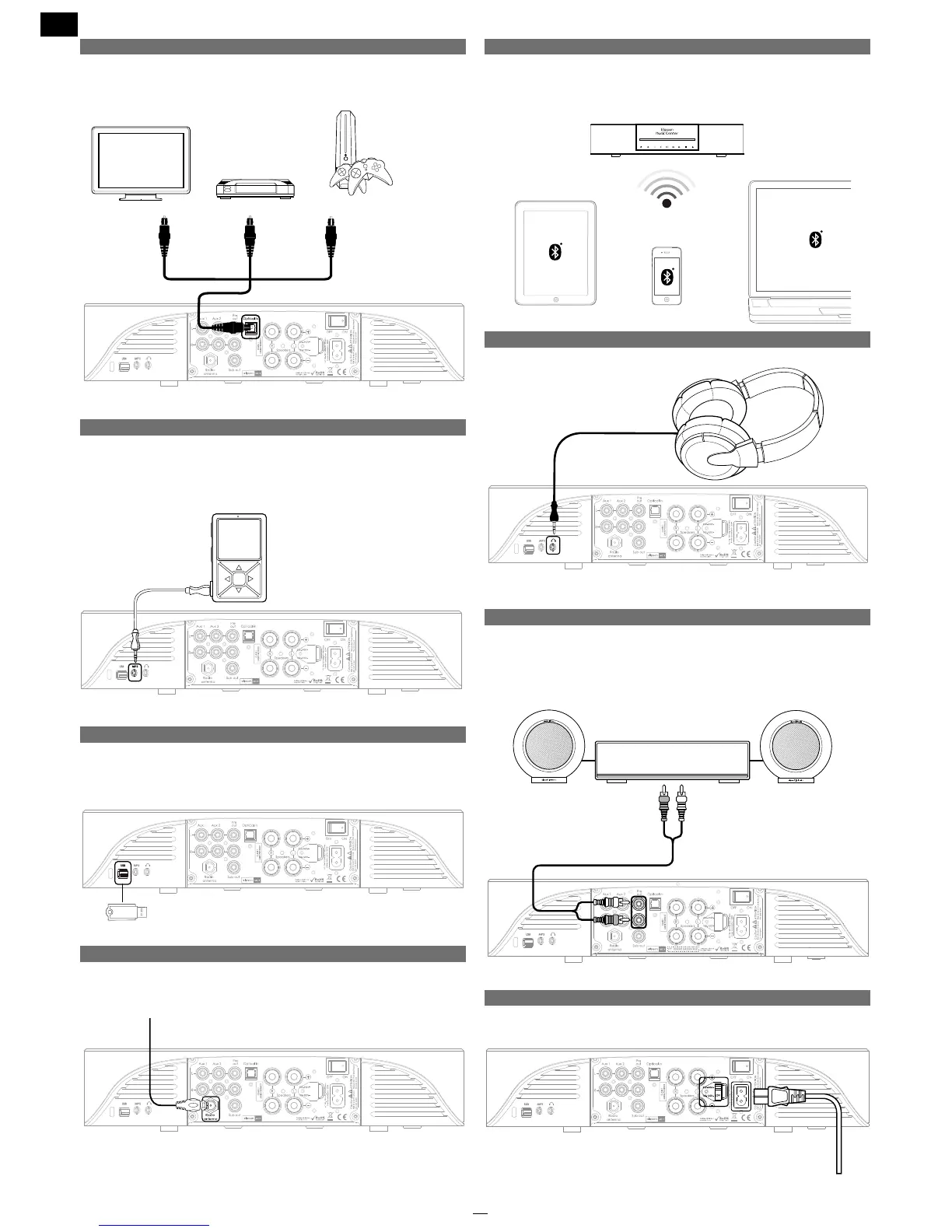
2.4 Optical
You can connect a device equipped with an optical output to
enjoy digital quality sound.
2.5 MP3
You can connect an MP3 player or any other device equipped
with headphones output by using the mini-jack cable included.
2.6 USB
You can plug in a USB key on the MC by using the USB plug located
on the side.
2.7 DAB / FM Tuner
To receive a radio signal, the antenna cable included should be
attached to the «Radio Antenna» plug.
2.8 Bluetooth Wireless input
The Music Center features a wireless Bluetooth input so you can
connect your smartphone, tablet, or PC/Mac computer.
Whenever your Bluetooth source allows for it, a Bluetooth aptX link
will be established to give you high performance audio quality.
2.9 Headphones
You can plug in wired headphones with the headphone plug.
2.10 Connecting an extra amplier
Although it already includes an amplier, the MC is equipped with
a Pre outlet that will let you connect another, for example, more
powerfull amplier. This amplier should be connected to the Pre
out output.
2.11 Voltage selection switch
Choose the voltage that matches the standard in your country of
residence. Then connect the power cable.


 To Next Page