11
EN
3.1 CD
CD
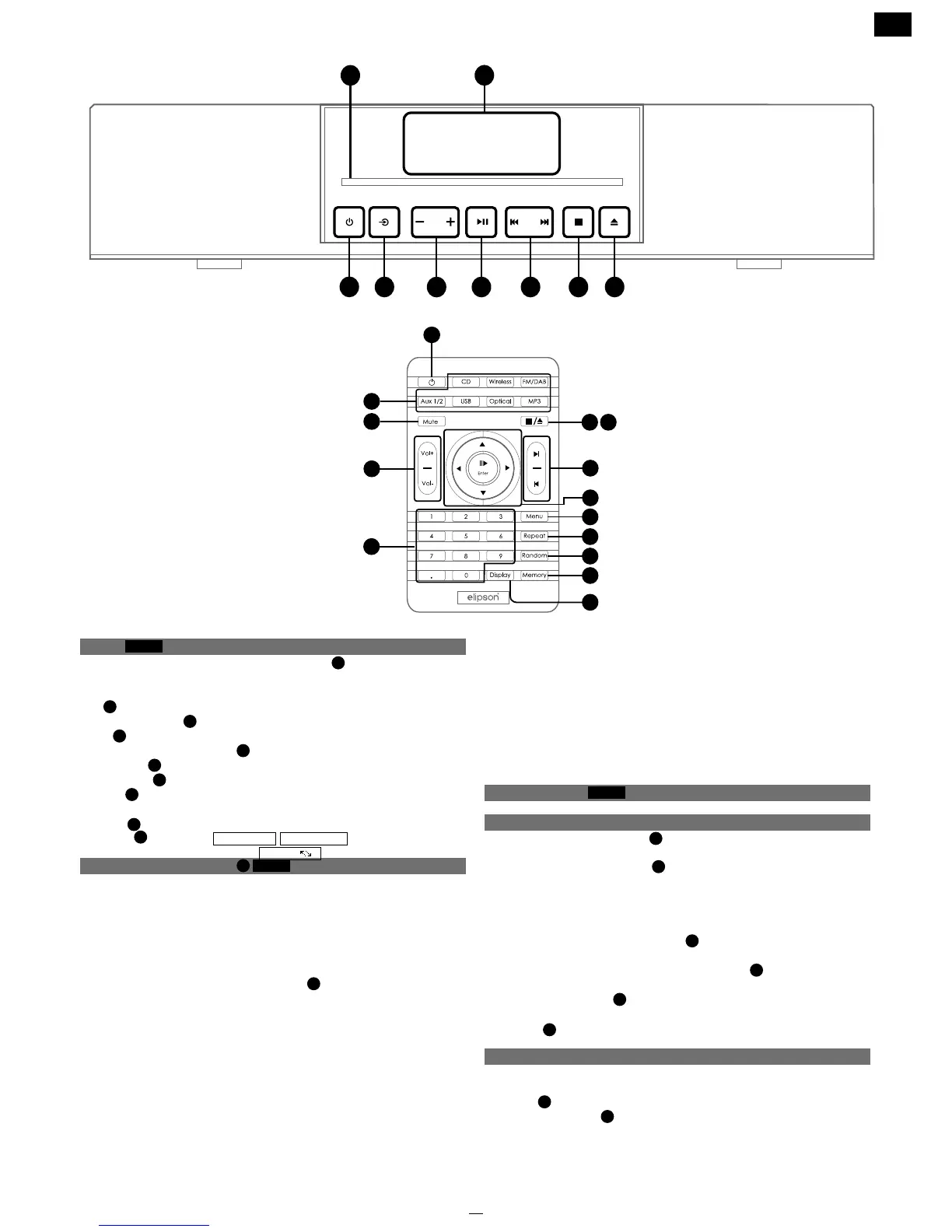
The MC is equipped with a slot-in CD player
1
. To read a CD,
carefully insert the disc in the slot on the front side.
The CD will be read automatically.
CD
4
: to choose the CD selection
Right/left Joystick
6
: rewind/fast forward
Eject
9
: ejects the CD
Next/previous track button
7
: next or previous track
Play/Pause
6
: to play/pause
Digital track
1
: direct access to the track
Display
14
: song time elapsed/song time remaining/CD time
elapsed/CD time remaining
Repeat
11
: song/CD
Random
12
: selects randomly
3.2 Bluetooth wireless input
4
Wireless
You can connect your smartphone, tablet, and computer to your
Music Center by a Bluetooth wireless connection.
The term «Smartphone» will be used to designate all Bluetooth
sources for more readability.
To set up this connection:
• On the MC, go to the «wireless» input
4
• On your smartphone, make sure that the Bluetooth function is on
• On your smartphone, select «Elipson MC BT»
• Set the MC volume at -20dB to start
• Play a song on your smartphone
The name of your smartphone will appear on the MC display once
the connection has been made.
The MC remote control will control your smartphone’s play / pause
/ previous track / next track functions.
3. USAGE
3
4
5
6 7 8 9
2
1
Elipson
Music Center
10
11
12
13
14
5
1
7
6
8 9
15
4
3
Bluetooth aptX : If your smartphone features the aptX function, a
high quality audio link will be established.
CAUTION : to maximize your Bluetooth connectivity, do not place
the MC inside furniture made of metal or on the oor. This will
diminish the range considerably and lead to temporary sound
shortage or signal drop. A 10m range has been tested and
conrmed in open space without signal loss or drop.
3.3 FM/DAB Tuner
FM/DAB
3.3.1 FM Tuner
Left/right directional track
6
: frequency change increment
equal to 0.05MHz
Up/down directional track
6
: frequency change up to the
next available radio station in the region.
To set a radio station (up to 25 pre-set):
• Choose the radio station frequency
• Press on the «Memory» button
13
• Enter a number with the digital track
• Conrm by pushing on the «Enter» button
6
Next/previous track
7
: lets you move from one memorized radio
station to another.
Display
14
: show RDS information if available.
3.3.2 DAB Tuner
The Music Center will automatically record the rst 25 DAB stations.
Preset: use the remote number to get direct access to your
preset
1
.
Left/Right joystick
6
: complete list of available DAB radio in
your area.
CD
1
CD
A
CD


 To Next Page