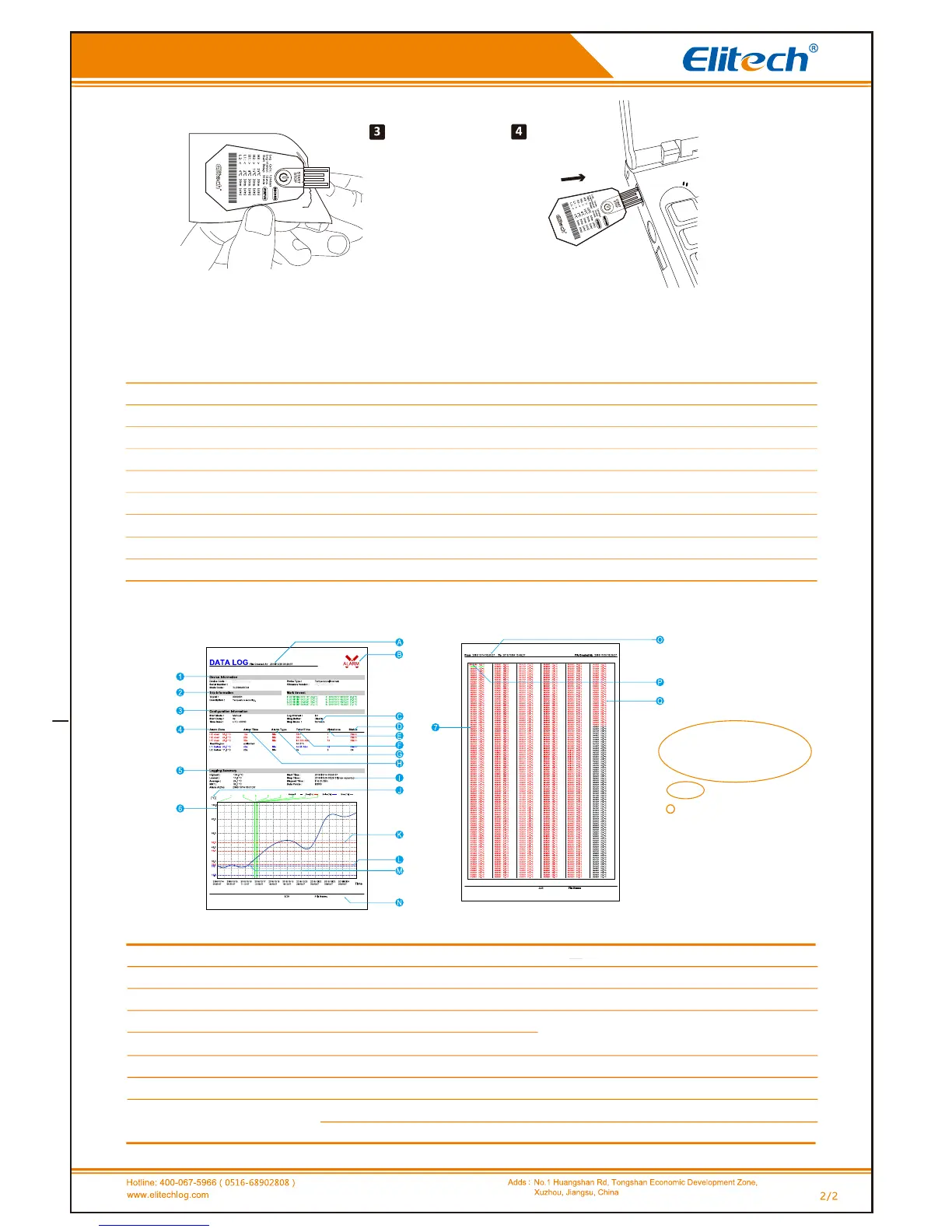
Press and release the buon to judge the logger’s working status through the flash of the red or green LED indicator.
Press and hold the buon for 5 seconds to stop logging. Red LED
will flash 5 mes. Tear the bag open and let USB port uncovered.
Insert the logger into a computer’s USB port to view the PDF report.
RC-18
EF216A100001-0000001
EF216A100001-0000001
User Manual RC-19 Single-Use Temperature Data Logger
Status Indicaon
Report
Status
Not started
Start delay
Started-normal
Started-alarm
Started-mark
Started-out of mark limits
Stopped-normal
Stopped-alarm
Acon of the indicators
Red and green LEDs flash once simultaneously.
Red and green LEDs flash once alternavely.
Green LED flashes once (It flashes once 10 seconds automacally).
Red LED flashes once (It flashes once 10 seconds automacally).
Red and green LEDs flash 3 mes simultaneously.
Red and green LEDs flash 3 mes simultaneously.
Green LED flashes 2 mes.
Red LED flashes 2 mes.
The first page Other pages
Note:
The data above
is only used as an
example of the report.
Please refer to the
actual document for specific
configuraon and
informaon.
1.Basic informaon
2.Descripon of the usage (customizable)
3.Configuraon informaon
4.Alarm threshold and related stascs
5.Stascal informaon
6.Temperature data curve
7.Temperature data details
A.Document creaon me(record stop me)
B.Alarm(Alarm status as shown in the figure)
C.The set stop mode
D.Alarm status of the alarm zone
E.Total mes of exceeding alarm thresholds
F.Total me of exceeding alarm thresholds
G.Alarm delay and alarm type
H.Alarm thresholds and alarm zones
J.Vercal coordinate unit of the data graph
K.Alarm threshold line (corresponding to the item L)
L.Alarm threshold
M.Data curve
Note: Red indicates ultra-high temperature;
blue indicates ultra-low temperature; black indicates others.
N. Document name (serial number & descripon of usage ID)
O. Record me range in the current page
P. Records when date changes (date & temperature)
Q Records when the date does not change (me & temperature)
S/N:EF216A100001
EF216A100001
S/N:EF216A100001
I.Stop me (actual stop mode)


 To Previous Page